

AI can do more than fill a prospect list: it can help determine which leads deserve attention next. Learning how to use AI for lead generation means combining prospect research, data enrichment, personalized outreach, buying-signal analysis, lead scoring, and workflow automation to turn scattered data into focused follow-up.
It’s reasonable to ask whether AI can genuinely help find prospects. It can, when you provide useful customer and sales data, set clear qualification criteria, and connect its recommendations to your team’s workflow. AI can’t replace a sound offer or make every lead a good fit, but it can help your team spot patterns and spend less time on repetitive tasks.
This guide explains how to build and enrich targeted lead lists, personalize marketing, identify buying signals, score prospects, and automate next steps. You’ll also see how these elements work together, so AI supports a practical lead-generation process instead of adding another disconnected tool.
Key Takeaways
- Shape prospect lists around your ideal customer profile, using company attributes and buyer roles to focus research.
- Choose AI tools based on your team’s sales process, data needs, and existing CRM workflows.
- Use customer segments to tailor messages to relevant needs instead of sending the same outreach to everyone.
- Combine CRM history with account activity to spot meaningful buying signals and prioritize follow-up.
- Set clear scoring rules and automate next steps, so promising leads reach the right people at the right time.
1. Building targeted lead lists and enriching records
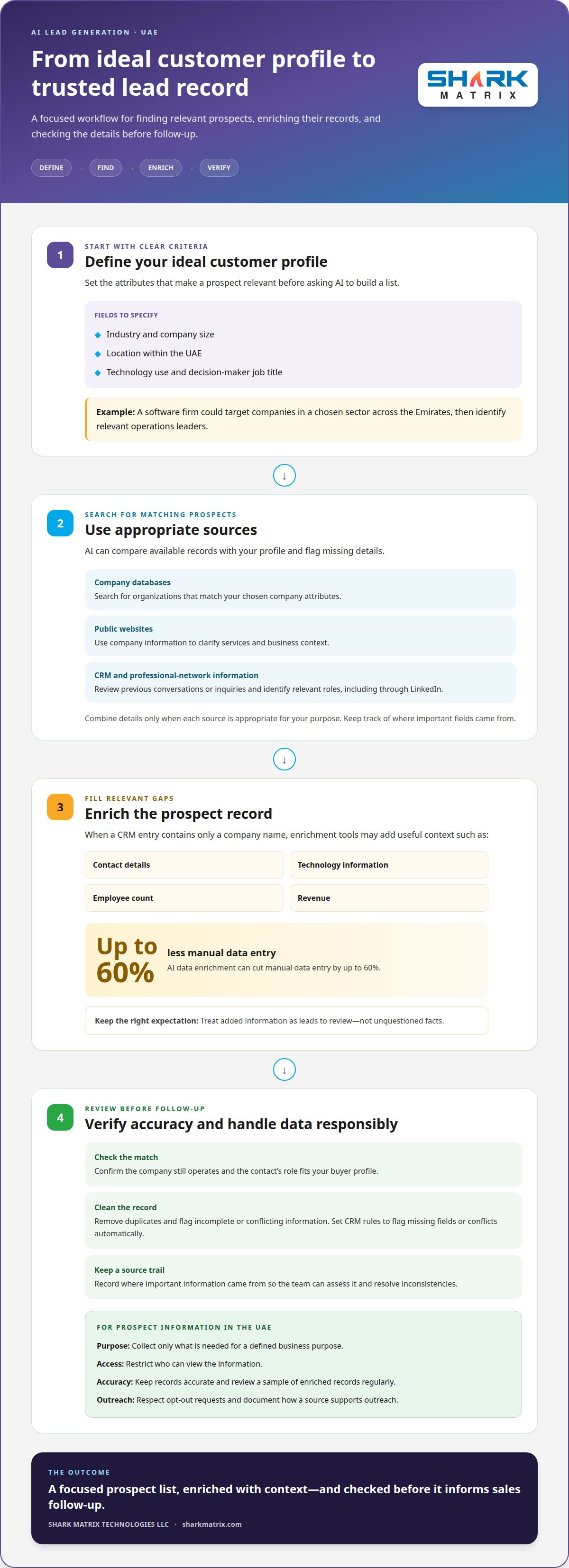
Start with a clear ideal customer profile, then use AI to find matching prospects. Define the fields that matter, such as industry, company size, location within the UAE, technology use, and decision-maker job title. For example, a software firm could prioritize companies across the Emirates in a chosen sector, then identify relevant operations leaders. Clear criteria keep the list focused instead of filling it with loosely related company names.
AI-powered list building can search company databases, public websites, CRM records, and professional-network information, including LinkedIn. The system can compare records with your profile and flag missing details. When a CRM entry contains only a company name, enrichment tools may add contact details, technology information, employee count, and revenue. Treat these additions as leads to review, not unquestioned facts.
Multiple sources can add context to a prospect record. A company website may clarify its services, while CRM history can show previous conversations or inquiries. A professional profile can help identify a relevant role. Combine details only when each source is appropriate for your purpose, and record where important fields came from. That source trail helps sales teams assess each record and resolve conflicting information.
- Set the profile: Specify target industries, UAE locations, company attributes, and buyer roles.
- Enrich the records: Use AI to fill relevant gaps from appropriate data sources.
- Review the matches: Remove duplicates and flag incomplete or conflicting information.
Automated enrichment can reduce repetitive entry; AI data enrichment can cut manual data entry by up to 60%. For example, a workflow can add a company’s website and industry when a new lead enters the CRM. Automation saves effort only when incoming data is useful, so define required fields and route uncertain matches for human review.
In the UAE, handle personal details with a defined business purpose. Limit collection to information needed for that purpose, restrict access, keep records accurate, and respect opt-out requests. Before using a data source, document its origin and how the information will support outreach. These steps help teams manage prospect information responsibly without treating every available detail as suitable for marketing.
Make verification part of enrichment, not an afterthought. Check whether a company still operates, whether a contact’s role matches your buyer profile, and whether duplicate records refer to the same person. Set CRM rules to flag missing fields or conflicting entries automatically. Review a sample of enriched records regularly, then adjust source priorities when errors appear. Accurate records give the sales process a stronger starting point.
2. Can I use AI for lead generation?
Yes. AI can support prospect research, outreach, lead qualification, and handoffs between marketing and sales. Learning how to use AI for lead generation starts with a specific sales need, not a long feature list. A small sales team might begin with automated lead summaries, while a larger team may need account intelligence, CRM connections, and routing rules. Choose a tool that fits your existing sales process and gives the team a clear next step.
Tool pricing depends on the case and is given after a quote request; cost factors include user seats, data access, usage, integrations, and support. Before comparing plans, write down the work the tool must do. For example, decide whether it should find accounts in a B2B database, summarize sales calls, draft outreach, or update CRM records. A focused requirement helps compare tools on practical fit rather than impressive demonstrations.
AI can analyze company and contact data, suggest prospects, draft tailored messages, and flag accounts showing buying interest. Connect it to the CRM and sales engagement tools your team already uses. That connection can create a feedback loop: recommendations inform sales activity, while outcomes help refine future recommendations. Keep a person responsible for reviewing sensitive customer-facing messages and correcting inaccurate intelligence.
Agree on routing rules before automating handoffs. Marketing-qualified leads can go to sales development representatives, while sales-qualified leads can go to account executives. Set clear qualification criteria, assign an owner, and define what information must accompany each handoff. For example, include the lead’s source, relevant activity, and reason for the score. This gives sales teams context for follow-up instead of another unexplained CRM alert.
Use AI to prepare for sales demos and pitches, not to replace the conversation. It can organize account research, surface likely questions, and adapt a presentation to a prospect’s stated needs. During negotiation, a salesperson should verify claims, handle objections, and agree on next steps. Agentic chatbots can drive an increase of up to 67% in sales-qualified leads, but teams still need a process for passing qualified conversations to a person.
Risks include inaccurate records, generic outreach, poor recommendations, and exposing information to tools without suitable controls. Limit access to relevant data, review outputs before sending them, and track whether recommendations lead to qualified opportunities. Start with one workflow, such as lead routing, then assess its accuracy and effect on the sales process before expanding. AI works best as decision support, with clear ownership of the final sales judgment.
3. Personalized marketing and customer segmentation
Personalization starts with knowing which accounts fit and what matters to each group. A third of teams, 33.3%, say weak audience understanding is their biggest lead-generation challenge. AI can help reveal patterns in customer and sales data, but teams must define the audience first. Otherwise, automation may deliver a polished message to the wrong people.
Build an ideal customer profile from closed-won deals, not assumptions. Analyze the last 50-100 wins and look for recurring characteristics, such as industry, company size, location, technologies, and decision-maker job titles. For example, an ERP provider might find that its strongest customers are regional distributors with complex inventory needs. Turn those patterns into clear inclusion and exclusion criteria.
Use those criteria to filter prospects into useful segments. A company’s industry and size can indicate likely needs, while a buyer’s role can shape the message. An operations director may care about workflow efficiency; a finance leader may focus on reporting. Keep filters tied to evidence from customer records, and revisit them when new deals reveal a different pattern.
AI can adapt emails to each segment using relevant details, such as a prospect’s stated priorities or challenges associated with their role. For example, an invitation to a product demonstration could emphasize inventory visibility for distributors, but reporting controls for finance teams. Keep the core offer consistent, and personalize the opening, supporting evidence, and next step. That makes each message specific without inventing claims about the recipient.
AI-personalized emails have been shown to increase open rates by up to 41% and click-through rates by 14%. Use those figures as potential outcomes, not a substitute for measuring your own campaign. Track engagement by segment, including replies and qualified inquiries, then compare results with the campaign’s original audience and message. A high open rate alone doesn’t show whether the right prospects are buying.
For B2B accounts, personalization may need to address several stakeholders. Buying decisions can involve 5-11 people across departments, so one contact’s interests may not represent the whole account. Create role-specific versions of a message, then coordinate them around the same business case. For instance, connect operational benefits with financial impact rather than sending disconnected pitches to each person.
Protect accuracy with a practical review loop. Before sending, check whether each segment has a clear definition, whether the message fits that group, and whether its supporting facts come from reliable records. Review replies and conversions after each campaign, then adjust one filter or message element at a time. This helps teams see what drives engagement and keeps personalization grounded in actual customer behavior.
4. AI lead discovery from CRM data and buyer signals
AI can surface accounts that deserve attention by combining CRM history with current buying signals. A useful account profile may draw on a company database, website tracking, CRM records, and third-party intent data. For example, a target account with repeated visits to product pages and relevant sales history may merit closer review. The model can organize those clues, but your team still defines what counts as meaningful intent.
Prepare CRM data before adding an AI workflow. Check that company and contact records are accurate, conversion outcomes use consistent labels, and duplicate accounts don’t distort patterns. Include the stages that matter, such as inquiry, qualified opportunity, and closed deal. If one team marks a lead as qualified while another uses the same label differently, models learn inconsistent signals and may recommend the wrong accounts.
Next, decide which signals the system should evaluate. Company attributes describe account fit; behavioral signals show recent activity. An assistant might flag a company that matches your target profile and has researched a relevant service. Keep the signal’s source and timing visible, so sales staff can distinguish recent account activity from older CRM notes. This context makes recommendations easier to assess during follow-up.
Build a feedback loop between AI recommendations, sales activity, and results. When a representative accepts, rejects, or reclassifies a suggested lead, record the reason in the CRM. Then compare those decisions with later opportunity outcomes. For example, if accounts from one industry repeatedly progress to qualified opportunities, the model can learn that pattern. If recommendations don’t convert, review the data and criteria before changing the workflow.
Measure return on investment by comparing AI-assisted leads with the outcomes your sales process values. Track qualified opportunities, conversion through each stage, time spent on manual research, and resulting pipeline contribution. Use the same definitions and reporting period across teams; otherwise, comparisons can mislead. Review both the quality of recommendations and the resources required to operate the workflow.
Data-driven optimization works best through controlled changes. First, establish a baseline using existing CRM conversion history. Then adjust one signal, such as website activity or account fit, and monitor how recommendations change. Record each change and its effect on sales acceptance and opportunity progression. This makes it easier to identify workflows that improve discovery rather than simply increasing the number of flagged prospects.
Finally, make the handoff useful. When an account crosses your qualification threshold, send sales the reason it surfaced, relevant activity, and recommended next action. A notification without that context creates extra manual investigation. Review the workflow with sales regularly, and update its signals when product priorities or target accounts change. This keeps AI discovery connected to real buying intent and business outcomes.
5. AI lead scoring and workflow automation
Lead scoring turns customer fit and buying activity into a shared priority system. AI tools can weigh company attributes against engagement signals, helping sales teams decide which prospect needs attention first. Start by defining your ideal customer, then choose signals linked to actual sales outcomes. A score should explain why a lead ranks highly, not simply produce a number without context.
Use a sample scoring framework as a starting point, then adjust it to your sales process. For example, assign points for buyer fit and recent actions:
- A job title matches the buyer persona: +20 points.
- Company size fits the target range: +15 points.
- Industry matches target verticals: +15 points.
- A pricing-page visit: +25 points.
- A case-study download: +15 points.
- Three or more email opens: +10 points.
- Webinar attendance: +20 points.
- Activity within the last 7 days: +10 points.
In this sample, scores of 80 or higher indicate sales readiness, while 50-79 indicate marketing qualification. These are example thresholds, not universal rules. Review accepted leads and closed opportunities to see whether the assigned weights reflect buyer behavior. If webinar attendees rarely progress, reduce that signal’s influence instead of treating attendance as purchase intent.
Automation makes the score useful. Set rules to alert a sales representative, add a qualified contact to an email sequence, or update a CRM stage when a threshold is reached. For example, a high-fit account that visits pricing can trigger prompt sales follow-up, while a lower-scoring contact receives relevant nurturing content. Assign an owner and define the action for each threshold, so alerts lead to consistent next steps.
Keep separate signals for account fit and buying intent. A large enterprise can match your ideal customer profile without showing active interest; a smaller company can show strong engagement but fall outside your target. AI scoring can combine both factors, allowing teams to distinguish a promising account from a currently engaged one. Predictive analytics can increase sales opportunities by up to 20% through lead nurturing and retargeting.
Begin with one workflow, such as scoring or automated routing. Most teams can implement a single AI workflow within 2-4 weeks. During rollout, compare scores with sales acceptance and opportunity progression, then refine rules when the results conflict. This feedback keeps the model aligned with actual outcomes and limits automation that creates noise.
For tailored scoring and handoff workflows, explore AI automation services to connect automation with your lead-management process.
Shark Matrix Technologies: Search Engine Optimization (SEO)
Shark Matrix Technologies can connect your lead-generation strategy with the channels that bring prospects to your business. Its Search Engine Optimization (SEO) work can support discoverability when potential customers research relevant products or services. Pay Per Click (PPC) Management can structure paid campaigns around defined audiences, while Web Design and Development can support a clear journey from landing page to inquiry.
Consider these services when your AI workflows are ready but your website or marketing channels need to support the next step. Clear landing pages and relevant content give interested prospects a practical way to learn and enquire.
Contact Shark Matrix Technologies to discuss your marketing needs, or visit sharkmatrix.com.
Make Your Next Lead-Generation Move
Choose one part of your sales process where better decisions would make a difference. Set a clear objective, such as improving the relevance of incoming inquiries or helping your team prioritize follow-up. Then decide what success looks like and who will review the results. A focused starting point helps you use AI for lead generation in a way that supports your business, rather than adding technology without a clear purpose.
AI works best when it fits the wider path from discovery to inquiry. Shark Matrix Technologies can help businesses consider how search visibility, paid campaigns, and website experience support that path. The right emphasis depends on your current marketing goals and where prospects need a clearer next step.
Ready to explore a practical direction for your business? Contact Shark Matrix Technologies to discuss what you’re aiming to improve. A thoughtful first step can set your team up to build with purpose.
Frequently Asked Questions
Can I use AI for lead generation?
Yes, AI can support lead generation by helping teams identify, organize, and engage potential customers. For example, a business selling accounting software could use it to group inquiry forms by company type and requested feature, then prepare relevant follow-up for review. Start with one defined task and a clear measure of success. Keep a person responsible for checking customer-facing material and deciding which opportunities deserve sales attention.
How does AI determine which leads are qualified?
AI estimates qualification by comparing a prospect’s characteristics and actions with patterns linked to suitable opportunities. A training company, for example, could assess whether an inquiry comes from a relevant organization and asks about a service it provides. Qualification criteria should reflect actual sales outcomes, not assumptions. Review why each lead received its assessment, and let sales staff correct cases where the model overlooks important context.
What are the steps to build an AI lead generation workflow?
Build the workflow in a clear sequence: choose a business goal, map the data and tools involved, define what AI should produce, and assign someone to review its output. Next, test the process with a limited group of records. For example, have AI classify website inquiries before changing how the full sales team handles them. Check the results, refine the instructions, and expand only when each handoff works.
Which AI tools are best for lead generation, and how do they compare?
The best tool depends on the task and the team’s existing systems. Prospect-research tools focus on finding or organizing account information; writing assistants help draft outreach; analytics tools identify patterns; automation platforms connect actions across systems. Compare tools by data inputs, output controls, integration options, and ease of review. A team that needs faster inquiry triage may value CRM connectivity more than extensive prospect-discovery features.
How can AI identify and qualify leads using customer data?
AI can compare customer records, inquiry details, and interaction history to identify people or accounts resembling successful customers. For example, a training provider could examine which course pages an inquiry viewed and what type of program it requested. Use only data relevant to the intended assessment, and keep records structured consistently. Then have staff review unusual cases, such as a strong prospect with a short or incomplete interaction history.
How can businesses use AI to personalize lead outreach and follow-ups?
Businesses can use AI to tailor a message to a prospect’s stated needs, role, or earlier inquiry. If someone asks about implementation, a follow-up might address onboarding questions rather than repeat a general product introduction. Give the tool approved information and a defined tone, then check each draft for accuracy and relevance. Set follow-up triggers around meaningful actions, such as a direct request for details, rather than sending messages without context.
How can AI lead generation integrate with CRM and marketing automation platforms?
Integration connects AI outputs with the systems teams already use to manage contacts and campaigns. For example, a website inquiry could enter the CRM, receive a category, and trigger a relevant nurture sequence after review. Map fields between platforms, decide which system owns each record, and test how updates and duplicate contacts are handled. Clear access controls and error notifications help teams identify broken handoffs before they disrupt follow-up.
 OpenAI
 Codex
 Vertex AI
 Cloud Vision
 OpenCV
 TensorFlow
 IBM Watson
 Cloud Natural Language
 Cognitive Services
 Bot Framework
 Mistral
 LLama
 Gemini
 Anthropic
 N8N