
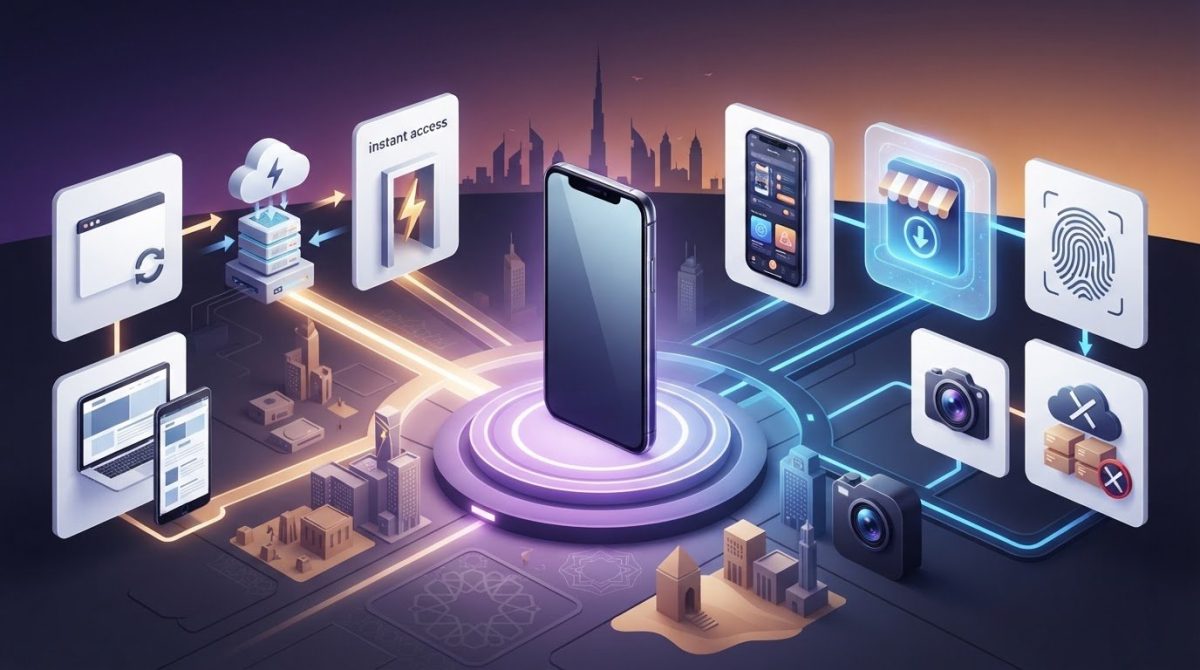
What if users could start using your app without downloading it first? That’s one of the key questions behind pwa vs native app benefits: a Progressive Web App (PWA) opens through a web link, while a native app can integrate more deeply with a mobile platform and be distributed through its app store.
If you’re unsure whether a PWA can deliver the experience your product needs, or whether it can support specific device features, the trade-off deserves a closer look. Access, installation, performance, and the tasks users need to complete all affect which approach makes sense. iOS also has specific limitations, including manual home-screen installation and restrictions on some hardware features.
This guide compares the practical advantages and limits of each option so you can match an approach to your users, required features, and business goals. We’ll look at reach, device integration, distribution, and long-term product planning. For any web or mobile product, start with what people need to do, then choose the technology that supports those tasks.
Key Takeaways
- See how browser access, home-screen installation, and app-store distribution shape the experience for users.
- Compare pwa vs native app benefits against your priorities, including reach, updates, offline behavior, and device access.
- Base your architecture decision on users’ core tasks and how they’re most likely to access your product.
- Map essential features to browser and operating-system support before choosing a PWA or native app.
- Create a practical product brief covering your audience, platforms, must-have features, and measures of success.
PWA vs. Native App Benefits: What Each Approach Offers
A Progressive Web App (PWA) is a web application designed to offer some app-like features through compatible browsers. Users open it from a link and may be able to add it to a device’s home screen. A native app, by contrast, is software developed for a specific mobile operating system, such as iOS or Android. The Progressive Web App (PWA) concept combines web delivery with capabilities that can make an experience feel more like an app.
The central trade-off is web access versus platform integration. A PWA can be shared and opened through the web, while a native app can make fuller use of platform-specific capabilities and app-store distribution. Neither is automatically the better choice. The right fit depends on who uses the product, how they access it, and what they need to accomplish.
What makes a progressive web app different from a website?
A responsive website adjusts its layout to fit different screen sizes. A PWA adds app-oriented behavior: it may be installable on a home screen, and service workers can manage selected resources to support features such as faster repeat visits or access to cached content. That doesn’t guarantee every screen or task will work offline.
These capabilities depend on the browser and operating system. Installation steps, notification support, and access to device features can vary, so design and test a PWA on the platforms your audience uses. Its web foundation makes sharing and discovery through a URL straightforward, but browser access alone doesn’t create a good app-like experience. Clear navigation, responsive pages, and well-planned task flows still matter.
What does a native app do differently?
A native app is built for a particular operating system, using technologies suited to iOS or Android. This platform-specific approach can support deeper integration with device capabilities that the operating system makes available, such as camera functions or notifications. Access depends on the feature, permissions, and platform rules, so native development doesn’t mean every capability is unrestricted.
Native apps are typically distributed through app stores, where users expect a platform-familiar installation and interface. That can suit products whose core tasks rely on device integration or whose audiences actively seek an app-store download. It also means planning for platform-specific development and experiences. The useful question isn’t which label sounds more advanced, but which approach supports real user journeys and the product roadmap.
How PWA and Native App Features Work in Everyday Use
Users notice the difference in how they find, install, and return to an app. A PWA starts with a web address and may offer a home-screen installation flow where supported. A native app is usually downloaded from the relevant app store. After launch, the practical differences depend on the device, browser, operating system, and how the product is built.
Installation, discovery, and updates: web versus app stores
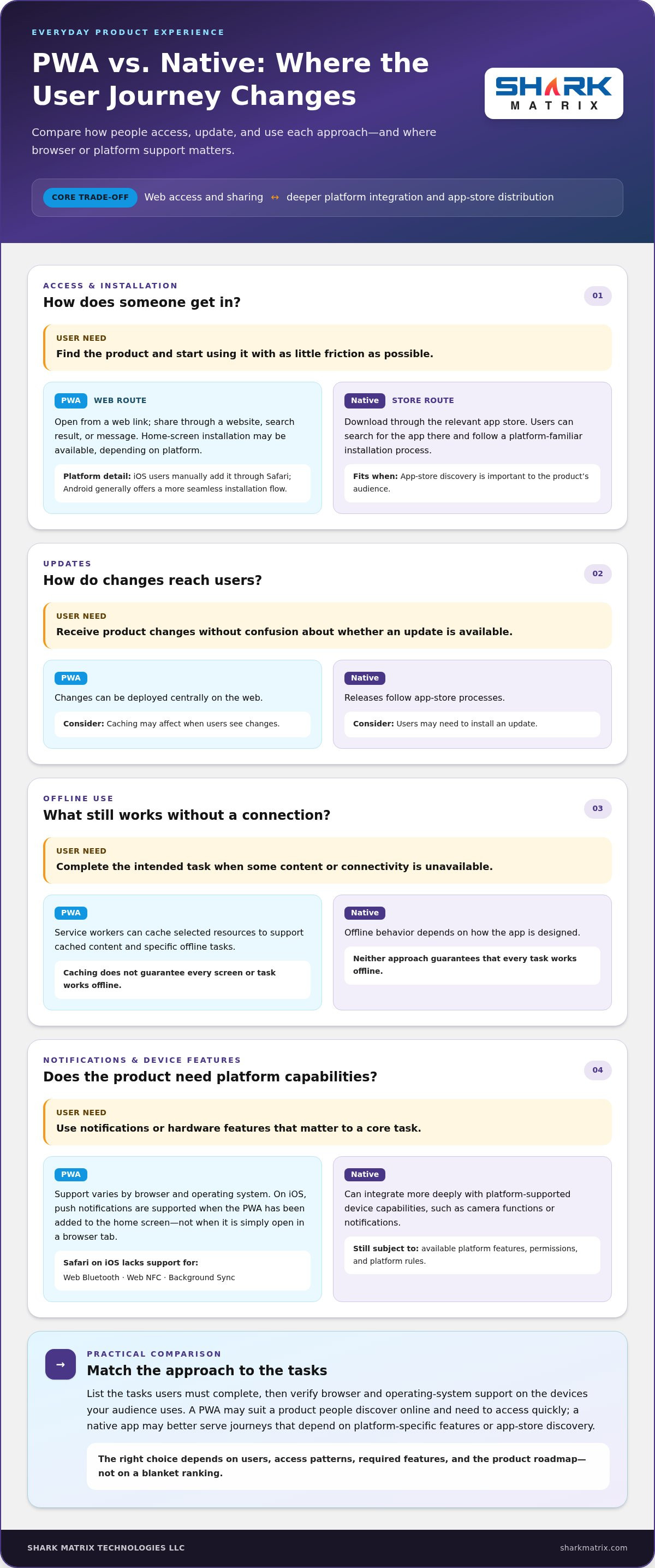
A PWA can be shared as a link, making it easy to include in a website, search result, or message. Installation options vary: on iOS, users manually add a PWA to the home screen through Safari; Android generally offers a more seamless installation flow. Native apps are distributed through platform stores, where users can search for and download them. Web updates can be deployed centrally, though caching may affect when users see changes. Native updates follow app-store release processes, and users may need to install an update.
Offline access, notifications, and device features
Service workers can cache selected content and support specific offline tasks, but they don’t make every feature available without a connection. The MDN Web Docs on PWAs explains how these web technologies work. Notification and hardware support also vary. As of October 2026, iOS supports PWA push notifications when the user has added the app to the home screen, but not for a PWA simply open in a browser tab. Safari on iOS also lacks Web Bluetooth, Web NFC, and Background Sync support. Android generally provides broader PWA support, while native apps can use platform-supported device capabilities subject to permissions.
Everyday feature snapshot
- Access: PWA via browser link or supported home-screen install; native app via app-store download.
- Updates: PWA changes deploy on the web, with caching considerations; native releases pass through store processes.
- Offline use: PWA can serve configured cached content; native offline behavior depends on app design. Neither guarantees every task works offline.
- Notifications and device access: PWA support varies by browser and operating system; native access depends on platform APIs and permissions.
These differences make the pwa vs native app benefits decision a feature-planning exercise. List the tasks users must complete, then check browser and operating-system support for each one. For example, if a core task depends on a hardware feature, verify that it works on your target devices before choosing an approach. This comparison can inform a web or mobile product plan, including web development planning.
PWA vs. Native App Benefits Compared by Business Priority
The useful comparison isn’t a blanket ranking. A PWA may suit a product that people discover online and need to access quickly, while a native app may better serve a journey that depends on platform-specific features or app-store discovery. In either case, performance, maintenance effort, and development scope depend on the product requirements and implementation.
Feature comparison
| Business priority | PWA | Native app |
|---|---|---|
| Reach | Shareable by web address; compatible browser required | Available for specific operating systems |
| Installation | Can be added to a home screen; flow varies by platform | Installed through an app store |
| Updates | Web changes can be deployed centrally; caching may affect timing | Updates follow platform store processes |
| Offline use | Selected cached content or tasks, if configured | Offline behavior depends on app design |
| Device access | Browser-supported features; access varies | Platform-supported features, subject to permissions |
| Distribution | Web discovery and sharing; store options vary | App-store presence and discovery |
When PWA benefits are strongest
Consider a content-led service, lightweight booking tool, or product research journey where users arrive from search, a link, or a campaign. A shared web experience can make access straightforward across compatible devices without requiring users to begin with an app-store download. Microsoft’s PWA Development Guide describes how web technologies can support app-like experiences across devices. Reach still depends on discoverability, page performance, and browser support, not architecture alone.
When native app benefits are strongest
A native app may be a stronger fit when core tasks rely on deeper device integration, such as a workflow built around supported hardware features, or when users expect to find and return to the product through an app store. Platform-specific interaction patterns can also matter for frequent, focused use. Native development doesn’t guarantee better performance in every case; the experience depends on implementation and the user’s task.
Use the pwa vs native app benefits comparison to prioritize user journeys, not to assume one codebase or distribution model will always require less effort. A clear product brief can weigh feature needs, target platforms, release plans, and ongoing maintenance together. For a product that calls for platform-specific planning, explore mobile app development.
How to Choose Between a PWA and Native App for Your Product
The pwa vs native app benefits decision becomes clearer when you start with user behavior, not a preferred technology. Map what people need to do, how they’ll reach the product, and which capabilities those tasks depend on. Then validate the architecture against platform support and product goals.
A five-step framework for selecting an app approach
- Step 1: Map users and journeys. Identify your primary audiences, their essential tasks, and where they first encounter the product, such as search, a shared link, or an app store. Note whether they use it occasionally or return often.
- Step 2: Separate must-haves from nice-to-haves. List required features such as camera use, notifications, location, or access to device hardware. Mark which are essential to completing a core task and which could wait.
- Step 3: Check platform and access needs. Match each essential capability to browser and operating-system support across your target devices. Include installation, app-store distribution, and specific offline tasks in the check.
- Step 4: Assess the whole product. Consider performance, accessibility, security, analytics, and integrations alongside initial development and ongoing maintenance. Compare the work required with the product roadmap instead of assuming one architecture is always simpler.
- Step 5: Test assumptions before committing. Build a focused prototype around a representative user journey. Test it with people who reflect your intended audience, observe where they struggle, and use those findings to refine the approach.
Questions to resolve before development begins
Make the decision concrete with a short planning brief. Which devices, operating systems, and browsers do your intended users actually use? Which systems must the product integrate with, and what privacy controls should shape those connections? What performance expectations will make core tasks feel dependable? The answers turn broad architecture preferences into requirements you can test.
Define success before launch, too. Choose measures tied to the product’s purpose, such as task completion, engagement, conversion, or retention. A prototype can test not only whether a feature works, but whether it makes the user journey easier. Document assumptions about browser support, distribution, offline behavior, and device integration so you can revisit them as the product evolves.
This process keeps the architecture aligned with user needs and maintainable product planning. For help translating requirements into a web product, explore web development planning.
Plan Your PWA or Native App Around the User Experience
An architecture decision is useful only if it leads to an experience people can use easily and your team can support over time. Turn your conclusion about pwa vs native app benefits into a short development brief: record who the product serves, what users need to do, and why the chosen approach fits those needs. This gives design and engineering a shared reference as the product takes shape.
Turn the comparison into a development brief
Capture the essentials before development begins. The brief should connect the approach to specific user needs, not just name a platform. Include:
- Audience and core journeys: who the users are, how they arrive, and the tasks the product must make straightforward.
- Platforms and capabilities: target devices, browsers, operating systems, required integrations, and essential device features.
- Experience requirements: accessibility considerations, performance expectations, and any necessary offline behavior.
- Distribution assumptions: expected browser support, installation flow, and whether app-store presence is part of the user journey.
- Validation plan: how the team will test usability with representative users and verify technical assumptions across target platforms.
Keep the brief measurable. Define success through outcomes such as users completing a key task, returning to the product, or completing a purchase. These measures help teams assess whether the experience works instead of relying on feature counts alone.
Build for a roadmap, not just the first release
Priorities can shift as a product gains users. A lightweight first release may later need new integrations, richer device features, or different distribution options. Plan for ongoing usability testing, analytics, maintenance, and periodic reviews of browser and operating-system support. Documenting assumptions makes them easier to revisit as user needs and platform capabilities change.
Consistent UI/UX design ties the product together, whether users arrive through a browser or an app store. Clear navigation, accessible interactions, and predictable task flows matter across both approaches. Product strategy and technical planning should evolve together, so new features strengthen the experience rather than add complexity without a clear user benefit.
Use your brief to turn the comparison into a practical roadmap. Shark Matrix Technologies LLC’s mobile app development services support product planning and the development of mobile experiences shaped around user journeys and requirements.
Choose the Experience That Moves Your Product Forward
The pwa vs native app benefits decision comes down to the people you need to reach, the tasks they need to complete, and the capabilities those tasks require. A PWA can suit browser-first journeys and broad web access, while a native app may be a better fit when deeper platform integration or app-store presence is central to the experience.
Before committing, map essential user journeys, check browser and operating-system support, and document assumptions about installation, offline use, integrations, and device access. A focused prototype and representative user testing can expose gaps before they become part of the product roadmap. Keep success measures and future maintenance in view so the choice supports more than the first release.
Shark Matrix Technologies LLC brings web and mobile app development together with custom software engineering and UI/UX design. This combination helps align technical decisions with user needs and a coherent product experience. Explore mobile app development services and take the next step toward an app approach built around your goals.
Frequently Asked Questions
What is the main difference between a PWA and a native app?
A PWA is a web application accessed through a browser that may offer features such as home-screen installation or selected offline access. A native app is developed for a specific operating system, such as iOS or Android, and is generally installed through its app store. In practical terms, PWAs emphasize web access and link sharing, while native apps can integrate more closely with platform-supported features. The right choice depends on user journeys and product requirements.
Are PWAs better than native apps for most businesses?
No single approach is better for every business. A PWA may suit a browser-first product where people need quick access through a link, while a native app may fit workflows that depend on deeper device integration or app-store distribution. The pwa vs native app benefits comparison should start with your audience, core tasks, and essential features. Check browser and operating-system support before choosing, then validate the expected experience with a prototype and user testing.
Can a PWA work offline?
Yes, a PWA can support selected offline experiences when developers configure caching and service workers for them. For example, it might display previously cached information when a connection drops. That doesn’t mean every screen or action will work offline: tasks that need fresh data or a server connection may be unavailable. Define offline requirements for each user journey and test them on target devices, since browser and operating-system support can affect behavior.
Do PWAs support push notifications on iPhone and Android?
They can, but support depends on the operating system, browser, and installation context. On iPhone, PWA push notifications are supported when the user has added the PWA to the home screen; notifications aren’t available to a PWA simply open in a browser tab. Android generally offers broader PWA support, though browser behavior still matters. Treat notifications as a platform-specific requirement and test the full permission and subscription flow on intended devices.
Can a PWA access a phone’s camera, location, or other device features?
PWAs can access some device capabilities, including camera and geolocation, through browser APIs and subject to user permissions. Support isn’t identical across browsers or operating systems. Some hardware features are more restricted: Safari on iOS doesn’t support Web Bluetooth or Web NFC. If a core task depends on a specific capability, verify support on target devices before selecting an architecture. Native apps can use platform-supported features, also subject to permissions and operating-system rules.
Is a PWA cheaper to build and maintain than a native app?
A PWA can require less initial development effort when one web experience meets the product’s needs across target devices. But savings aren’t automatic: complex browser requirements, device integrations, testing, or ongoing support can change the workload. Native apps may involve platform-specific development and release processes. Maintenance also depends on the feature set and roadmap. Compare the work needed to build, test, update, and support your actual user journeys rather than assuming one option always costs less.
 OpenAI
 Codex
Codex
 Vertex AI
 Cloud Vision
 OpenCV
 TensorFlow
 IBM Watson
 Cloud Natural Language
 Cognitive Services
 Bot Framework
 Mistral
 LLama
LLama
 Gemini
 Anthropic
 N8N
N8N