
Categories
Mobile App Development

PWA vs. Native App Benefits: How to Choose the Right Approach in 2026

What if users could start using your app without downloading it first? That’s one of the key questions behind pwa vs native app benefits: a Progressive Web App (PWA) opens through a web link, while a native app can integrate more deeply with a mobile platform and be distributed through its app store.

If you’re unsure whether a PWA can deliver the experience your product needs, or whether it can support specific device features, the trade-off deserves a closer look. Access, installation, performance, and the tasks users need to complete all affect which approach makes sense. iOS also has specific limitations, including manual home-screen installation and restrictions on some hardware features.

This guide compares the practical advantages and limits of each option so you can match an approach to your users, required features, and business goals. We’ll look at reach, device integration, distribution, and long-term product planning. For any web or mobile product, start with what people need to do, then choose the technology that supports those tasks.

Key Takeaways

  • See how browser access, home-screen installation, and app-store distribution shape the experience for users.
  • Compare pwa vs native app benefits against your priorities, including reach, updates, offline behavior, and device access.
  • Base your architecture decision on users’ core tasks and how they’re most likely to access your product.
  • Map essential features to browser and operating-system support before choosing a PWA or native app.
  • Create a practical product brief covering your audience, platforms, must-have features, and measures of success.

PWA vs. Native App Benefits: What Each Approach Offers

A Progressive Web App (PWA) is a web application designed to offer some app-like features through compatible browsers. Users open it from a link and may be able to add it to a device’s home screen. A native app, by contrast, is software developed for a specific mobile operating system, such as iOS or Android. The Progressive Web App (PWA) concept combines web delivery with capabilities that can make an experience feel more like an app.

The central trade-off is web access versus platform integration. A PWA can be shared and opened through the web, while a native app can make fuller use of platform-specific capabilities and app-store distribution. Neither is automatically the better choice. The right fit depends on who uses the product, how they access it, and what they need to accomplish.

What makes a progressive web app different from a website?

A responsive website adjusts its layout to fit different screen sizes. A PWA adds app-oriented behavior: it may be installable on a home screen, and service workers can manage selected resources to support features such as faster repeat visits or access to cached content. That doesn’t guarantee every screen or task will work offline.

These capabilities depend on the browser and operating system. Installation steps, notification support, and access to device features can vary, so design and test a PWA on the platforms your audience uses. Its web foundation makes sharing and discovery through a URL straightforward, but browser access alone doesn’t create a good app-like experience. Clear navigation, responsive pages, and well-planned task flows still matter.

What does a native app do differently?

A native app is built for a particular operating system, using technologies suited to iOS or Android. This platform-specific approach can support deeper integration with device capabilities that the operating system makes available, such as camera functions or notifications. Access depends on the feature, permissions, and platform rules, so native development doesn’t mean every capability is unrestricted.

Native apps are typically distributed through app stores, where users expect a platform-familiar installation and interface. That can suit products whose core tasks rely on device integration or whose audiences actively seek an app-store download. It also means planning for platform-specific development and experiences. The useful question isn’t which label sounds more advanced, but which approach supports real user journeys and the product roadmap.

How PWA and Native App Features Work in Everyday Use

Users notice the difference in how they find, install, and return to an app. A PWA starts with a web address and may offer a home-screen installation flow where supported. A native app is usually downloaded from the relevant app store. After launch, the practical differences depend on the device, browser, operating system, and how the product is built.

Installation, discovery, and updates: web versus app stores

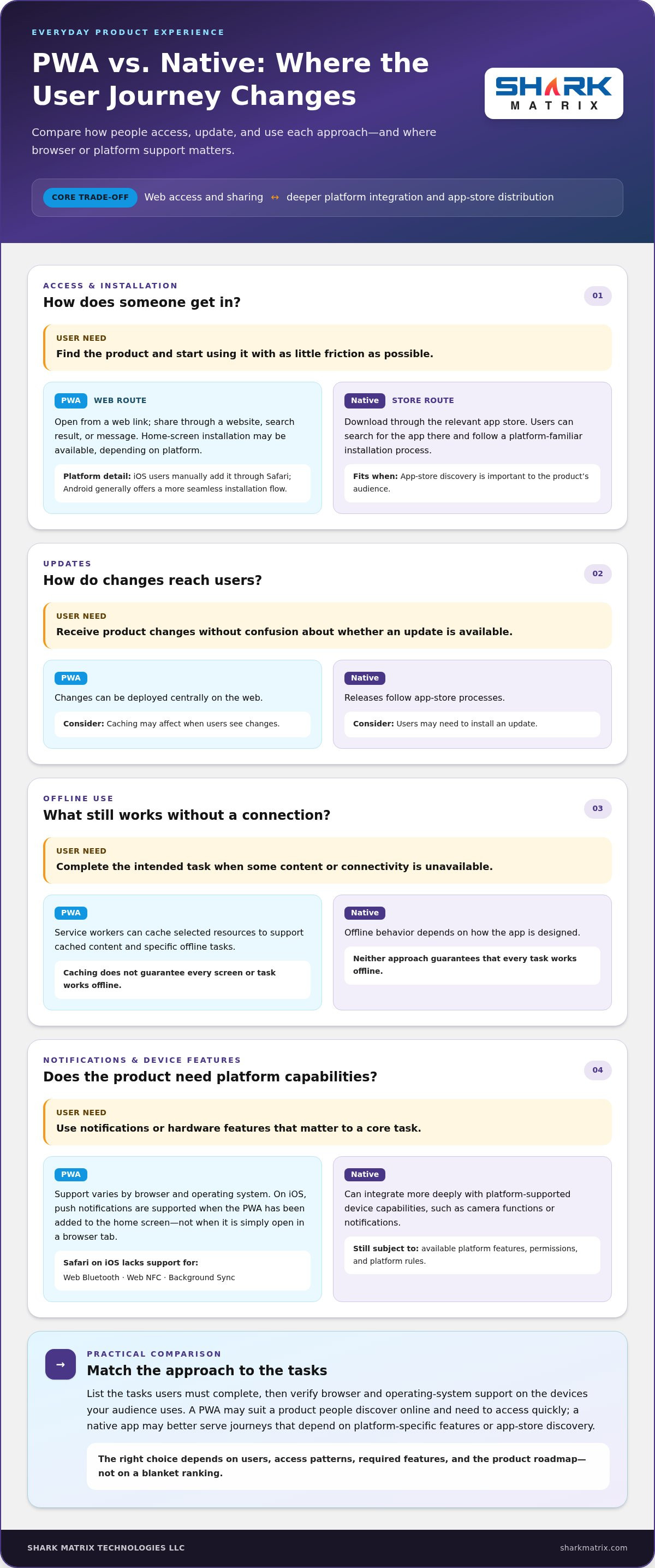
A PWA can be shared as a link, making it easy to include in a website, search result, or message. Installation options vary: on iOS, users manually add a PWA to the home screen through Safari; Android generally offers a more seamless installation flow. Native apps are distributed through platform stores, where users can search for and download them. Web updates can be deployed centrally, though caching may affect when users see changes. Native updates follow app-store release processes, and users may need to install an update.

Offline access, notifications, and device features

Service workers can cache selected content and support specific offline tasks, but they don’t make every feature available without a connection. The MDN Web Docs on PWAs explains how these web technologies work. Notification and hardware support also vary. As of October 2026, iOS supports PWA push notifications when the user has added the app to the home screen, but not for a PWA simply open in a browser tab. Safari on iOS also lacks Web Bluetooth, Web NFC, and Background Sync support. Android generally provides broader PWA support, while native apps can use platform-supported device capabilities subject to permissions.

Everyday feature snapshot

  • Access: PWA via browser link or supported home-screen install; native app via app-store download.
  • Updates: PWA changes deploy on the web, with caching considerations; native releases pass through store processes.
  • Offline use: PWA can serve configured cached content; native offline behavior depends on app design. Neither guarantees every task works offline.
  • Notifications and device access: PWA support varies by browser and operating system; native access depends on platform APIs and permissions.

These differences make the pwa vs native app benefits decision a feature-planning exercise. List the tasks users must complete, then check browser and operating-system support for each one. For example, if a core task depends on a hardware feature, verify that it works on your target devices before choosing an approach. This comparison can inform a web or mobile product plan, including web development planning.
PWA vs. Native App Benefits: How to Choose the Right Approach in 2026

PWA vs. Native App Benefits Compared by Business Priority

The useful comparison isn’t a blanket ranking. A PWA may suit a product that people discover online and need to access quickly, while a native app may better serve a journey that depends on platform-specific features or app-store discovery. In either case, performance, maintenance effort, and development scope depend on the product requirements and implementation.

Feature comparison

Business priority PWA Native app
Reach Shareable by web address; compatible browser required Available for specific operating systems
Installation Can be added to a home screen; flow varies by platform Installed through an app store
Updates Web changes can be deployed centrally; caching may affect timing Updates follow platform store processes
Offline use Selected cached content or tasks, if configured Offline behavior depends on app design
Device access Browser-supported features; access varies Platform-supported features, subject to permissions
Distribution Web discovery and sharing; store options vary App-store presence and discovery

When PWA benefits are strongest

Consider a content-led service, lightweight booking tool, or product research journey where users arrive from search, a link, or a campaign. A shared web experience can make access straightforward across compatible devices without requiring users to begin with an app-store download. Microsoft’s PWA Development Guide describes how web technologies can support app-like experiences across devices. Reach still depends on discoverability, page performance, and browser support, not architecture alone.

When native app benefits are strongest

A native app may be a stronger fit when core tasks rely on deeper device integration, such as a workflow built around supported hardware features, or when users expect to find and return to the product through an app store. Platform-specific interaction patterns can also matter for frequent, focused use. Native development doesn’t guarantee better performance in every case; the experience depends on implementation and the user’s task.

Use the pwa vs native app benefits comparison to prioritize user journeys, not to assume one codebase or distribution model will always require less effort. A clear product brief can weigh feature needs, target platforms, release plans, and ongoing maintenance together. For a product that calls for platform-specific planning, explore mobile app development.

How to Choose Between a PWA and Native App for Your Product

The pwa vs native app benefits decision becomes clearer when you start with user behavior, not a preferred technology. Map what people need to do, how they’ll reach the product, and which capabilities those tasks depend on. Then validate the architecture against platform support and product goals.

A five-step framework for selecting an app approach

  • Step 1: Map users and journeys. Identify your primary audiences, their essential tasks, and where they first encounter the product, such as search, a shared link, or an app store. Note whether they use it occasionally or return often.
  • Step 2: Separate must-haves from nice-to-haves. List required features such as camera use, notifications, location, or access to device hardware. Mark which are essential to completing a core task and which could wait.
  • Step 3: Check platform and access needs. Match each essential capability to browser and operating-system support across your target devices. Include installation, app-store distribution, and specific offline tasks in the check.
  • Step 4: Assess the whole product. Consider performance, accessibility, security, analytics, and integrations alongside initial development and ongoing maintenance. Compare the work required with the product roadmap instead of assuming one architecture is always simpler.
  • Step 5: Test assumptions before committing. Build a focused prototype around a representative user journey. Test it with people who reflect your intended audience, observe where they struggle, and use those findings to refine the approach.

Questions to resolve before development begins

Make the decision concrete with a short planning brief. Which devices, operating systems, and browsers do your intended users actually use? Which systems must the product integrate with, and what privacy controls should shape those connections? What performance expectations will make core tasks feel dependable? The answers turn broad architecture preferences into requirements you can test.

Define success before launch, too. Choose measures tied to the product’s purpose, such as task completion, engagement, conversion, or retention. A prototype can test not only whether a feature works, but whether it makes the user journey easier. Document assumptions about browser support, distribution, offline behavior, and device integration so you can revisit them as the product evolves.

This process keeps the architecture aligned with user needs and maintainable product planning. For help translating requirements into a web product, explore web development planning.

Plan Your PWA or Native App Around the User Experience

An architecture decision is useful only if it leads to an experience people can use easily and your team can support over time. Turn your conclusion about pwa vs native app benefits into a short development brief: record who the product serves, what users need to do, and why the chosen approach fits those needs. This gives design and engineering a shared reference as the product takes shape.

Turn the comparison into a development brief

Capture the essentials before development begins. The brief should connect the approach to specific user needs, not just name a platform. Include:

  • Audience and core journeys: who the users are, how they arrive, and the tasks the product must make straightforward.
  • Platforms and capabilities: target devices, browsers, operating systems, required integrations, and essential device features.
  • Experience requirements: accessibility considerations, performance expectations, and any necessary offline behavior.
  • Distribution assumptions: expected browser support, installation flow, and whether app-store presence is part of the user journey.
  • Validation plan: how the team will test usability with representative users and verify technical assumptions across target platforms.

Keep the brief measurable. Define success through outcomes such as users completing a key task, returning to the product, or completing a purchase. These measures help teams assess whether the experience works instead of relying on feature counts alone.

Build for a roadmap, not just the first release

Priorities can shift as a product gains users. A lightweight first release may later need new integrations, richer device features, or different distribution options. Plan for ongoing usability testing, analytics, maintenance, and periodic reviews of browser and operating-system support. Documenting assumptions makes them easier to revisit as user needs and platform capabilities change.

Consistent UI/UX design ties the product together, whether users arrive through a browser or an app store. Clear navigation, accessible interactions, and predictable task flows matter across both approaches. Product strategy and technical planning should evolve together, so new features strengthen the experience rather than add complexity without a clear user benefit.

Use your brief to turn the comparison into a practical roadmap. Shark Matrix Technologies LLC’s mobile app development services support product planning and the development of mobile experiences shaped around user journeys and requirements.

Choose the Experience That Moves Your Product Forward

The pwa vs native app benefits decision comes down to the people you need to reach, the tasks they need to complete, and the capabilities those tasks require. A PWA can suit browser-first journeys and broad web access, while a native app may be a better fit when deeper platform integration or app-store presence is central to the experience.

Before committing, map essential user journeys, check browser and operating-system support, and document assumptions about installation, offline use, integrations, and device access. A focused prototype and representative user testing can expose gaps before they become part of the product roadmap. Keep success measures and future maintenance in view so the choice supports more than the first release.

Shark Matrix Technologies LLC brings web and mobile app development together with custom software engineering and UI/UX design. This combination helps align technical decisions with user needs and a coherent product experience. Explore mobile app development services and take the next step toward an app approach built around your goals.

Frequently Asked Questions

What is the main difference between a PWA and a native app?

A PWA is a web application accessed through a browser that may offer features such as home-screen installation or selected offline access. A native app is developed for a specific operating system, such as iOS or Android, and is generally installed through its app store. In practical terms, PWAs emphasize web access and link sharing, while native apps can integrate more closely with platform-supported features. The right choice depends on user journeys and product requirements.

Are PWAs better than native apps for most businesses?

No single approach is better for every business. A PWA may suit a browser-first product where people need quick access through a link, while a native app may fit workflows that depend on deeper device integration or app-store distribution. The pwa vs native app benefits comparison should start with your audience, core tasks, and essential features. Check browser and operating-system support before choosing, then validate the expected experience with a prototype and user testing.

Can a PWA work offline?

Yes, a PWA can support selected offline experiences when developers configure caching and service workers for them. For example, it might display previously cached information when a connection drops. That doesn’t mean every screen or action will work offline: tasks that need fresh data or a server connection may be unavailable. Define offline requirements for each user journey and test them on target devices, since browser and operating-system support can affect behavior.

Do PWAs support push notifications on iPhone and Android?

They can, but support depends on the operating system, browser, and installation context. On iPhone, PWA push notifications are supported when the user has added the PWA to the home screen; notifications aren’t available to a PWA simply open in a browser tab. Android generally offers broader PWA support, though browser behavior still matters. Treat notifications as a platform-specific requirement and test the full permission and subscription flow on intended devices.

Can a PWA access a phone’s camera, location, or other device features?

PWAs can access some device capabilities, including camera and geolocation, through browser APIs and subject to user permissions. Support isn’t identical across browsers or operating systems. Some hardware features are more restricted: Safari on iOS doesn’t support Web Bluetooth or Web NFC. If a core task depends on a specific capability, verify support on target devices before selecting an architecture. Native apps can use platform-supported features, also subject to permissions and operating-system rules.

Is a PWA cheaper to build and maintain than a native app?

A PWA can require less initial development effort when one web experience meets the product’s needs across target devices. But savings aren’t automatic: complex browser requirements, device integrations, testing, or ongoing support can change the workload. Native apps may involve platform-specific development and release processes. Maintenance also depends on the feature set and roadmap. Compare the work needed to build, test, update, and support your actual user journeys rather than assuming one option always costs less.

Categories
Development

Strategic Mobile App Development Services for UAE Enterprises: The 2026 Guide

Did you know that 70.1% of the UAE’s working-age population is actively using AI technologies as of early 2026? In a market where smartphone penetration sits at over 99%, simply having a presence on a user’s home screen isn’t enough to guarantee success. To truly compete, enterprises require specialized mobile app development services that balance technical performance with the strict cultural and legal requirements of the Emirates. You’re likely looking for a way to maximize ROI while avoiding the technical debt that often comes from choosing the wrong framework or ignoring the nuances of the local market.

We understand the pressure of building a platform that resonates with Arabic-speaking users while staying compliant with the new Federal Decree-Law No. 26 of 2025 on Child Digital Safety. This guide will show you how to leverage cutting-edge mobile technologies and strategic Arabic localization to scale your brand across the national market. We’ll examine how to integrate AI for seamless user experiences, navigate the latest data privacy laws, and select the right cross-platform tools to ensure your app remains high-performing and scalable for years to come.

Key Takeaways

  • Understand the shift from basic web wrappers to AI-first mobile ecosystems to meet the demands of the UAE’s tech-forward market.
  • Evaluate the trade-offs between native performance and cross-platform speed to select the right mobile app development services for your scalability needs.
  • Discover how generative AI and machine learning personalization can drive higher user retention and engagement across the national population.
  • Learn why effective Arabic localization must go beyond simple translation to include deep cultural UX adaptations and Right-to-Left design.
  • Follow a structured development roadmap that prioritizes business alignment and iterative feedback to ensure a high-performance launch.

The Evolution of Mobile App Development Services in the UAE

The UAE has moved past the era of simple digital presence. By 2026, the evolution of mobile app development has reached a critical tipping point where national enterprises are abandoning basic web wrappers for sophisticated, AI-first ecosystems. This shift aligns with the UAE National AI Strategy 2031, which aims to position the country as a global leader in artificial intelligence. Enterprise leaders now understand that a basic mobile site cannot match the deep integration and processing power required by a population where 70.1% of working-age adults already use AI technologies daily.

Professional mobile app development services in the Emirates have transformed to meet these demands. It’s no longer just about having an app; it’s about owning a high-performance touchpoint that functions as a core driver of the national digital economy. Businesses that rely on generic solutions often find themselves struggling with technical debt and poor user retention. In contrast, custom-built applications offer the stability needed to integrate with complex national infrastructure and local payment gateways.

Mobile Apps as a Catalyst for National Brand Growth

Expanding a brand across the seven emirates requires more than just physical locations. High-performance mobile tools allow enterprises to transcend geographical boundaries, reaching users from Abu Dhabi to Ras Al Khaimah with equal precision. These platforms serve as powerful engines for data-driven lead generation, capturing user preferences that inform broader business strategies. In 2026, the UAE mobile landscape is defined by intelligent, hyper-localized ecosystems that prioritize user safety and cultural relevance.

Addressing the “App vs. Responsive Web” Debate

While responsive websites are essential for SEO and initial discovery, they often fall short when it comes to long-term ROI and customer loyalty. Mobile apps offer superior performance by leveraging native device features that a browser simply can’t access efficiently. Consider the impact of biometric security, real-time push notifications, and robust offline access on user trust. These features create a frictionless experience that keeps users coming back to your brand rather than searching for a competitor.

Enterprises should consider investing in dedicated mobile app development services when they identify specific business triggers:

  • Users require frequent, high-speed interactions that exceed browser capabilities.
  • The business needs to collect and process complex data securely on-device.
  • Personalization through machine learning is required to maintain a competitive edge.
  • Compliance with the latest Federal Decree-Law No. 26 of 2025 necessitates advanced parental controls and age verification.

Choosing a dedicated app over a web-only approach ensures that your brand remains an authoritative presence in a market with over 99% smartphone penetration. It’s a strategic move that secures your place in the user’s daily digital routine while providing the scalability needed for future growth.

Selecting the Right Technology Stack: Native vs. Cross-Platform

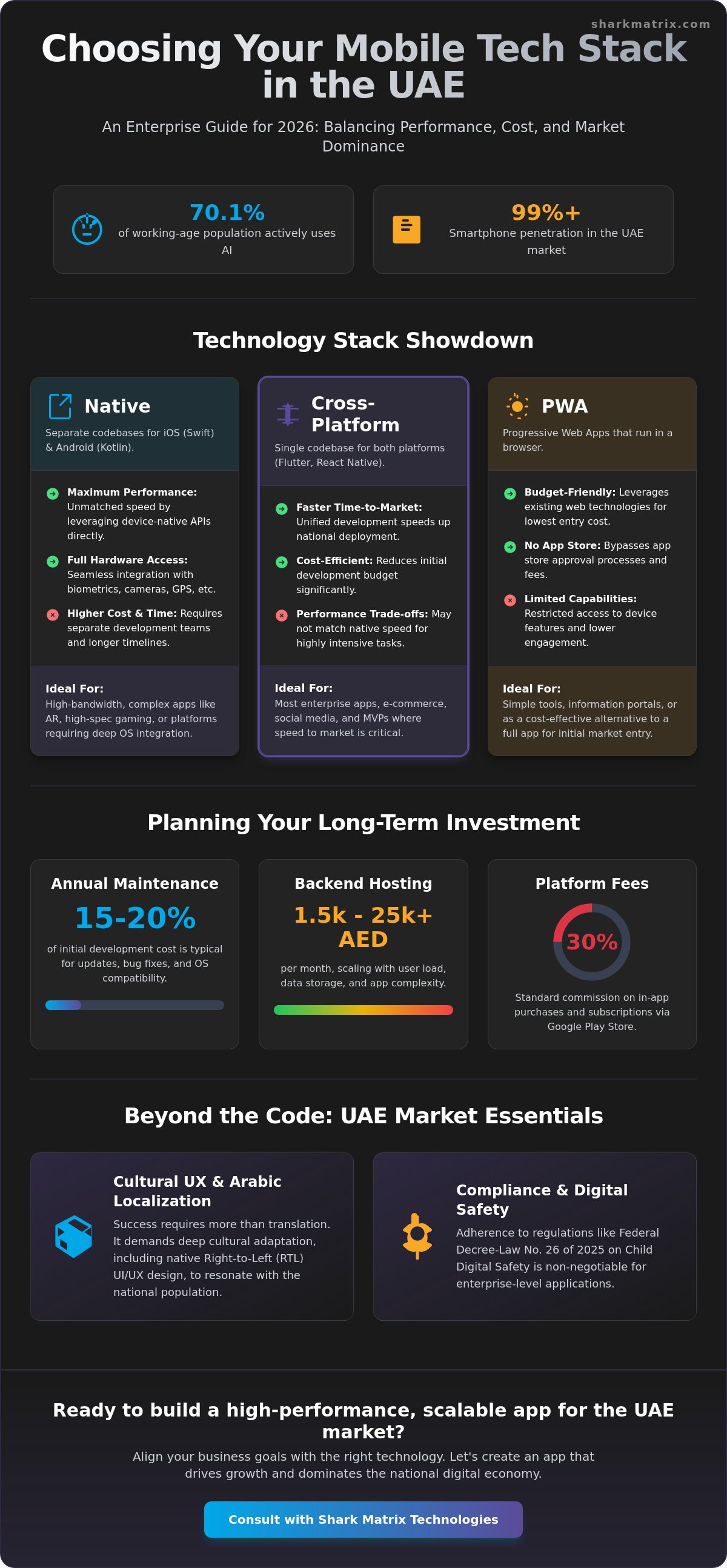
Deciding on a technology stack is one of the most significant hurdles for UAE enterprises. Native development involves building separate codebases for iOS and Android using Swift and Kotlin. This approach ensures maximum performance and seamless integration with hardware, which is vital for complex, high-bandwidth apps. However, it often requires a larger budget and longer timelines. For many, professional mobile app development services now lean toward cross-platform frameworks to achieve faster national deployment without sacrificing quality.

Cross platform app development tools like Flutter and React Native have become the leading technologies in 2026. They allow developers to maintain a single codebase that runs on both major operating systems. While this reduces initial development time, businesses must plan for ongoing costs. Typical annual app maintenance and updates usually range from 15% to 20% of the initial development cost. You also need to account for backend hosting, which can range from AED 1,500 to over AED 25,000 per month depending on complexity. Third-party SDKs and Google’s 30% commission on in-app purchases are other vital factors for your long-term budget.

For businesses with tighter budgets, Progressive Web Apps (PWAs) offer a middle ground. They work through a browser but mimic app functionality. However, they lack the deep integration required for 5G-enabled experiences or advanced AI features. Before committing, it’s wise to evaluate how your choice aligns with the broader Mobile Economy in the Middle East, where user expectations for speed and reliability are at an all-time high.

iOS and Android: Navigating the Dual-Platform Reality

The UAE market is unique because of its high-income demographic and diverse population, leading to significant user bases on both major platforms. You can’t afford to ignore either group. Achieving feature parity is essential so that an Android user in Sharjah has the same premium experience as an iPhone user in Abu Dhabi. If your strategy prioritizes Apple’s ecosystem, working with a qualified iOS app development company in Dubai ensures your application is built to the latest Swift and SDK standards while meeting local regulatory requirements. To better understand how these choices impact your budget, you should review our guide on App Development Cost in the UAE 2026.

Framework Selection for Enterprise Scalability

Flutter has emerged as a dominant force for enterprise applications in 2026. Its ability to deliver high-end UI/UX with a single codebase makes it ideal for the rapid pace of the UAE market. However, the “Write Once, Run Anywhere” promise has its limits. You’ll still need platform-specific tweaks to handle things like the new Child Digital Safety Law requirements or specific Right-to-Left (RTL) layout adjustments for Arabic users. If you’re ready to build a scalable solution, exploring specialized mobile app development services can help you navigate these technical nuances efficiently. For a deeper dive into how modern frameworks like Flutter and React Native can reduce your development costs by up to 40%, our comprehensive guide to cross platform app development in 2026 covers everything UAE enterprises need to know.

Strategic Mobile App Development Services for UAE Enterprises: The 2026 Guide

Integrating AI and Automation into Modern Mobile Applications

With 70.1% of the UAE’s working-age population already using AI technologies, the expectation for intelligent digital experiences has never been higher. Modern mobile app development services have shifted away from static interfaces toward dynamic, AI-first ecosystems. This transition means moving beyond simple buttons and menus to incorporate generative AI as a core feature. Whether it’s generating personalized travel itineraries or creating custom shopping lookbooks on the fly, generative AI allows your app to provide unique value to every individual user in real time.

Machine learning personalization engines are now the primary drivers of user engagement for national enterprises. These engines analyze user behavior to predict what a customer wants before they even search for it. In the B2B and e-commerce sectors, predictive analytics help streamline interfaces by surfacing relevant tools and products based on historical data. Beyond the user interface, AI automation works silently in the backend to reduce operational costs. By automating data entry, inventory tracking, and order processing, businesses can redirect their human capital toward higher-level strategic goals.

Custom AI Development for Mobile Ecosystems

Building a custom AI layer within your mobile app is essential for maintaining a competitive edge in the Emirates. Integrating Natural Language Processing (NLP) allows your application to understand the nuances of user search intent, including the various Arabic dialects common across the UAE. This level of sophistication significantly improves the user experience and builds brand authority. Furthermore, AI plays a critical role in security. AI-driven fraud detection systems can identify suspicious patterns in milliseconds, protecting both your business and your customers. Industry data shows that AI-driven apps can reduce churn rates by up to 20% by consistently delivering relevant, secure content.

AI Chatbots and Virtual Assistants

The days of frustrating, rule-based chatbots are over. In 2026, intelligent virtual assistants use generative models to provide context-aware support that feels natural and helpful. These assistants can handle complex queries, process returns, and even provide technical guidance without the need for human intervention. This shift improves customer support efficiency and ensures that your brand is available to assist users at any time of day. For enterprises looking to maintain a consistent AI strategy across all platforms, it’s helpful to see how these technologies align with web-based systems in The 2026 Guide to Website Design and Development. By choosing comprehensive mobile app development services that prioritize these automations, you ensure your platform is built for the future of the UAE’s digital economy.

Cultural UX and Arabic Localization: Dominating the National Market

Localization in the UAE is often misunderstood as a simple translation task. For national enterprises, true localization is a comprehensive UX strategy that respects cultural identity and user behavior. While English is widely spoken, Arabic remains the language of trust and cultural connection for the local population. High-quality mobile app development services must go beyond swapping text strings to create an environment that feels native to the user’s worldview. This includes everything from the way images are framed to the specific tone of voice used in push notifications.

Building trust within the app also depends on seamless integration with regional payment gateways like Network International or Telr. Users in the Emirates expect secure, familiar checkout experiences that support local cards and digital wallets. When your app reflects the local culture through high-quality digital marketing and localized content, it creates a sense of authority that generic, English-only platforms can’t match. This strategic approach ensures your brand isn’t just another icon on a screen but a trusted part of the user’s daily life. To amplify this cultural resonance beyond the app itself, partnering with a specialist social media advertising agency in Dubai can help you extend your localized messaging across TikTok, Instagram, and other high-traffic platforms where UAE audiences are most active.

RTL Design Mastery for Arabic Users

Right-to-Left (RTL) design is the foundation of any successful UAE mobile application. It’s not just about aligning text to the right; it’s about mirroring the entire user interface. Common pitfalls include failing to mirror icons that indicate direction, such as back arrows or progress bars. However, some elements like clocks and media playback controls should generally remain in their standard format to avoid confusing the user. Typography also requires careful attention. Arabic characters are more complex than Latin ones, requiring specialized font selection and increased line height to maintain legibility on mobile screens. A seamless bilingual switch allows users to toggle between English and Arabic without losing their place or breaking the layout.

Cultural Sensitivity in Mobile Interface Design

Visual storytelling must resonate with the UAE national audience to be effective. This means using imagery, icons, and color palettes that reflect regional preferences and social norms. For example, using local landmarks or culturally appropriate attire in your graphics can significantly boost brand affinity. Some businesses argue that “English is enough” because of the country’s large expat population. However, statistics consistently show that local engagement is higher when brands speak to users in their native language. While Modern Standard Arabic is ideal for formal banking or government apps, using local dialects can be far more effective for social engagement or marketing. If you want to build a platform that truly resonates with the national market, you need a partner who understands these nuances. Explore our specialized mobile app development services to start your localization journey.

From Discovery to Deployment: Your Strategic Development Roadmap

Launching a successful application in the Emirates requires more than just clean code. It demands a structured roadmap that bridges the gap between a conceptual idea and a high-performance digital asset. The process begins with a rigorous discovery phase. Here, we align your app’s core features with national business goals and the specific regulatory requirements of the UAE market. This stage ensures that every functional requirement serves a purpose, whether it’s driving lead generation or improving internal enterprise workflows.

Agile methodology is at the heart of modern mobile app development services. This iterative approach prioritizes transparency and regular feedback, allowing you to see progress in real time through scheduled sprints. It’s during this phase that we refine the user experience based on actual data rather than assumptions. Once the build is stable, our quality assurance team conducts rigorous testing across the diverse device market found in the UAE. From the latest flagship iPhones to high-end Android devices, we ensure your app performs flawlessly under various network conditions, particularly within the country’s extensive 5G infrastructure.

The Shark Matrix Technologies LLC End-to-End Delivery Model

Our approach is unique because we don’t treat development as an isolated silo. We integrate SEO and PPC strategy into the initial app architecture from day one. This proactive planning ensures that your platform is discoverable and ready for high-intent traffic the moment it hits the store. We also prioritize robust API and backend integration to ensure the app communicates perfectly with your existing enterprise CRM or ERP tools. To learn more about how we drive visibility for national brands, explore our Comprehensive SEO Services 2026.

Continuous Improvement and Maintenance

Deployment is just the beginning of your app’s lifecycle. Success in 2026 depends on continuous improvement through active monitoring of user behavior. This data allows us to drive meaningful feature updates that keep users engaged and prevent churn. We also manage the technical complexities of staying compliant with evolving App Store and Google Play guidelines. Remember that annual maintenance costs typically range from 15% to 20% of the initial development spend. This investment covers security patches, OS updates, and the integration of new technologies like Answer Engine Optimization (AEO) to stay ahead of generative search trends. If you’re ready to build a market-leading platform, you can partner with Shark Matrix Technologies LLC for your national mobile app strategy today.

Securing Your Digital Future in the UAE Market

Success in the Emirates isn’t just about launching a product; it’s about sustaining a high-performance ecosystem that evolves with its users. You’ve explored how technical framework choices, AI-driven personalization, and deep cultural UX form the pillars of a dominant mobile presence. When these elements align, your brand moves beyond being a simple utility to becoming a core part of your customers’ daily digital routines. Choosing professional mobile app development services is the most critical decision in this journey, ensuring your infrastructure is ready for the high-speed demands of the national market.

Shark Matrix Technologies LLC has spent over 15 years refining this balance for national enterprises. Since our founding in 2010, we’ve focused on the intersection of custom engineering and Arabic market dynamics. As experts in generative engine optimization (GEO) and AI automation, we ensure your platform remains visible and relevant in an increasingly intelligent search landscape. Our team brings the regional insight necessary to navigate local regulations while pushing the boundaries of what’s possible with modern mobile technology.

We’re ready to help you build a scalable, culturally resonant app that drives real growth across the UAE. Start Your Strategic Mobile App Project with Shark Matrix Technologies LLC and position your brand at the forefront of the national digital economy. Let’s create a mobile experience that truly resonates with your audience and delivers lasting value.

Frequently Asked Questions

How much do mobile app development services cost in the UAE?

Development costs vary based on the complexity and feature set of your application. Simple apps typically range from AED 20,000 to AED 50,000, while medium complexity projects with third-party integrations cost between AED 50,000 and AED 150,000. Complex, AI-powered enterprise solutions often start at AED 150,000 and can exceed AED 400,000. These figures reflect the specialized engineering required for secure, high-performance mobile app development services in the national market.

What is the difference between native and cross-platform app development?

Native development involves building separate applications for iOS and Android using platform-specific languages like Swift or Kotlin. This ensures maximum performance and hardware integration. Cross platform app development uses frameworks like Flutter or React Native to create a single codebase for both platforms. This approach is increasingly popular for UAE enterprises because it reduces development time and costs while maintaining a high-quality user experience across all devices.

How long does it take to develop a custom mobile application?

A standard timeline for a custom enterprise app usually spans three to nine months. Simple applications can reach deployment in approximately 12 weeks, while complex platforms with AI features or extensive backend integrations often require six months or more. This schedule includes the critical discovery phase, UI/UX design, development sprints, and rigorous testing to ensure the app meets local regulatory standards and performance expectations.

Do I need a separate app for iOS and Android devices?

You don’t need two separate codebases if you choose cross-platform mobile app development services. Modern frameworks allow you to build one application that runs seamlessly on both iOS and Android. This strategy is highly effective in the UAE, where smartphone penetration is over 99% and users are split between both operating systems. It ensures feature parity while simplifying your long-term maintenance and update cycles.

How does Arabic localization affect my app’s performance in the UAE?

Localization is a primary driver of user retention and brand trust. Apps that implement high-quality Arabic translation and Right-to-Left (RTL) layout adjustments see significantly higher engagement from the local population. Beyond mere translation, cultural localization involves adapting imagery and icons to regional preferences. This creates a more intuitive experience for users, helping your brand stand out in a competitive national market where cultural relevance is a key differentiator.

Can I integrate my existing AI or CRM tools into a new mobile app?

Yes, modern mobile architectures are built to integrate with existing enterprise ecosystems through secure APIs. You can connect your app to CRM systems like Salesforce or custom AI models to ensure real-time data synchronization. This integration allows your mobile platform to serve as a powerful extension of your current workflows, providing users with personalized content and allowing your business to maintain a single source of truth for customer data.

What are the ongoing costs for mobile app maintenance?

Annual maintenance costs generally range from 15% to 20% of the initial development investment. These costs cover essential security updates, hosting fees, and compatibility patches for new iOS and Android versions. Regular maintenance ensures your app remains compliant with the latest UAE data privacy laws and continues to perform at peak levels. Neglecting this aspect can lead to technical debt and a decline in user satisfaction over time.

Why should a UAE business choose a national agency over offshore developers?

National agencies provide essential expertise in the UAE’s specific regulatory and cultural landscape. They understand the nuances of the 2026 Child Digital Safety Law and have direct experience integrating with regional payment gateways. Working with a local partner ensures better communication during the discovery phase and guarantees that your app is optimized for the high-bandwidth 5G networks prevalent across the Emirates, which offshore teams may not fully account for. For businesses specifically targeting Apple device users, our detailed comparison of how to select the right iOS app development company in Dubai can help you identify a partner with the precise technical and cultural expertise your project demands.