

A ranking dip may not be the real problem. Important pages might be difficult to crawl or may not be indexed as intended. A technical seo audit checklist helps you distinguish these technical barriers from ordinary fluctuations, so you can investigate the right issues before making changes.
Audit tools can return long lists of warnings without explaining what matters. Fixes may also involve developers, and changing the wrong setting can create new problems. Work through checks in a consistent order: begin with crawlability and indexability, then investigate architecture, performance, rendering, and lower impact refinements.
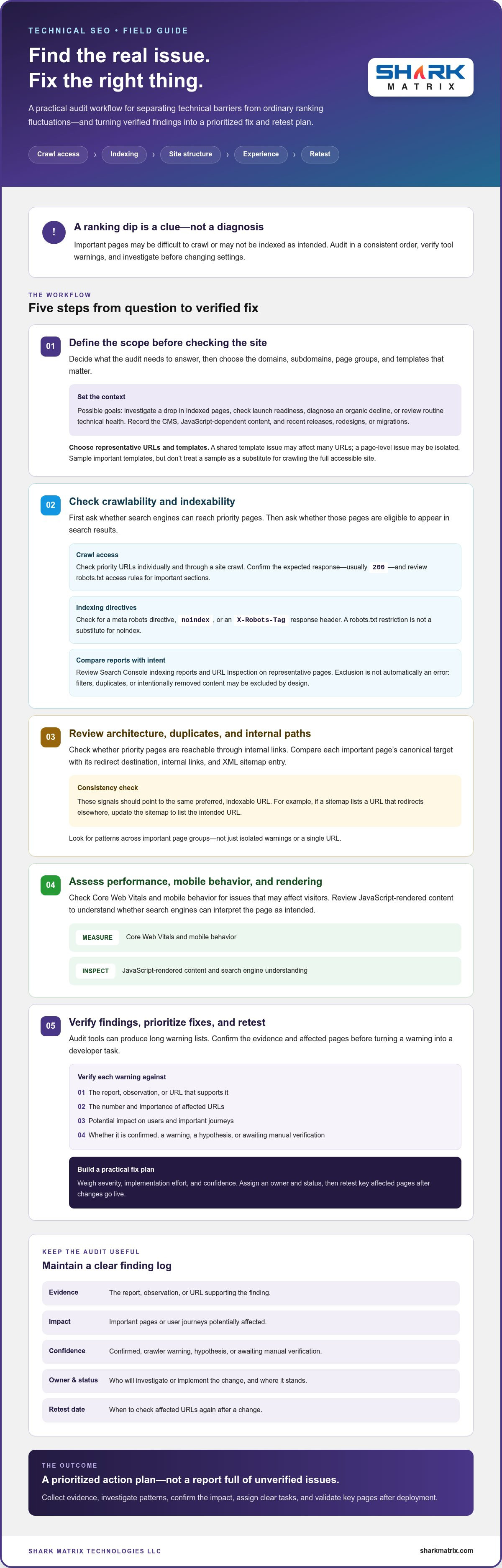
This guide takes you through five steps to assess affected pages, weigh potential impact against implementation risk, and turn verified findings into clear tasks. You’ll also learn how to validate fixes after deployment. The aim is a prioritized action plan, not another audit report full of issues you’re unsure how to handle.
Key Takeaways
- Set an audit goal and select representative URLs and templates first, so your review focuses on pages that matter.
- Use a technical seo audit checklist to examine crawl access, sitemap entries, canonical signals, and internal paths to priority pages.
- Check Core Web Vitals, mobile behavior, and JavaScript rendered content for issues that may affect visitors or search engine understanding.
- Verify tool warnings by checking evidence, the number and importance of affected URLs, and potential user impact.
- Turn confirmed findings into a fix plan that considers severity, effort, and confidence, then retest key pages after changes go live.
Technical SEO Audit Checklist: Define Scope Before Checking the Site
Before opening a crawler or reviewing warnings, decide what the audit needs to answer. Are you investigating a drop in indexed pages, checking launch readiness, diagnosing an organic decline, or reviewing routine technical health? Your goal determines which pages and evidence deserve attention. Technical SEO can involve crawl access, indexing, site architecture, and rendering, so setting boundaries helps keep the review useful rather than endless.
How to scope a technical SEO audit
Record the audit date, the domains or subdomains in scope, and the page groups that matter to the business. For an online store, this might include key category and product pages, as well as the steps users take to complete a purchase. For a service site, include important service pages and the paths visitors use to reach enquiry forms.
Sample every important page template, but don’t treat a sample as a substitute for crawling the full accessible site. A shared template issue may affect many URLs, while a problem on one page may be isolated. Note the CMS, how much content depends on JavaScript, and any recent releases, redesigns, migrations, or other technical changes. Compare those events with known traffic or indexing changes to give findings useful context.
What evidence to collect before the checklist
Gather Google Search Console information related to your audit goal, including indexing signals, sitemap details, and performance trends. Save crawler exports and relevant analytics context, along with examples of affected URLs. If a category appears to have lost visibility, record representative URLs and compare them with pages on other templates. This helps you investigate patterns instead of reacting to a single warning.
Start a finding log before deciding what to fix. For each item, capture:
- Evidence: The report, observation, or URL that supports the finding.
- Impact: The important pages or user journeys potentially affected.
- Confidence: Whether the finding is confirmed, a crawler warning, a hypothesis, or awaiting manual verification.
- Owner and status: Who will investigate or implement the change, and where it stands.
- Retest date: When to check the affected URLs again after a change.
This distinction prevents an automated warning from becoming a rushed developer task without verification. A practical technical seo audit checklist connects each issue to evidence and affected pages, while clearly marking uncertain findings for investigation. That shared record gives site owners, SEO specialists, and developers a common starting point for the checks that follow.
Crawlability and Indexability: Check Whether Search Engines Can Access Key Pages
First check whether search engines can reach the pages that matter. Then check whether those pages are eligible to appear in results. These are related but different questions: robots.txt can restrict crawling, while a noindex directive asks search engines not to index a page they can access. Google’s Google Search Essentials explains the core requirements for appearing in Google Search. Use it as a reference, then assess each finding against the site’s intended behavior.
Are important pages crawlable and indexable?
Check priority URLs individually and through a site crawl. Confirm that they return the expected response, usually 200, and aren’t blocked by a robots.txt rule, a meta robots directive, or an X-Robots-Tag response header. Review access rules for important sections, not just the homepage. A blocked page may still appear in search results without a snippet, so a robots.txt restriction isn’t a substitute for a noindex directive.
Next, compare Google Search Console’s indexing reports with the site owner’s intent. Use URL Inspection on representative pages to check Google’s reported indexing status and, where available, the tested live page. An excluded URL isn’t automatically an error: filters, duplicate pages, and intentionally removed content may be excluded by design. Investigate patterns, such as valuable category pages being excluded, and confirm whether those URLs can be reached through internal links.
Do canonicals, redirects, and sitemaps send consistent signals?
For each important page, compare its canonical target with its redirect destination, internal links, and XML sitemap entry. These signals should point to the same preferred, indexable URL. For example, if a sitemap lists a URL that redirects to another page, update the sitemap to list the final destination. Look for redirect chains, loops, and destinations that no longer serve users.
Check that sitemap URLs return successful responses, aren’t blocked or marked noindex, and identify themselves as canonical. Confirm that the sitemap is accessible and referenced in robots.txt where appropriate. A mismatch doesn’t always mean a page is broken, but it does need investigation.
- Access: Can crawlers reach the intended page?
- Indexability: Do page directives allow indexing?
- Signals: Do canonicals, redirects, internal links, and sitemap entries agree?
Use this sequence in your technical seo audit checklist to distinguish genuine visibility barriers from intentional exclusions. When crawl or indexation issues involve complex site changes, professional SEO support from agencies like Web Media Grp. can help teams investigate findings and coordinate next steps.
Technical SEO Audit Checklist for Architecture, Duplicates, and Internal Links
A page may be crawlable but still difficult to discover if it sits deep in the site or has no internal links pointing to it. Map the main page templates and trace how visitors and crawlers can reach priority content through relevant navigation, category pages, or related resources. The goal isn’t to make every URL equally prominent. It’s to give valuable pages clear, useful paths.
How to find weak internal linking and orphan pages
Compare the URLs found in a site crawl with sitemap entries and your known priority pages. If a priority URL appears in the sitemap but not in the crawl, it may lack internal links or be inaccessible to the crawler. Check whether key pages receive contextual links from relevant sections, then inspect pagination and filters. Useful category links can help discovery, while endless combinations of filters may create many low value URLs.
Use click depth as a diagnostic, not a rigid pass or fail threshold. If an important page takes several navigation steps to reach, consider whether a relevant category, menu, or related page should link to it. Test internal links for broken destinations and inconsistent URL formats, such as links that alternate between trailing slash and non trailing slash versions.
How to assess duplicate URLs and canonical choices
Look for URL variations that may expose the same or near identical content: tracking or filter parameters, uppercase and lowercase paths, trailing slash differences, and HTTP versus HTTPS versions. Check that canonical tags point to the intended preferred URL, and that each target resolves correctly rather than redirecting, returning an error, or pointing to an unrelated page. Don’t apply a blanket canonical or noindex rule without checking how each template is designed to work and how its pages appear in search.
Use a compact evidence log to connect patterns to investigation and action:
- Pattern: A priority page has no internal links.
- Evidence: It appears in the sitemap but not among the crawl’s linked URLs.
- Likely impact: Discovery may depend on the sitemap or external links instead of site navigation.
- Verify: Check the page’s purpose, then add a relevant contextual link if it should be discoverable.
Other patterns to record: Parameter URLs with duplicate content, inconsistent canonical targets, and broken internal links. For each pattern, note the affected template, compare representative URLs, and confirm the intended behavior with the site owner before recommending a change. This makes the technical seo audit checklist more useful than a raw list of crawler alerts.
Technical SEO Checks for Core Web Vitals, Mobile, and JavaScript Rendering
Test actual page templates, not just the homepage. In Google Search Console, review Core Web Vitals field data where available. Google’s “Good” thresholds are LCP at or below 2.5 seconds, INP at or below 200 milliseconds, and CLS at or below 0.1, measured at the 75th percentile of real user page loads. Field data reflects users’ experience. A lab test is a controlled snapshot that helps reproduce and investigate a problem. Treat them as complementary evidence, not interchangeable scores.
How to investigate page experience and mobile issues
Group affected URLs by shared template before proposing a sitewide fix. If product pages show layout shifts, compare several products to see whether the cause is a shared image area, banner, or component. On mobile, check viewport behavior, text and navigation visibility, intrusive overlays, and key interactions such as opening menus or submitting forms. Google uses mobile versions for indexing and ranking, so confirm that important content and functionality are available on mobile too.
Use field reports to spot patterns and lab testing to investigate specific pages or interactions. After a performance or layout change, retest representative mobile pages and make sure the change hasn’t introduced new usability problems.
How to check JavaScript rendering and structured data
For templates that rely on JavaScript, compare the initial HTML with the rendered page. Confirm that essential text, links, titles, and other metadata are present after rendering, and that important content isn’t hidden behind an interaction or dependent on a failed script. Treat a crawler warning as a lead, not proof. Check the page as delivered and as rendered, then note the affected template and example URLs.
Review structured data for errors and confirm that it describes information users can actually see on the page. For example, don’t mark up a product detail that isn’t visible to visitors. Valid markup may make a page eligible for enhanced search appearances, but it doesn’t guarantee rich results.
- Record: The affected template and representative URLs.
- Compare: Field data, lab results, mobile behavior, and rendered content.
- Verify: Retest after changes and check that visible content matches structured data.
These checks help your technical seo audit checklist distinguish template wide problems from isolated page issues. If resolving a rendering or mobile problem requires development work, coordinate with your development team to plan and validate the technical changes.
Turn Technical SEO Audit Findings into a Prioritized Fix and Retest Plan
An audit creates value when its findings lead to safe, verifiable changes. Start with confirmed blockers affecting valuable pages, then look for repeated problems across shared templates and issues that disrupt user journeys. A warning on a low value URL may matter less than a verified indexing problem affecting an important page. Keep severity, implementation effort, and confidence separate: a high impact issue may still need more investigation before anyone changes the site.
How to prioritize technical SEO issues
Group findings by root cause and affected template. One verified fix to a shared page template may resolve a pattern across many URLs, while unrelated symptoms may need separate tasks. Put access or indexability blockers on priority pages near the top of the queue. For each proposed change, record the evidence, example URLs, expected behavior, owner, and how the team can roll it back if a release causes an unexpected problem.
Write tickets that give a developer enough detail to act without guessing. Identify the affected template, show a representative URL, describe the current and intended behavior, and list the validation steps. Coordinate changes involving routing, rendering, or deployment with the people responsible for those systems. A tool’s severity label alone isn’t a reason to change production code.
When to get specialist technical SEO support
What to do after the audit
Retest changes in staging when appropriate, then verify them in production after release. Check the same URLs or templates against the original evidence, confirm the intended behavior, and update the finding log with the result and retest date. Continue monitoring important pages so a later release doesn’t quietly reintroduce the issue.
Use the technical seo audit checklist as a working record, not a one time scorecard. When a fix requires development work, coordinate with your development team to plan and validate the implementation. To discuss the next steps for your audit, discuss your technical SEO priorities.
Turn Your Audit into a Clear Next Step
A useful technical seo audit checklist does more than surface warnings. It helps you define what matters, verify whether key pages can be crawled and indexed, and identify patterns in site architecture, performance, mobile experience, and rendering. Then prioritize confirmed issues by impact and affected pages, give developers clear tasks, and set criteria for retesting.
Keep audit findings visible after implementation. Rechecking affected URLs and templates helps confirm that fixes worked and gives your team a practical reference for future releases. Technical SEO often involves collaboration between site owners, SEO specialists, and developers, especially when changes affect important templates or site behavior.
Shark Matrix Technologies LLC offers SEO services, along with web and e-commerce development services for businesses working on search and site implementation. If you’d like support assessing your findings or planning next steps, discuss your technical SEO priorities.
Start with the pages and issues that matter most, and turn each verified finding into a manageable improvement. A clear plan makes the next step easier to take.
Frequently Asked Questions
What should a technical SEO audit checklist include?
A technical SEO audit checklist should cover audit scope, crawl access, indexability, response codes, redirects, canonicals, sitemaps, site architecture, internal links, mobile usability, performance, JavaScript rendering, and structured data. Start with pages that matter to the business, then check representative templates and investigate patterns across the site. Record evidence and affected URLs for each finding so the audit leads to verified, prioritized tasks rather than an unfiltered list of tool warnings.
How do I check if a page is crawlable and indexable?
Check whether the page loads successfully, whether robots.txt allows crawling, and whether a meta robots directive or X-Robots-Tag header prevents indexing. Confirm that the page has a discoverable internal link and inspect its status in Google Search Console using URL Inspection. Compare the reported canonical with the URL you intend to appear in search. A page’s exclusion isn’t necessarily an error, so check whether it matches the site owner’s intent.
How often should I run a technical SEO audit?
There’s no single schedule that suits every website. Review technical health routinely, and run a focused audit after a migration, redesign, major release, or unexpected change in traffic or indexing. Large sites or websites with frequent technical updates may need more regular checks than a stable, smaller site. Between audits, monitor important URLs and Search Console reports so emerging patterns are noticed and investigated before the next full review.
Can technical SEO issues prevent a page from appearing in Google Search?
Yes. A page may be difficult to discover if internal links are missing, inaccessible if crawling is blocked, or ineligible for indexing if a noindex directive is present. Errors, redirect problems, and conflicting canonical signals can also affect how Google processes a URL. But not every excluded page signals a problem. Check the page’s purpose, directives, and Search Console status before deciding whether its absence from results needs a fix.
What is the difference between crawlability and indexability?
Crawlability is whether a search engine can access and fetch a URL. Indexability is whether the page can be considered for inclusion in search results. A robots.txt rule can prevent crawling, while a noindex directive tells a crawler not to index a page it can access. These controls serve different purposes. Check both, because a page that’s crawlable isn’t automatically indexable, and a page blocked from crawling may not communicate its other directives.
How do I prioritize technical SEO audit issues?
Start with confirmed access or indexability problems affecting valuable pages, then assess how many URLs or templates share the issue and whether it harms user journeys. Separate impact from implementation effort and confidence: a potentially serious finding may need verification before a developer acts. Record evidence, example URLs, an owner, expected behavior, and retest criteria. This turns an audit inventory into manageable tasks and helps teams avoid rushed changes based only on a tool’s severity label.
Do I need a technical SEO tool to audit my website?
How can I check whether Google can render JavaScript content?
Use URL Inspection in Google Search Console to test a live URL and review the rendered result where available. Compare what appears after rendering with the initial HTML, paying attention to essential text, links, and metadata. Google may process JavaScript after first crawling a page, so some content can take longer to be discovered. If key elements are missing, record the affected template and example URL, then investigate scripts or resources that may be preventing rendering.
 OpenAI
 Codex
Codex
 Vertex AI
 Cloud Vision
 OpenCV
 TensorFlow
 IBM Watson
 Cloud Natural Language
 Cognitive Services
 Bot Framework
 Mistral
 LLama
LLama
 Gemini
 Anthropic
 N8N
N8N