
Categories
Uncategorized

B2B SEO Agency: How to Choose a Partner That Builds Qualified Pipeline

What if your organic traffic is rising, but the right accounts still aren’t entering your pipeline? More visits don’t automatically mean more qualified opportunities. A b2b seo agency needs to understand who’s searching, what buying roles need to know, and how organic activity supports a long decision-making journey.

It’s reasonable to be cautious: rankings can look impressive while reports leave the link to business growth unclear. Effective B2B SEO connects buyer intent with useful content, website improvements, and measurement that helps you understand whether organic search is attracting relevant prospects.

This guide explains what a capable B2B SEO partner should deliver and how to evaluate a strategy. You’ll learn which research, content, and technical capabilities matter, how to assess reporting beyond traffic and rankings, and how to set practical expectations for collaboration and ongoing optimisation. It also explores how SEO can work alongside content marketing and website development as part of a connected growth strategy, rather than a standalone promise of higher rankings.

Key Takeaways

  • Effective B2B SEO accounts for multiple stakeholders, specialist questions, and the different stages of a longer buying journey.
  • Choose a b2b seo agency based on its ability to connect buyer intent with research, technical SEO, useful content, authority, and measurement.
  • Compare partners by their strategy, deliverables, reporting, and collaboration approach, not by ranking guarantees or traffic promises.
  • Build a practical optimisation cycle: set a baseline, prioritise work, publish and improve, then review visibility alongside qualified enquiries.
  • Coordinated SEO, content marketing, and website improvements can support a connected growth strategy.

Why B2B SEO Needs an Agency That Understands Complex Buying Journeys

A B2B SEO agency aligns a company’s organic visibility with the needs of business buyers at different stages of a purchase. The goal isn’t simply to appear for more searches. It’s to help the right people find clear, credible information as they investigate a problem, compare approaches, and decide what to do next.

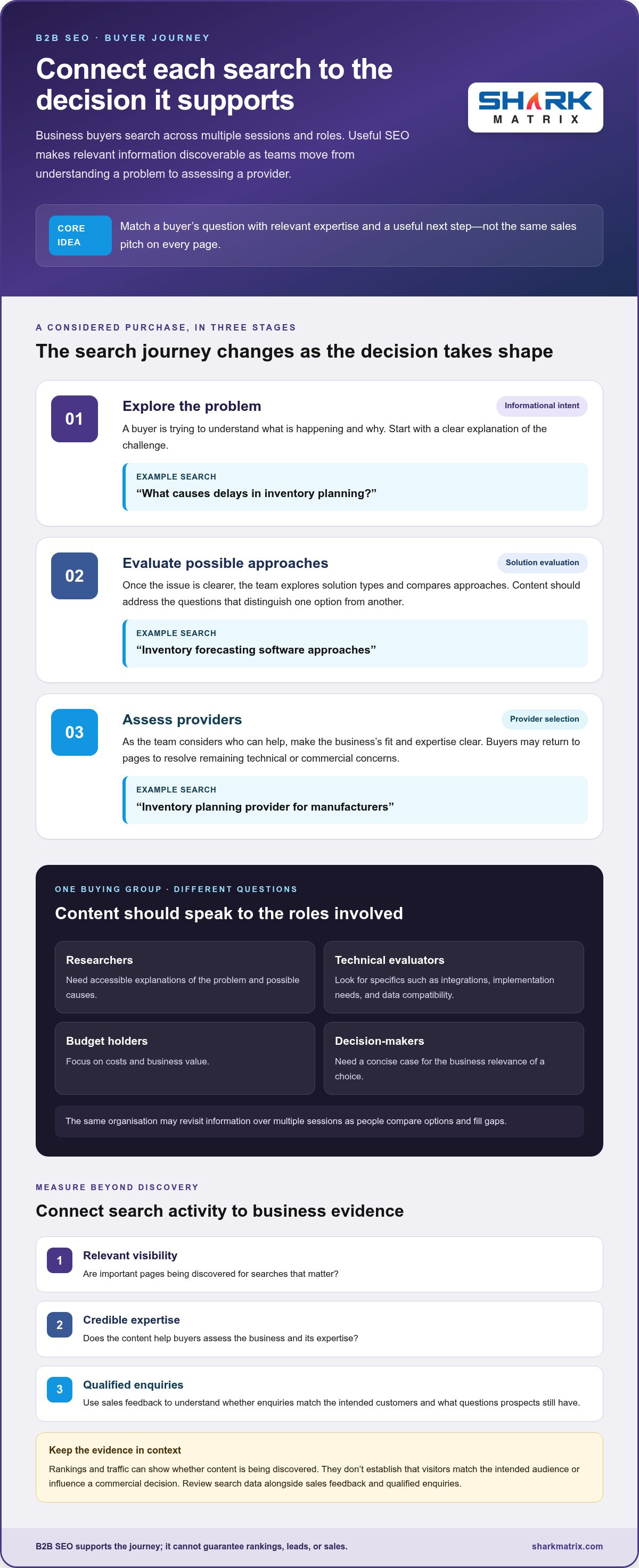
Put simply, B2B SEO connects business buyers’ search questions with relevant expertise and useful next steps throughout a considered purchase. That distinction matters because one organisation’s buying journey can involve researchers, technical evaluators, budget holders, and final decision-makers, each searching with different priorities. A researcher may look for possible causes of a problem, while a technical evaluator examines integrations or implementation needs. A budget holder may focus on costs and business value.

These searches can happen across multiple sessions, with buyers returning to compare options or fill information gaps before contacting a provider. A company may first search for ways to reduce a process bottleneck, then explore possible solutions, and later assess whether a particular service fits its requirements. A useful foundation in understanding B2B marketing helps explain why business audiences, buying processes, and decision criteria shape the content that deserves to rank.

How B2B search differs from a simple online purchase

A consumer purchase may involve one person choosing a familiar item, but business purchases often require agreement across roles. Search content should answer distinct questions without treating every visitor as if they have the same knowledge or authority. An early-stage researcher may need an accessible explanation; a technical evaluator may want specifics; a decision-maker may need a concise case for business relevance.

For example, a business researching a recurring operational problem might begin with an informational query. After understanding the issue, the team could search for solution types, compare providers, and revisit pages to resolve technical or commercial concerns. SEO should make useful resources discoverable and connected, rather than relying on a single page to serve every role and stage.

What a B2B SEO agency should help a business achieve

A considered strategy connects three objectives: relevant visibility for searches that matter, credible expertise that helps buyers assess a business, and clear next steps that support further research or contact. Rankings and traffic can indicate whether content is being discovered, but they don’t establish that visitors match the intended audience or influence a commercial decision.

That’s why business context and sales feedback belong alongside search data. Teams can share which enquiries match their target customers, what questions arise during sales conversations, and where prospects need more information. An agency can use those insights to refine topic priorities and content. SEO can support demand generation, but it can’t guarantee rankings, leads, or sales. Its contribution is best understood through ongoing evidence connecting search visibility, relevant engagement, and qualified enquiries.

Which B2B SEO Agency Capabilities Turn Search Intent into Useful Content?

A capable b2b seo agency doesn’t treat keyword volume as a content plan. It connects research, technical foundations, content, authority, and measurement so each activity helps the right audience find and assess useful information. Research identifies buyer questions, site improvements make answers accessible, and measurement shows which topics merit further investment.

Research that maps search demand to B2B buyer intent

Strong research separates searches by purpose. Someone asking “what causes delays in inventory planning?” is exploring a problem. A person comparing “inventory forecasting software approaches” is evaluating solutions. A search for “inventory planning provider for manufacturers” signals provider selection. Each query calls for a different answer, not a page that repeats the same sales pitch.

Map topics by problem, search intent, buyer role, and decision stage, then consider the language each audience uses. Technical users may search for integration requirements or data compatibility; commercial stakeholders may look for implementation considerations and business value. Sales conversations, support questions, and recurring objections can reveal terms and concerns that keyword tools don’t capture. Use that input to fill gaps, clarify terminology, and prioritise topics connected to the business’s actual offer.

Content and website improvements that support evaluation

Different page types serve different needs. Expert articles explain challenges and approaches; service pages describe what the business does and who it helps; case evidence can show how a solution addressed a specific business problem. Together, they give buyers a path from learning to evaluation, without forcing every page to act as a thin landing page. Useful content answers the question fully, states its limits clearly, and gives readers a relevant next step.

Technical foundations matter because valuable information can’t help if search engines or people struggle to reach it. A clear site structure, crawlable pages, descriptive headings, and accessible mobile layouts support discovery and navigation. Rather than chasing every technical task, prioritise changes that remove barriers to important content and pages.

Some improvements require coordination between SEO and development, particularly when a recommendation affects templates, navigation, or page performance. Working with web development services can help bring those changes into the site rather than leaving them as items in a report.

Authority also grows from consistency: publish well-supported material in areas the business knows, and make related resources easy to find. Review performance by topic and intent, not just by individual keywords. If a page attracts visitors but doesn’t help relevant prospects evaluate the offer, improve its substance or connection to the next useful page. For broader context on how search strategy can support business goals, explore Shark Matrix’s SEO services.

How to Compare B2B SEO Agencies Without Choosing on Rankings Alone

A proposal can promise visibility, but a sound comparison looks at how the work will connect to your business priorities. Use the same criteria to review each approach: what the agency learns, what it plans to deliver, how it reports progress, and how your team will contribute. A useful b2b seo agency plan explains its reasoning instead of relying on ranking guarantees or traffic forecasts.

Strategic fit: Does the proposed plan reflect your business goals, target accounts, and the questions buyers need answered?

B2B experience: Does the approach account for specialist audiences, multiple buying roles, and considered decisions?

Deliverables: Are the planned research, technical work, content, and optimisation activities specific enough to understand and act on?

Reporting: Does the plan distinguish search visibility and engagement from lead quality and sales feedback?

Collaboration: Are responsibilities, decision points, and the process for adapting priorities clearly explained?

Look closely at the reasoning behind each recommendation. If a plan proposes content around a broad, high-volume topic, it should explain how that topic relates to your offer and the people you want to reach. For businesses in vertical markets like construction, specialised partners such as H&A Marketing build campaigns around trade-specific procurement processes rather than generic industry traffic. Review how the agency incorporates target accounts, buying roles, and sales objections into its research. Strong planning draws on customer questions and business priorities, explains its assumptions, and shows how new evidence may change the plan.

Assess proof, reporting, and commercial fit

Case evidence is most useful when it gives enough context to judge relevance. Look for the starting situation, the work completed, the period or conditions involved when stated, and the outcome measured. A traffic increase alone doesn’t show whether the audience was commercially relevant. Clear evidence distinguishes what changed from what the agency can reasonably attribute to its work.

Reporting should connect leading indicators, such as organic visibility and engagement with priority pages, to downstream signals like qualified enquiries and sales feedback. These measures help teams make informed decisions; they don’t guarantee a specific business result. Rankings and leads depend on factors beyond an agency’s direct control, including competition, the offer, website experience, and how sales enquiries are handled.

Shark Matrix reports 250+ Projects Successfully Completed and 20+ Industries Served. These figures provide context about project and industry breadth, not a promise of a particular outcome for every business. When evaluating a plan, consider whether the agency explains how its experience informs the proposed work and how success will be assessed together.

A good commercial fit also means an understandable working rhythm: who provides subject-matter input, who approves content, and how findings influence the next priorities. For a practical view of how Shark Matrix approaches SEO, explore its SEO services.
B2B SEO Agency: How to Choose a Partner That Builds Qualified Pipeline

What a Practical B2B SEO Engagement Should Measure and Improve

A useful measurement plan starts with your business context, not a generic traffic target. Before work begins, agree on what organic search should support, what information is available, and how marketing and sales will recognise a relevant enquiry. A b2b seo agency can then use a repeatable cycle to turn evidence into priorities, instead of treating a monthly report as the finish line.

Agree on goals, baseline, and meaningful indicators

Set a baseline for current organic visibility, priority-page engagement, and enquiries attributed to organic search. Define a qualified organic enquiry with sales: agree on the business fit and information that make an enquiry worth follow-up. The exact definition depends on your offer and sales process, so document it before comparing performance over time.

Also agree on reporting cadence, who owns each data source, and how questions will be investigated. If a change in enquiries coincides with a change in rankings, that’s a useful signal, not proof that SEO alone caused the result. Seasonality, sales activity, website changes, and other marketing can affect outcomes. Shared definitions help teams discuss these influences rather than overstate attribution.

Turn performance reviews into the next round of improvements

Use reviews to decide what to do next. A practical sequence keeps the work focused:

  1. Establish the baseline: Record agreed visibility, page, and enquiry measures, noting gaps in tracking or data.
  2. Prioritise work: Choose improvements based on buyer relevance, business value, and what the team can implement.
  3. Publish and improve: Update or create useful pages, then make sure changes are live and accessible.
  4. Review the evidence: Compare results with the baseline, add sales feedback, and refine the next priorities.

Search queries can show how people describe their needs; landing-page behaviour can suggest whether a page helps them continue their research. Sales feedback adds context: did recent enquiries match the intended audience, and what questions or concerns surfaced? If visitors arrive for an unrelated query, the content may need clearer scope. If relevant prospects repeatedly ask for information a page lacks, that’s a useful candidate for improvement.

B2B SEO measurement is strongest when search signals show who finds your content and sales signals help explain whether those visitors become relevant opportunities. Neither signal tells the whole story alone. Organic growth takes ongoing work, and results vary with the market, website, competition, and sales process. Keep expectations grounded, document what changed, and treat each review as a chance to make the next decision better informed.

To connect search priorities with a practical measurement plan, discuss your B2B SEO strategy with Shark Matrix.

How Shark Matrix Can Support a B2B SEO Growth Strategy

Once you’ve defined what a useful partner should do and how you’ll assess progress, the next step is finding an approach that fits your business. Shark Matrix brings SEO together with content marketing, web development, and related digital capabilities, so organic search can be considered alongside the website and content changes that support it. The work is shaped around your audience, priorities, and current challenges, not a fixed ranking or pipeline promise.

Shark Matrix’s mission is Your Growth, Our Mission – AI-Powered Digital Solutions That Accelerate Business Growth. The company reports 5+ Years of Digital and Technology Experience and 250+ Projects Successfully Completed. These figures offer context for its digital and technology work; your strategy and measures should still reflect your own market, buyer journey, and sales process.

A connected team for SEO strategy and implementation

A B2B SEO plan may involve more than keyword and content decisions. Strategists can shape priorities around business goals; digital marketers can connect search research with content planning; designers can help make key pages clearer to navigate; and developers can implement relevant site improvements. AI specialists add another discipline to the team’s broader capabilities. Shark Matrix reports 20+ Industries Served, reflecting experience across a range of industry contexts.

Coordination helps connect recommendations to practical changes. For example, if research points to a gap in information for technical evaluators, the response might involve developing expert content and ensuring the relevant page is easy to find. If site structure makes important resources difficult to navigate, design or development work may be part of the plan. The scope depends on your needs, and better visibility or a particular business result should never be presented as guaranteed.

Choose a next step based on your business priorities

Start with the information that can make a strategy more relevant: who you want to reach, what growth priorities matter, what questions your sales team hears, and where organic search currently falls short. Sharing these details helps frame a discussion around useful priorities rather than a generic list of SEO tasks. It also gives both teams a basis for discussing scope, responsibilities, and how progress might be evaluated.

A conversation is an opportunity to explore an appropriate approach, not a promise of leads, rankings, or sales. You can discuss how search research, content, and website improvements may fit together, and what evidence can guide ongoing optimisation. If your business is ready to consider a B2B SEO strategy grounded in its goals, Discuss your B2B SEO goals with Shark Matrix.

Make Your Next SEO Decision Count

The most useful next step isn’t to chase every keyword or launch a larger content calendar. Start with one business priority your team can clearly define, then identify how organic search could help the right buyers explore it. That focus gives marketing, sales, and your SEO partner a practical way to align the work and learn from what happens.

A strong b2b seo agency relationship should make decisions easier over time: what to prioritise, what evidence to review, and where to adjust when buyer needs or business goals shift. Treat the strategy as an evolving part of growth, with room to connect search, content, and website improvements as your understanding develops.

If you’re ready to turn your priorities into a considered SEO approach, explore a strategy tailored to your business goals with Shark Matrix. Your next step can be focused, collaborative, and grounded in the outcomes that matter to your business.

Frequently Asked Questions

How long does B2B SEO take to show results?

There’s no dependable deadline for B2B SEO results because timing depends on competition, website condition, available resources, and how consistently the plan is carried out. A technically sound site in a less competitive niche may respond differently from a large site with longstanding issues. Track progress against an agreed baseline, and review trends in visibility and relevant enquiries rather than judging the work on a single ranking change.

Is B2B SEO suitable for a small or highly specialised company?

Yes, B2B SEO can suit a small or specialised company if its buyers use search to research relevant needs. A focused business may prioritise a small set of important topics, such as a specific technical problem or service application, instead of trying to cover a broad market. This principle also applies across niche sectors; for instance, specialised directories like uppercervicalcare.com focus strictly on connecting patients with specialized upper cervical chiropractic doctors rather than competing for broad, generic healthcare terms. A b2b seo agency can help assess which opportunities fit the business and its resources, without guaranteeing demand or results.

Can B2B SEO support a business where referrals drive most new customers?

Yes. Search can complement referrals by helping prospects validate a recommendation, understand a service, or compare approaches before they make contact. For example, a referred buyer might search for a provider’s expertise or read a detailed explanation of a challenge their team faces. Useful, findable information can support that research. SEO doesn’t need to replace referrals; it can strengthen the information available during the buyer’s evaluation.

What should a B2B company prepare before working with an SEO agency?

Prepare a concise account of your business goals, priority audiences, sales insights, site access, and capacity to review work. Useful background might include your best-fit customer profiles, services to prioritise, common reasons prospects hesitate, and examples of enquiries that weren’t a fit. Identify who can provide subject expertise and approve content or website changes. This helps the agency plan around real business constraints, not assumptions.

How can a B2B company tell whether organic enquiries are qualified?

Agree on qualification criteria with sales, then apply them consistently to organic enquiries. Criteria could include whether the organisation fits your target market, whether the person has a relevant need, and whether the enquiry concerns a service you provide. Record outcomes in your CRM, including reasons an enquiry is unsuitable. Sales feedback can reveal whether search is attracting prospective buyers or people seeking unrelated information.

Should B2B SEO focus on high-volume keywords or specialist search terms?

Prioritise intent and buyer relevance over volume alone. A broad phrase may attract a large audience with varied needs, while a specialist query can signal a problem closely related to your expertise. Assess whether a term reaches a meaningful buyer, matches your offer, and presents a realistic opportunity to create a useful answer. A balanced plan can include broad educational topics and more specific evaluation searches.

Can a B2B SEO agency work with an in-house marketing team?

Categories
Uncategorized

SEO for UAE Hospitality: 2026 Practical Guide

What if your next guest discovers your property through search, finds the information they need, and books directly instead of stopping at a booking platform? That’s the opportunity behind seo for hospitality industry uae: connecting search visibility with clear, useful information that helps guests take the next step. Online travel agencies (OTAs) can broaden discovery, but hospitality businesses also benefit from a strong presence of their own.

It can be hard to know where to focus. Technical health, useful content, business profiles, and guest reviews all play a role, but their priority depends on your services and how guests book. A rise in visibility is only useful if you can also see whether it brings relevant visits, enquiries, or bookings.

This practical guide explains how SEO supports each stage of the guest journey, from early research to booking consideration. You’ll learn how to prioritise improvements for your hospitality business and booking model, build trust through relevant content and reputation, and measure organic contribution without expecting guaranteed rankings or bookings. The aim is a clear, connected approach to turning search discovery into direct booking opportunities.

Key Takeaways

  • SEO for hospitality industry uae works best when it connects guest search intent with clear, useful information at each stage of decision-making.
  • Prioritise search phrases and content around the services and experiences your hospitality business actually offers.
  • Use your website to support direct discovery and build guest trust, while recognising that SEO can complement rather than replace OTAs.
  • Measure progress in stages, from search visibility and website engagement to enquiries and confirmed bookings.
  • Coordinate strategy, content, technical SEO, and measurement around your business goals for a more focused programme.

What Does UAE Hospitality SEO Actually Do?

Hospitality SEO helps potential guests discover relevant businesses through unpaid search results, then gives them a useful website experience once they arrive. It connects what people search for with clear pages, practical information, and next steps that fit the business. The scope of the hospitality industry includes accommodation, food, attractions, and travel experiences, so a hotel’s search strategy won’t automatically suit a restaurant or tour operator.

Guests may research in English or Arabic, begin with broad inspiration searches, or look for a particular service or experience. SEO can help a business appear for relevant searches, answer questions during comparison, and make it easier to enquire or book. Search visibility supports discovery and decision-making, but doesn’t guarantee enquiries, reservations, or revenue.

Which hospitality businesses can benefit from SEO?

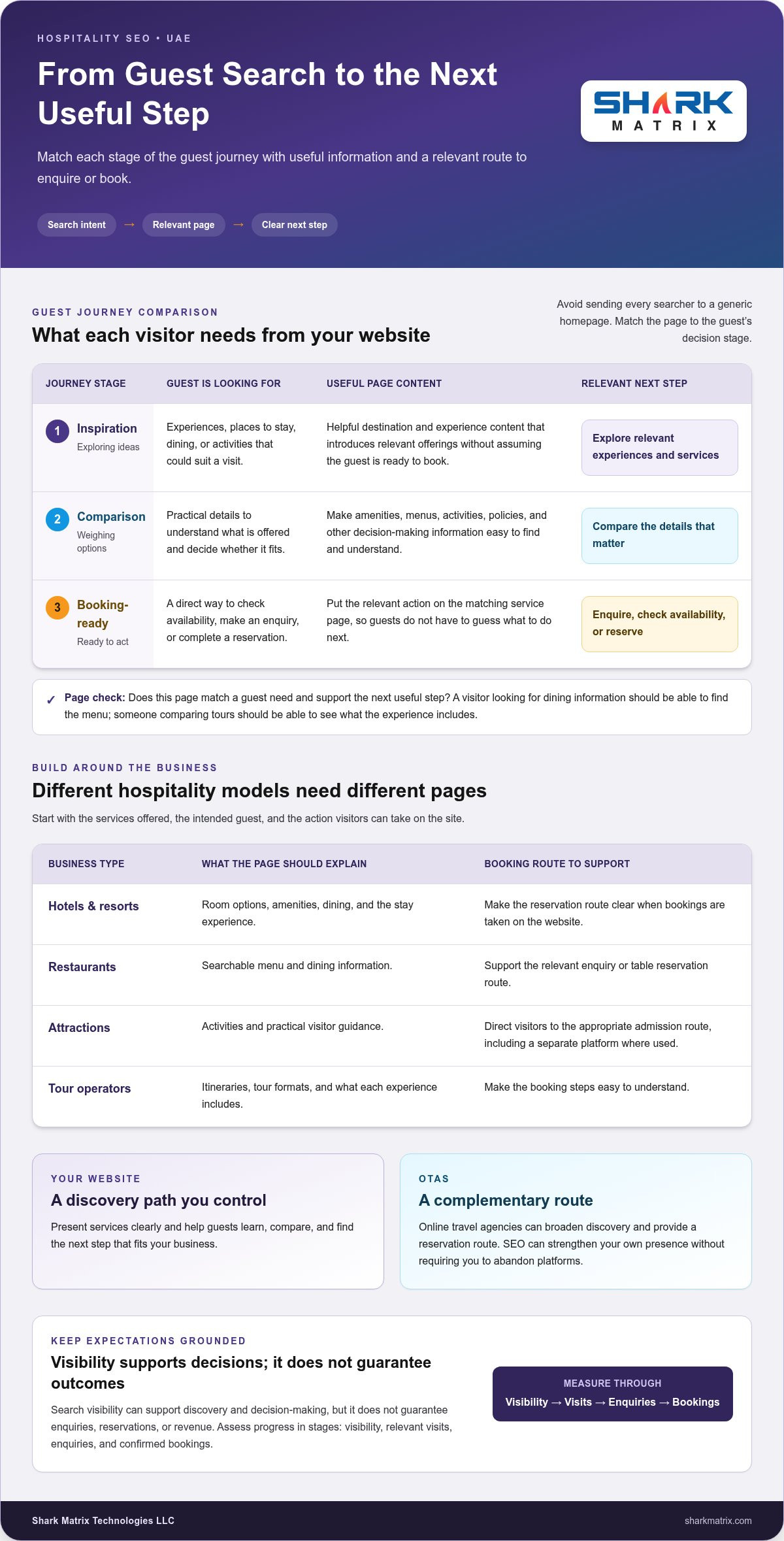
Hotels and resorts need pages that explain room options, amenities, dining, and the stay experience. A restaurant may need searchable menu and dining information, while an attraction can focus on activities and visitor guidance. Tour operators can clarify itineraries, tour formats, and booking steps. Each page should answer a real visitor question rather than repeat broad promotional claims.

Start with the business model and booking route. For entrepreneurs exploring restaurant expansion or looking to Own a Russo’s New York Pizzeria & Italian Franchise – Pizza Franchise Opportunity, building local search visibility is just as essential as day-to-day operations. A hotel taking reservations on its website has different conversion needs from a restaurant where guests enquire or reserve a table, or an attraction selling admission through a separate platform. Plan seo for hospitality industry uae around the services offered, the intended guest, and the action visitors can take on the site.

Where does SEO fit in the guest journey?

Search intent changes as a guest moves from imagining a trip to choosing an experience. Matching pages to these stages helps avoid sending every visitor to a generic homepage:

  • Inspiration: Someone planning a visit may search for experiences, places to stay, dining, or activities. Helpful destination and experience content can introduce relevant offerings without assuming the guest is ready to book.
  • Comparison: Visitors weigh practical details. Make amenities, menus, activities, policies, and other decision-making information easy to find and understand.
  • Booking-ready: A guest who has chosen what they want needs a direct route to check availability, make an enquiry, or complete a reservation. Make the relevant action prominent on the matching service page.

Organic search and booking platforms can work alongside each other. OTAs may provide a discovery and reservation route, while a business website gives the business more control over how its services are presented and what information guests see before acting. SEO doesn’t require abandoning platforms. It strengthens the business’s own discovery path and gives guests another way to learn, compare, and book.

Use a practical test for each important page: does it match a guest need and support the next useful step? A visitor looking for dining information shouldn’t have to search a hotel’s site for its menu, and someone comparing tours shouldn’t have to guess what an experience includes. Aligning search intent, page content, and booking route makes SEO more useful for any hospitality business model.

How UAE Hospitality Businesses Build Search Visibility That Matches Guest Intent

Start with the words potential guests use, not a list of industry keywords. A hotel team might hear questions about family rooms, dining, or accessible facilities. Restaurant visitors may want to view a menu or understand the dining experience, while tour customers may need details about routes, inclusions, and formats. These conversations reveal what people need to know before choosing.

Next, identify the intent behind each search. Someone looking for ideas needs helpful inspiration; someone comparing options needs specific details; someone ready to act needs a clear reservation or enquiry route. This intent-led approach keeps seo for hospitality industry uae tied to real guest needs rather than keyword volume alone. For broader foundations, see this 2026 UAE SEO guide.

How should hospitality teams map keywords to pages?

Give each important page a distinct purpose. Accommodation pages can answer questions about rooms and amenities; dining pages can present menus and service details; experience pages can explain activities and tour options. Practical information pages can cover visitor questions such as opening hours, facilities, or policies when they are relevant.

Separate informational content from pages that support enquiries or reservations. An article answering a planning question shouldn’t compete with a booking page targeting the same query. Before creating a new page, check whether an existing one already answers that guest question. Improve it if the intent is the same; create another only when it serves a meaningfully different need.

How do business profiles and multilingual content support discovery?

Keep each business profile accurate and consistent with the relevant property or hospitality business. Check that its name, contact details, hours, categories, and website destination match the information on the site. A restaurant, hotel, attraction, or tour operator should direct searchers to the most relevant page, not a generic destination that makes them hunt for essential details.

Choose languages according to the guests you want to reach. If Arabic and English content both serve your audience, plan each version around how people naturally describe services and experiences in that language. Avoid translating phrases word for word and assuming the result matches search behaviour. Make each page fluent, keep business details accurate, and ensure the next step is clear.

Useful content beats repeated phrases. Write menu descriptions that explain what guests can expect, amenity details that answer practical questions, and service pages that clarify what an experience includes. Avoid stuffing the same keyword into every heading or creating near-identical pages with only a phrase changed. A focused content plan also makes it easier to keep details accurate as services, menus, and visitor information change.

These fundamentals turn search research into a page plan that reflects the business model and audience. Shark Matrix provides SEO, content marketing, and professional Arabic digital marketing to help hospitality businesses align search priorities with guest needs. Explore Shark Matrix’s SEO services.

Can Hospitality SEO Generate Direct Bookings Without Depending on OTAs?

Yes, organic search can help guests discover a hospitality business’s own website and find a direct route to enquire or reserve. But SEO can’t guarantee bookings, and it doesn’t mean every business should abandon OTAs. Platforms can introduce properties to people who might not otherwise find them; a well-optimised website gives guests another path and lets the business present its offering in greater depth.

Think of SEO as one part of the booking mix. A search visit is not the same as a completed reservation. Guests may compare options, return later through another channel, or decide based on availability, pricing, reputation, and how easy the booking process feels. For seo for hospitality industry uae, track these steps separately to understand where organic discovery contributes and where the path to booking needs attention.

What can organic search do that an OTA listing cannot?

A business website can explain its wider experience, services, and brand story without relying only on a platform listing’s space and format. Helpful articles or service pages can answer questions earlier in trip planning, before someone is ready to reserve. OTAs still have a role in discovery and comparison. A balanced channel mix lets the website and platform listings complement each other rather than treating one as a replacement for the other.

Use a simple measurement framework to distinguish what happens after a guest searches:

  • Organic visits: A person arrives on the website from an unpaid search result. This measures discovery, not booking intent by itself.
  • Platform referrals: A visitor moves from the website to an OTA or another booking platform. The reservation may then be completed outside the site.
  • Enquiries: A visitor submits a form, calls, or takes another tracked step to ask about a stay, meal, or experience. This is a meaningful action, but not a confirmed sale.
  • Completed bookings: A reservation is recorded as confirmed through the direct booking route. Compare this outcome with the source data available for other channels.

What needs to happen after a guest reaches the website?

Make the next step obvious on mobile. Guests should be able to find relevant accommodation, dining, or experience details without digging through unrelated pages. Keep reservation or enquiry actions visible, label them plainly, and make sure each action fits the page. For example, a guest researching a private charter with Monaliza Yachts should reach a clear enquiry or booking path, not a general contact page with no clear direction.

Then test the booking journey. Check whether important details remain clear as a guest moves from the service page into the booking engine, and whether the process works smoothly on a phone. Confusing steps, missing information, or a mismatch between the page and booking options can interrupt a decision. Address these as website and booking-flow improvements, not search-ranking fixes.

SEO can bring the right audience to the door, but the business still needs a credible offer and a usable route to action. Reviewing search visits alongside referrals, enquiries, and confirmed bookings gives hospitality teams a more realistic picture of direct-booking contribution than rankings alone.

SEO for UAE Hospitality: 2026 Practical Guide

How to Prioritise and Measure a Hospitality SEO Programme

A useful SEO programme links search activity to business priorities, then checks whether the evidence supports the next step. For seo for hospitality industry uae, measurement should reflect the business model: a hotel may focus on room enquiries and reservations, while a restaurant may track table enquiries or menu-page engagement. Search changes can inform decisions, but they’re evidence to investigate, not proof that future performance is guaranteed.

Use a clear workflow to move from measurement to action:

  1. Establish a baseline. Record current search visibility, important landing pages, website engagement, and enquiry or booking activity. Note how each figure is measured and the period it covers.
  2. Identify priorities. Find important pages with technical barriers, weak visibility for relevant queries, or a gap between guest intent and the page experience. Focus on improvements that matter to the business, not every available recommendation.
  3. Implement changes. Assign an owner to each change, such as updating a service page, resolving a crawl issue, or clarifying an enquiry path. Record what changed and when so later comparisons have context.
  4. Review the evidence. Compare results over a suitable period, investigate unexpected shifts, and decide whether to maintain, refine, or expand the work. Account for seasonal demand and changes to services or booking routes.

Which hospitality SEO indicators are useful to track?

Google Search Console can show search impressions, clicks, landing pages, and query patterns. Google Analytics 4 can help review engaged visits and tracked enquiry or booking-engine interactions when it’s configured appropriately. Keep these measures distinct: visibility indicates exposure, engagement shows how visitors use the site, and a recorded booking is a business outcome. Not every visit or interaction becomes a reservation.

Compare like with like where possible, using periods that suit the property’s booking cycle. Changes in demand, operating hours, available experiences, or promotion can affect traffic and actions independently of SEO work. Annotate these changes to make the analysis more useful.

How should teams decide what to improve first?

Start with technical barriers that stop important pages from being crawled or used, then address high-value pages where guest intent and business relevance already align. A booking page with confusing information may deserve attention before a low-priority article. Set an owner and review point for every recommendation so analysis leads to implementation rather than an open task list.

Choose a small set of measures connected to each page’s goal. For example, track search visibility and relevant visits for an informational page, then review enquiry actions on a service page. A rise or fall is a signal to investigate alongside other business changes, not a promise of what comes next.

Shark Matrix connects SEO strategy, implementation, and ongoing optimisation to business goals. Discuss a hospitality SEO programme with Shark Matrix.

How Shark Matrix Supports Hospitality SEO Across the UAE

Hospitality SEO works best when it connects business priorities with the way guests search, evaluate options, and decide what to do next. Shark Matrix brings strategy, content, technical work, and measurement together so a hospitality business can focus its SEO programme on relevant audiences and practical goals. The approach is tailored to the business model, whether the priority is accommodation, dining, attractions, or tours.

Shark Matrix serves 20+ Industries Served, including Hospitality, and provides SEO alongside digital strategy, design, development, and ongoing optimisation. This breadth helps connect search recommendations with the website experience and the actions a business wants guests to take. Explore SEO services to understand how strategy and implementation can be shaped around your business needs.

What does a joined-up hospitality SEO approach involve?

It starts with the business objective, then identifies the guest audiences and search intent that matter. From there, recommendations can align priority pages, content needs, and technical foundations with clear enquiry or booking journeys. Reporting shows what is changing and where to investigate next, supporting ongoing optimisation without promising fixed rankings or outcomes.

For example, if a hospitality business wants to increase relevant enquiries, the work should connect the service page guests find through search with the information they need and a straightforward enquiry action. Technical issues that prevent that page from being found or used belong in the same improvement plan as its content and conversion path. This joined-up view keeps recommendations connected to the guest experience, not just a checklist of SEO tasks.

What should hospitality teams prepare to get started?

Bring a clear view of priority services, intended audiences, relevant languages, and the actions guests should take. Existing website content, search data, analytics access, and booking or enquiry pathways can help establish a useful starting point. Sharing what has changed in the business also gives the work context, so recommendations reflect current priorities rather than outdated pages or assumptions.

A practical starting brief can include:

  • Business priorities: The services or experiences the SEO programme should support.
  • Audience and language: The guests the business wants to reach and the languages that suit them.
  • Desired actions: The enquiries, reservations, or other meaningful outcomes the website should encourage.
  • Available evidence: Website access, existing analytics, search information, and current content for assessment.

These inputs help shape a focused scope and connect recommendations with implementation and review. Explore Shark Matrix’s SEO approach as a starting point for a conversation about your hospitality business goals.

Make Your Next SEO Move Count

The strongest next step is to turn search insights into a focused improvement your team can act on, then learn from what happens. For seo for hospitality industry uae, choose priorities that fit your guests, business model, and booking goals. Treat results as evidence for ongoing decisions, not guaranteed outcomes.

Shark Matrix brings a multidisciplinary approach to digital growth, backed by 250+ Projects Successfully Completed and 5+ Years of Digital and Technology Experience. The team connects strategy and implementation with the needs of your business.

Ready to shape a practical next step for your organic visibility? Explore how Shark Matrix can support your SEO growth. With clear priorities and ongoing review, your hospitality business can build a stronger path from discovery to guest action.

Frequently Asked Questions

Is SEO worth it for a small hospitality business?

SEO can be worthwhile for a small hospitality business if the audience, competition, website readiness, and booking economics support the effort. A focused seo for hospitality industry uae plan might begin with a page for a signature experience and one clear enquiry goal, rather than a large content programme. SEO is a sustained channel, not an instant booking guarantee. Smaller operators can prioritise searches closely tied to the services they provide.

How long does hospitality SEO take to show results?

There’s no fixed timeline. Progress depends on the site’s condition, competition, content quality, implementation, and how people search for the business. Establish a baseline before changes, implement improvements consistently, and review search visibility alongside meaningful actions such as enquiries. Compare appropriate periods rather than reacting to short-term movement. This helps distinguish potential SEO progress from normal shifts in demand, which can vary with seasons and business changes.

Can SEO help a hotel get direct bookings as well as OTA reservations?

Yes. Organic search can lead guests to a hotel’s own website, where a clear booking route may support direct reservations. It can’t ensure a visitor will book or remove the need for OTAs, which may remain part of the hotel’s channel mix. A guest’s decision also depends on factors such as availability, reputation, rates, mobile usability, and the booking-engine experience, so review the full journey rather than rankings alone.

Should hospitality websites publish content in Arabic and English?

Use Arabic and English when those languages match intended guests and the business can provide useful, consistent experiences in both. Adapt the wording naturally rather than translating each sentence literally; menu descriptions and service details should make sense to readers in each language. Keep key facts aligned across versions and make language navigation clear. The right coverage depends on the property’s audience and priorities, not a one-size-fits-all rule.

Do online reviews affect hospitality SEO?

Reviews can influence guest trust and whether someone chooses a business after finding it in search. Keep business details accurate, and respond to feedback professionally and appropriately, including when a review raises a concern. Treat review management as part of reputation and the guest decision process, not as a guaranteed way to improve rankings. Review the current policies of each platform before requesting or responding to reviews.

Does hospitality SEO work for seasonal businesses?

Yes. Seasonal businesses can make relevant services and planning information easier to find before periods of peak demand. Review search patterns, refresh dates and availability when they change, and maintain evergreen pages that remain useful between seasons. Assess results against comparable periods while accounting for differences in demand, operating schedules, and available services. This gives the team a more useful view than expecting the same traffic or enquiries throughout the year.

Categories
Uncategorized

Digital Marketing Reporting Framework: Build One That Drives Better Decisions in 2026

What if your busiest marketing dashboard is hiding the one decision your team needs to make? A digital marketing reporting framework should do more than list clicks, impressions and leads. It should show whether SEO, paid media, social and content are helping the business move towards its goals, and where the team should act next.

If your reports feel busy but inconclusive, you’re facing a common challenge: channel data can’t guide decisions when teams define metrics differently, compare mismatched reporting periods or rely on unstated attribution assumptions. Add a long list of KPIs, and it becomes harder to see what matters.

This guide explains how to build a practical framework around business objectives, choose meaningful measures for each channel, and connect performance to outcomes such as qualified leads. You’ll also learn how to compare channels without treating unlike metrics as interchangeable, set shared reporting rules, and turn review meetings into clear actions with owners and follow-up measures. The result is reporting that helps marketing teams across the UAE decide what to continue, improve or investigate, rather than simply documenting what happened.

Key Takeaways

  • Build your digital marketing reporting framework around a business objective and the decision you need to make, not a long list of available metrics.
  • Separate leading indicators, such as qualified visits, from lagging outcomes, such as completed leads, to understand both progress and results.
  • Compare SEO, paid media and social against shared goals, while noting each channel’s role, data source and measurement limitations.
  • Use a consistent review flow to explain performance changes, agree on an action, assign an owner and set a follow-up date.
  • Improve reporting by addressing broken tracking, outdated KPIs and unclear ownership before adding dashboards or automated summaries.

What Is a Digital Marketing Reporting Framework, and What Should It Help You Decide?

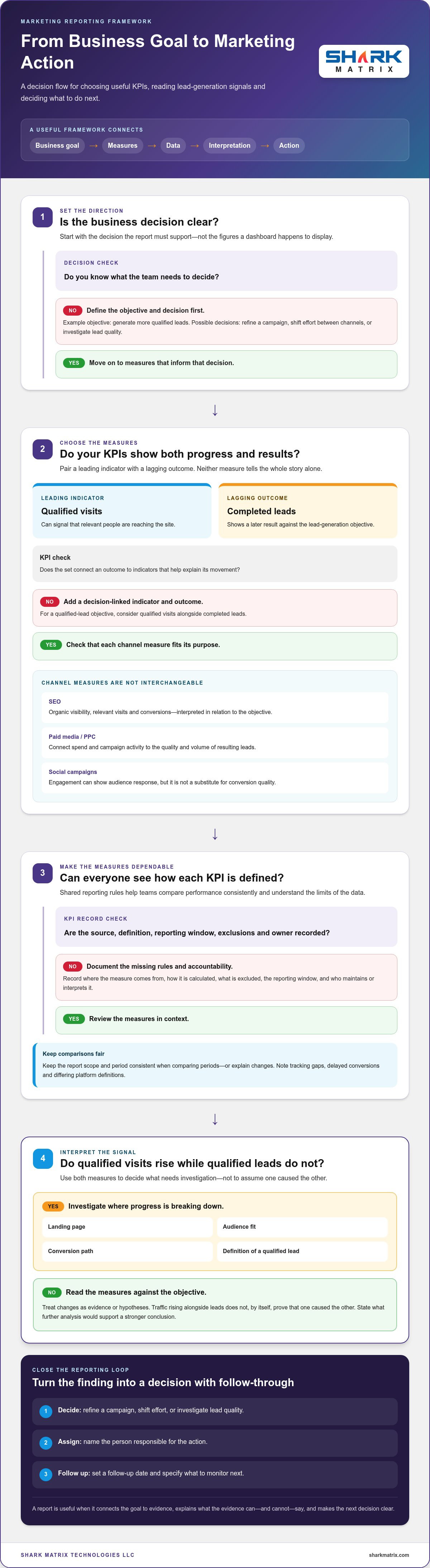
A digital marketing reporting framework is a repeatable system that connects business goals to measures, data, interpretation and action. A dashboard displays selected data, while a one-off report captures performance for a particular period. The framework sits behind both: it defines what to track, where the information comes from, who interprets it, when it is reviewed and which decisions the evidence can inform.

That distinction matters when SEO, paid campaigns, social media and content all contribute to the same growth objective. These channels are different parts of digital marketing, but separate platform summaries won’t automatically explain their combined contribution to qualified leads. A useful framework gives channel owners enough detail to diagnose performance, while helping business leaders and client-facing teams understand progress and agree on priorities.

Start with the business decision, not the dashboard

Before opening an analytics tool, name the decision the report should support. You might need to reallocate effort between channels, refine a campaign that attracts visits but few enquiries, or investigate why lead quality has changed. Connect that decision to a business objective, such as generating more qualified leads, before choosing metrics. This prevents available dashboard figures from dictating what the team pays attention to.

Separate routine optimization from strategic planning. A channel owner may use campaign-level signals to adjust targeting or content. Leadership may need to decide whether the current channel mix supports broader growth priorities. The first calls for timely diagnostic information; the second needs a wider view of outcomes and trends. Both can draw on related data without being forced into the same level of detail or decision cycle.

Set the scope and audience for each report

Define the report’s boundaries so readers know what they’re looking at. Record which channels, campaigns and objectives are included, the reporting period, and any important exclusions. For example, a report might cover SEO, paid media and social activity for lead generation over a stated period. Keep the scope consistent when comparing periods, or explain any changes that affect the comparison.

Then tailor the view to its reader. Leadership usually needs outcomes and implications; channel owners need diagnostic measures that help them locate a change. Client-facing teams need a clear explanation of what the findings mean and what happens next. One shared framework can serve these audiences without giving everyone the same crowded dashboard.

Finally, state limitations alongside conclusions. Tracking gaps, delayed conversions or differing platform definitions can affect what the data shows. A rise in traffic alongside an increase in leads does not, by itself, prove that one caused the other. Label observations as evidence or hypotheses, and state what further analysis would support a stronger conclusion. Clear limits build trust and keep the next decision grounded in what the report can actually tell you.

Digital Marketing Reporting Framework: Goals to KPIs

Once the business objective is clear, translate it into measures in a deliberate order. A useful digital marketing reporting framework prevents teams from choosing KPIs simply because a platform makes them easy to export. A KPI is useful only when it informs a defined objective or decision.

  1. Choose an objective: for example, generate more qualified leads.
  2. Define the decision: decide whether to refine a campaign, shift effort or investigate lead quality.
  3. Select KPIs: pair an outcome measure with indicators that help explain it.
  4. Assign sources and owners: record where each measure comes from and who maintains or interprets it.
  5. Review: use the findings to make a decision and specify what to monitor next.

This sequence separates leading indicators from lagging outcomes. Qualified visits may signal that relevant people are reaching the site, while completed leads show a later result. Neither tells the whole story on its own. If visits rise but qualified leads do not, investigate the landing page, audience fit, conversion path or definition of a qualified lead.

Choose a small, decision-linked set of KPIs

Pair outcomes, such as completed conversions or qualified leads, with channel measures that help diagnose movement. For SEO, a team could track organic visibility, relevant visits and conversions, using consistent definitions for each. Interpret SEO measures in relation to the objective they support, rather than treating a search metric on its own as a business result.

For PPC, connect spend and campaign activity to the quality and volume of resulting leads. For social campaigns, engagement can show how audiences respond, but it shouldn’t stand in for conversion quality. These channels play different roles and use different platform definitions. Compare each against its purpose and a shared business outcome, not as if a click, impression and engagement were interchangeable units. Commercial marketing specialists such as big-voice.co.uk take a similar approach for growing businesses, focusing on measurable commercial returns rather than vanity metrics.

Document data sources, definitions, and owners

Create a simple KPI record with the calculation, source, reporting window, exclusions and accountable owner. For example, define whether a “lead” means a form submission or a lead accepted as qualified in the CRM. Name the system of record and the person responsible for investigating differences between analytics and CRM figures. Digital.gov’s guidance on analytics strategy and reporting also connects performance goals and KPIs with data-informed decisions.

Use UTM parameters consistently to identify campaign traffic across analytics and CRM records. Agree on campaign naming conventions before launches, and document how missing or incorrectly tagged visits are handled. This makes channel comparisons more interpretable without implying that tracking captures every interaction or proves causation.

When SEO, paid media and social all contribute to lead generation, structured reporting can connect channel findings to shared priorities. Keep the KPI record accessible to everyone who contributes data or acts on the results, so definitions don’t drift as campaigns change.

How to Compare Channel Performance Without Misreading Marketing Data

Cross-channel comparison works only when everyone agrees on what the numbers mean. A click in a paid platform, an organic visit in analytics and an engagement in a social account describe different behaviours. Compare each channel with the same business objective, such as qualified lead generation, but don’t treat platform metrics as equivalent units. A digital marketing report definition and importance can provide useful context for how reporting supports performance review and strategic changes.

Platform-reported conversions may overlap, so don’t simply add them together and treat the total as unique leads. A person may interact with more than one channel before converting, and each platform may claim credit according to its own settings. Attribution is a model for assigning conversion credit across touchpoints, not definitive proof that a particular channel caused the outcome.

Separate channel contribution from channel efficiency

Read performance in layers: traffic, engagement, lead volume, lead quality and business outcomes. Each layer answers a different question. SEO may contribute relevant visits over time; PPC may capture active search demand; social activity may introduce or re-engage audiences. Compare each channel’s contribution to a shared outcome, while preserving its role and context.

Efficiency comparisons need aligned definitions, reporting periods and included costs. If one channel’s conversion count includes every form submission while another counts only qualified leads, a cost-per-conversion comparison will mislead. Where available, use CRM records to see whether leads progress beyond their initial conversion. Paid-search results also make more sense alongside campaign intent and management context, as discussed in Choosing the Right PPC Agency: A Guide to National Growth.

Use a consistent comparison view

A compact channel comparison keeps important context next to each result. Include these fields for every channel:

  • Channel and journey role: for example, SEO supporting discovery or PPC capturing active search demand.
  • Key KPI and source: name the measure and the platform, analytics system or CRM record behind it.
  • Limitation: note any tracking gap, differing definition or delayed conversion window.
  • Next decision: state whether to maintain, investigate or adjust the activity, and what evidence would guide that choice.

This view gives leadership a consistent way to discuss outcomes while letting channel owners interpret their own diagnostic measures. It also prevents a high engagement count from being mistaken for stronger lead quality.

Interpret attribution and data gaps responsibly

Observed data can be affected by consent choices, cross-device journeys and platform settings. A conversion may not be connected to an earlier interaction, or reporting systems may assign credit differently. Record those limits beside the result. If tags are missing or campaign names are inconsistent, flag the gap and investigate it rather than filling it with an assumption.

Use attribution to guide questions, not to declare a channel the sole cause of growth. Compare trends using consistent definitions, check CRM outcomes where possible, and be explicit about what the available data supports. That discipline helps a digital marketing reporting framework inform sound channel decisions without claiming more certainty than the evidence provides.

Digital Marketing Reporting Framework: Build One That Drives Better Decisions in 2026

How to Run a Reporting Cycle That Turns Findings into Action

A report creates value only when someone uses it to make a decision and follows through. Build a recurring cycle into your digital marketing reporting framework so findings don’t stop at discussion. Move from the objective to a performance variance, its possible explanation, a decision, an accountable owner and a date to review the result.

Separate evidence from interpretation. A confirmed finding might be that recorded qualified leads declined during the reporting period. A possible explanation, such as a landing-page change or weaker audience fit, is still a hypothesis until the team checks supporting data or runs a suitable test. Label the difference clearly so the team doesn’t mistake a plausible story for a proven cause.

Choose a cadence that matches the decision

Review active campaign issues often enough to act while the information is useful. Strategic outcomes may need a longer observation period before a meaningful trend emerges. Weekly or monthly reviews can work when the decision and data support that rhythm, but neither should be automatic. Don’t spend each meeting reviewing every available metric. Bring forward only the measures relevant to decisions due now, and reserve deeper analysis for questions that need it.

Make every insight testable and accountable

Start with a specific question about a variance, rather than jumping straight to a recommendation. If an SEO page is receiving relevant visits but producing fewer enquiries, ask whether the page’s message, search intent or conversion path has changed. If the cause remains uncertain, agree on what to investigate before making a wider campaign change. A deeper SEO diagnostic, such as How to Conduct a Comprehensive SEO Audit for Your Business, can help structure that investigation.

Record the decision in a simple action log. For example:

  • Finding: Relevant organic visits continue, but enquiries from a key page have declined.
  • Proposed response: Review the page’s content and conversion path before changing broader SEO priorities.
  • Accountable owner: The assigned SEO or web team member.
  • Success measure: The agreed enquiry measure, interpreted alongside relevant visits.
  • Follow-up: A specific review date after the investigation or change.

For paid campaigns, the same log might capture a lead-quality concern, the audience or search terms to investigate, the person responsible and the CRM measure to check at follow-up. Keep the expected signal observable, and note whether it would confirm the hypothesis or prompt another question. If data quality is too weak to judge the result, make improving measurement the action.

Close each review by reading back decisions, owners and follow-up dates. Shark Matrix provides SEO and broader digital marketing services that can support campaign priorities and lead generation.

How to Improve Your Digital Marketing Reporting Framework Over Time

A reporting framework should evolve as business priorities, campaigns and data systems change. Review it periodically to catch KPIs that no longer guide decisions, broken tracking, duplicate reports and measures without a clear owner. A useful audit asks more than whether each dashboard still works: does every report help someone decide what to do next?

Start by checking whether each measure still supports an active objective. Remove or replace metrics that no longer influence a decision, and investigate duplicated reporting that creates competing versions of performance. Check that campaign tracking works as intended and that responsibility for maintaining definitions and sources is clear—an area where agencies like Barlo Digital prioritise tracking and measurement audits before rolling out broader growth campaigns. Fix these foundations before adding dashboards or automated summaries. More output won’t correct inconsistent inputs.

Keep definitions and measurement governance current

Set a regular review point for metric definitions, data sources, campaign naming conventions and tracking implementation. Revisit them when a platform, analytics setup or campaign process changes. Keep a short change log: note what changed, when it took effect and which reports it affects. That context helps readers distinguish a genuine shift in performance from a change in how it was measured.

Automation can reduce repetitive collection and formatting, but it shouldn’t make decisions on the team’s behalf. Assign a person to review unusual results, check whether definitions remain consistent and interpret what the numbers mean for the objective. Treat automated summaries as a starting point for analysis, not a substitute for accountable judgment.

Get support when reporting spans channels and teams

SEO, PPC, social media and lead-generation activity often sit across different platforms and teams. Coordinated reporting can bring them into one view tied to shared business goals, while preserving each channel’s role, definitions and measurement limits. Explore SEO services as part of your search and reporting priorities.

For a practical framework audit, use a short checklist:

  • Relevance: Does every KPI still support a current objective or decision?
  • Reliability: Are tracking, sources, calculations and reporting windows consistent?
  • Ownership: Is someone accountable for each definition, data check and follow-up?
  • Use: Do reports lead to decisions, or are they repeated without changing priorities?

Shark Matrix supports SEO, PPC, social media campaigns and data-driven lead generation. If reporting across channels makes it difficult to see what should happen next, explore how Shark Matrix’s digital marketing services can support your growth priorities.

Make Your Next Reporting Review the Starting Point

Your next step doesn’t need to be a complete reporting overhaul. Pick one upcoming business decision and use it to test whether your current reporting gives the team enough evidence to act. If it doesn’t, identify the missing definition, data source or owner, then improve that piece before expanding the system.

Over time, this steady approach can turn a digital marketing reporting framework into a practical learning loop. Each review can sharpen what the team measures, how it interprets results and which questions deserve further investigation. The aim isn’t a perfect dashboard; it’s clearer, more confident decisions that support sustainable growth.

Shark Matrix brings digital marketing services across SEO, PPC management, social media campaigns and content marketing, with a focus on data-driven lead generation. Explore Shark Matrix’s digital marketing services to align your marketing activity with your growth goals.

Frequently Asked Questions

What should a digital marketing reporting framework include?

It should include the information and responsibilities needed to move from a marketing goal to a follow-up decision. For example, if the goal is to generate qualified enquiries, document how an enquiry is classified, where that information is recorded, who checks it, and how the team will assess progress. Include the reporting period and any known data limitations so readers can interpret results consistently as campaigns or systems change.

How often should a business review digital marketing reports?

Set the review rhythm according to how quickly a decision needs to be made and how soon reliable data is available. An active campaign may warrant frequent checks for issues requiring prompt attention, while a longer-term initiative needs enough time to produce a meaningful signal. If conversions usually take time to mature, reviewing them too early can prompt unnecessary changes. Choose a cadence, then adjust it when the decision cycle changes.

Which digital marketing metrics should executives see?

Executives generally need a concise view of business outcomes and progress towards agreed targets, rather than every channel’s operational detail. Depending on the organisation, that could include qualified leads, lead-to-customer progression, conversion rate or cost per qualified lead. Show the trend and explain notable changes in plain language. Include only measures with clear definitions, and flag when incomplete data limits what the figures can support.

Can a digital marketing report prove which channel caused a sale?

No. A report can show recorded interactions and how an attribution model assigns credit, but that doesn’t by itself prove what caused a sale. For stronger evidence, teams can run a controlled test, such as comparing outcomes between a group exposed to a campaign and a suitable comparison group. The test design matters, so state what was tested, what other factors may have changed and how confidently the result can be interpreted.

What is the difference between a digital marketing dashboard and a reporting framework?

A dashboard is a display for selected data; a reporting framework is the operating structure that determines what should be measured, how figures are defined, who reviews them and what actions follow. The same dashboard could serve different teams, but the framework clarifies how each audience should use it. For example, a channel specialist may inspect campaign details, while an executive view focuses on progress towards business targets.

How can a small team create a reporting framework without too many tools?

Start with tools the team already uses, such as its analytics platform, customer records and a shared spreadsheet for metric definitions and actions. Choose one business objective, record a small set of measures, name each data source and assign responsibility for checking the figures. Use consistent campaign tags and a simple review note to capture decisions. Add another tool only when a specific reporting task can’t be handled reliably with the current setup.

Categories
Uncategorized

PPC Budget Allocation Model: Build a Smarter, Goal-Led Plan

A fixed PPC split can make a budget look organised while quietly starving your strongest opportunities. The right ppc budget allocation model isn’t a universal percentage chart. It helps you direct spend towards the campaigns and funnel stages most likely to support your business goals.

If you’re unsure how much to assign to each channel, or worried that a standard percentage rule will limit growth, you’re not alone. The decision gets harder when conversion history is limited: forecasts are less certain, and performance comparisons can be difficult. A useful plan makes room for what the data shows without pretending every decision is backed by perfect evidence.

This guide compares practical budget models and explains how to choose one that fits your goals and available data. You’ll learn how to turn targets and campaign performance into an actionable allocation, then set review rules for adjusting spend with discipline rather than reacting to every short-term change. The central idea is simple: allocate by potential marginal returns, not by fixed channel percentages.

Key Takeaways

  • Choose a ppc budget allocation model that reflects your business goals and the evidence available, rather than defaulting to fixed channel percentages.
  • Turn your desired outcomes into an allocation plan by defining acceptable economics, estimating demand, and validating assumptions.
  • Compare goal-based, historical-performance, and other practical models by their input needs, risks, and review signals.
  • Use campaign tracking, pacing checks, and scheduled reviews to guide adjustments based on conversion quality and performance data.
  • Document your assumptions, measure results, and refine the plan as part of a disciplined PPC management process.

Why a PPC Budget Allocation Model Beats Fixed Spending Splits

Setting a total advertising budget answers one question: how much can the business spend? It doesn’t answer how that amount should be distributed across platforms, campaigns, audiences, or stages of the customer journey. A ppc budget allocation model helps answer that second question by connecting spend to business and campaign objectives, such as generating qualified leads, driving sales, or building awareness.

Allocation is a decision framework shaped by goals, evidence, and constraints. It accounts for conversion economics, available demand, campaign capacity, and the reliability of your data. It also recognises that paid search, social campaigns, and other PPC activity may play different roles. As a foundation, Pay-per-click (PPC) describes advertising in which advertisers pay when users click. The value of a click depends on what happens next.

A fixed percentage split can be a useful starting point for planning or testing, but it isn’t a universal performance formula. If one campaign has a clear path to valuable conversions and another supports discovery, dividing spend equally may ignore their different jobs. The aim isn’t to give every channel the same share. It’s to make each allocation defensible against the objective it serves.

What decisions does a PPC allocation model guide?

The model guides distribution after the total budget is set. It helps determine which platforms and campaigns receive funding, which audiences to prioritise, and how much to reserve for discovery versus high-intent activity. Base each decision on target outcomes, the economics of a conversion, and the demand each campaign can realistically reach, rather than an automatic equal split.

Why do fixed budget percentages often fall short

Accounts differ in goals, customer journeys, campaign maturity, and available evidence. A split that suits a sales campaign may not suit lead generation or awareness activity. Weak tracking can misattribute conversions, while small samples can make a channel look unusually strong or weak. Treat early results as signals to investigate, not proof that the apparent winner deserves every extra dollar.

For a practical allocation, assess each proposed share against a few questions:

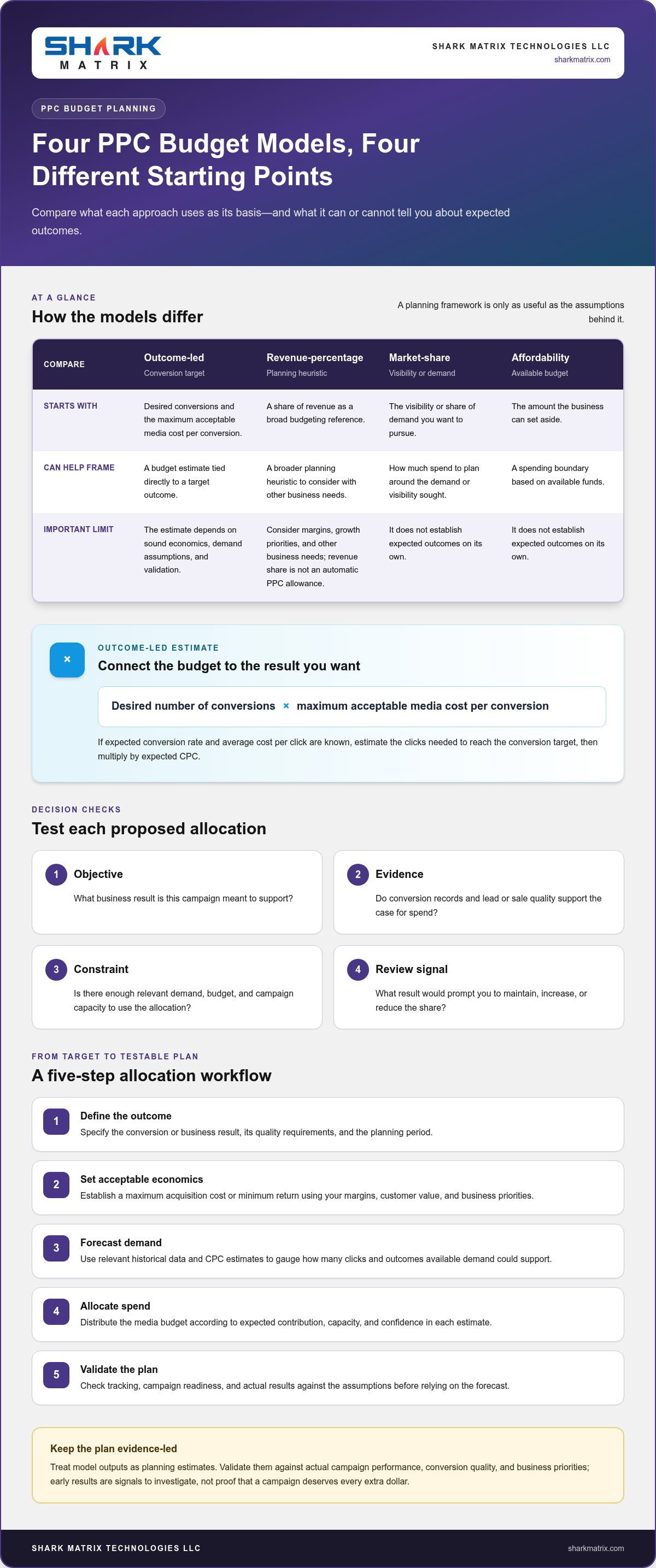
  • Objective: What business result is this campaign meant to support?
  • Evidence: Do conversion records and lead or sale quality support the case for spend?
  • Constraint: Is there enough relevant demand, budget, and campaign capacity to use the allocation?
  • Review signal: What result would prompt you to maintain, increase, or reduce the share?

These checks make assumptions visible and give teams a consistent basis for comparison. They also help prevent budget shifts driven by isolated results, especially when campaigns have different conversion paths or times to outcome. Treat every model output as a planning estimate, then validate it against actual campaign performance. As results accumulate, revisit the assumptions and adjust distribution based on conversion quality and business priorities.

How to Calculate a PPC Budget Allocation Model

Build the allocation from business outcomes, not from a channel split chosen for convenience. A useful ppc budget allocation model makes its assumptions visible: what result you want, what that result can reasonably cost, how much demand may be available, and what evidence will tell you whether the plan needs adjustment.

Start with a goal-based or revenue-based calculation

For an outcome-led estimate, multiply the desired number of conversions by the maximum acceptable media cost per conversion. If you know your expected conversion rate and average cost per click, estimate the clicks needed to reach the conversion target, then multiply by expected CPC. Both approaches connect budget to outcomes. Revenue-percentage budgeting is a broader planning heuristic. Use it alongside margin, growth priorities, and other business needs, rather than treating a revenue share as an automatic PPC allowance.

Market-share budgeting starts with the visibility or share of demand you want to pursue. Affordability budgeting starts with the amount the business can set aside. Neither establishes expected outcomes on its own. Practical PPC budget planning can compare these approaches, but the assumptions still need to fit your economics and campaign conditions.

Use this five-step workflow:

  1. Define the outcome. Specify the conversion or business result, its quality requirements, and the planning period.
  2. Set acceptable economics. Establish a maximum acquisition cost or minimum return using your own margins, customer value, and business priorities.
  3. Forecast demand. Use relevant historical data and CPC estimates to gauge how many clicks and outcomes the available demand could support.
  4. Allocate spend. Distribute the media budget across campaigns according to expected contribution, capacity, and confidence in each estimate.
  5. Validate the plan. Check tracking, campaign readiness, and actual results against the assumptions before treating the forecast as a reliable guide.

Turn assumptions into a forecast you can test

Gather historical clicks, spend, conversions, conversion quality, and conversion value where available. Add estimated CPC, expected conversion rate, campaign capacity, and the target outcome. Separate media spend from the complete budget: management, tools, and creative production are supporting costs, not click spend. Keep both views so the campaign allocation doesn’t hide the resources needed to run it.

Label the variables before calculating: B = media budget, CPC = estimated cost per click, CVR = expected conversion rate, and V = average value per conversion. Then estimate:

  • Forecast clicks = B ÷ CPC
  • Forecast conversions = forecast clicks × CVR
  • Forecast conversion value = forecast conversions × V

A forecast is a planning estimate, not a performance guarantee. Compare actual delivery with these estimates, investigate gaps in tracking or demand, and revise assumptions before shifting budgets. For support with planning, managing, and evaluating campaigns, explore PPC management support.

Which PPC Budget Allocation Model Fits Your Situation?

The right model depends on the decision you need to make and the evidence you can trust. Use a goal-based approach when conversion economics are clear, forecasting when historical results are useful, and simpler constraints when data is thin or the business needs a defined spending limit. A ppc budget allocation model can combine approaches, such as setting an affordability ceiling before distributing spend according to campaign forecasts.

Choose a model based on your data maturity

For a new campaign, plan conservative scenarios and treat initial spend as a controlled test. Set a clear learning objective and decide what evidence would justify expanding. Established campaigns can use validated CPA or ROAS targets to compare opportunities, but only when conversion tracking and lead or sale quality are dependable. In complex accounts, cross-channel attribution may not clearly show each touchpoint’s contribution, so avoid treating reported channel credit as complete proof of incremental impact.

Model Useful conditions Required inputs Main risk Review signal
Goal-based Conversion economics are clear Target conversions, allowable CPA or ROAS Targets may ignore available demand Qualified outcomes against target
Forecasting Historical data is usable Spend, clicks, CPC, conversions, value Past patterns may not persist Actual results versus forecast
Revenue percentage Useful as a broad planning limit Revenue, margin, growth priorities Revenue share may not reflect profitability Return and business affordability
Market share Visibility or demand coverage is a priority Market opportunity, impression or reach goals More exposure may not create efficient outcomes Incremental reach and conversion quality
Affordability Cash flow sets a firm ceiling Available budget and operating constraints Spend limit isn’t an outcome forecast Pacing and value generated within the limit
Full-funnel Campaigns support different journey stages Stage roles, audience and outcome signals Allocation can imply impact that hasn’t been measured Stage-specific indicators and downstream quality

Revenue-percentage, market-share, and affordability models are best treated as planning constraints, not proof that a particular spend level will perform. They can establish a workable envelope, then goal-based or forecast evidence can guide distribution inside it.

Compare channel, campaign, and funnel-level allocation

Platform-level budgets set the broad division between advertising channels. Campaign-level decisions prioritise specific products, services, or objectives within a platform. Funnel allocation instead assigns roles by journey stage, such as discovery, consideration, or high intent. It organises investment, but doesn’t by itself prove that an upper-funnel activity caused later conversions.

Branded searches capture people already looking for a business, while non-branded searches can reach audiences exploring a category or solution—such as car shoppers researching vehicle options on sites like carseek.com. Their intent and measurement needs differ, so assess them separately before comparing results. When PPC management is part of the plan, define the objectives, reporting needs, and review signals that will guide campaign decisions.

PPC Budget Allocation Model: Build a Smarter, Goal-Led Plan

How to Implement, Monitor, and Reallocate Your PPC Budget

A budget model only becomes useful when it shapes day-to-day campaign decisions. Put the ppc budget allocation model into operation with clear campaign roles, reliable measurement, and agreed rules for changing spend. This turns allocation from a one-time forecast into a managed process, without letting every short-term performance swing trigger a budget change.

Set pacing and review rules before campaigns launch

Start by mapping each campaign to its platform, objective, audience, funnel role, planned allocation, and target metric. Check that conversion actions are configured correctly and that lead quality or sales value can be assessed, not just clicks and form submissions. Then establish pacing checks and review timing based on campaign volume, sales cycles, and how quickly conversion data becomes dependable.

Agree in advance who can approve changes and where decisions will be recorded. Set thresholds from business targets and account baselines, rather than borrowing universal benchmarks. Routine pacing adjustments can correct delivery against plan. Material allocation changes should include a reason, the evidence behind it, the expected effect, and a date to review the result.

Reallocate based on evidence, not short-term swings

Before moving budget towards a reported winner, check whether tracking is working, attribution is comparable, and conversions reflect genuine business quality. A campaign with a lower reported CPA may be generating weaker leads, or its recent result may rest on too few conversions to support a confident decision. Compare like with like and account for the time between ad interaction and business outcome.

Use structured tests to learn what drives a difference. Change one major factor at a time, such as the channel, campaign, audience, or funnel allocation, while keeping the objective and measurement consistent. Define the test question and review signal before launch. If several factors change together, results may not reveal which change influenced performance.

For each review, distinguish between three decisions: keep the allocation, adjust pacing within the agreed plan, or propose a material reallocation. Document the evidence and revisit the decision after enough relevant data has accumulated. If tracking is incomplete or conversion volume is too limited, record the uncertainty and avoid presenting a tentative signal as a confirmed improvement.

Monitoring checklist

  • Confirm planned spend and actual pacing by platform and campaign.
  • Check conversion tracking, attribution settings, and any unusual changes in recorded activity.
  • Review conversion quality alongside CPA or ROAS, using the metric that matches the campaign goal.
  • Assess whether there’s enough reliable data for a decision, considering conversion delays and sales cycles.
  • Record the change, rationale, approver, and review point before making a significant shift.

This disciplined cycle connects campaign management with measurable business objectives and supports data-led evaluation. Discuss a data-led PPC strategy to bring planning, campaign execution, and performance review into one process.

Turn Your PPC Budget Allocation Model into a Managed Growth Plan

A budget model earns its place when it guides consistent decisions, not just the initial split. Choose an approach that fits your goals and evidence, document its assumptions, launch campaigns with reliable measurement, then review results and refine the plan. This turns a ppc budget allocation model into a working process your team can revisit as business priorities and campaign data evolve.

What a disciplined PPC management process should connect

Effective management links business objectives to budget assumptions, campaign structure, conversion tracking, and reporting. Platform metrics such as clicks and conversions help diagnose delivery, but lead quality and commercial outcomes show whether the activity is valuable to the business. Cross-channel context can inform priorities across PPC, SEO, and social media without requiring equal spending across them.

Shark Matrix Technologies LLC provides PPC management and digital marketing strategy to support campaign planning, execution, and evaluation. A connected approach helps teams assess whether each campaign is serving its intended role and whether reported performance aligns with measurable business objectives. It should inform decisions, not promise a particular result.

Prepare a budget brief your team can act on

Before launch, create a concise brief that makes the plan understandable to everyone involved. Record what the budget is meant to achieve, how the allocation was chosen, which data supports it, and what conditions would prompt a review. This creates a shared reference point when campaign performance or priorities change.

  • Objectives and constraints: State the business outcome, planning period, budget limit, and any campaign or capacity restrictions.
  • Target economics: Document the CPA, ROAS, conversion value, or other measure that will guide decisions.
  • Evidence and confidence: Name the data sources, note gaps in tracking or conversion history, and record how confident the team is in its assumptions.
  • Model and allocation logic: Explain why the selected model fits the goal and how it informs platform, campaign, or funnel investment.
  • Ownership and review conditions: Identify decision owners and specify which changes require approval, along with the signals that trigger a reassessment.

Keep the brief current as actual results replace planning assumptions. Review whether platform reporting reflects the quality of leads or sales, and consider wider channel activity when interpreting changes in PPC performance. Cross-channel insight adds context. It doesn’t mean every channel deserves the same share or that one channel caused every observed result.

With a documented plan, teams can move from model selection to measured implementation and informed refinement. PPC management support can bring campaign planning, management, and performance review into a broader digital marketing strategy.

Make Your Next Budget Decision More Deliberate

Your next step doesn’t need to be a complete account overhaul. Choose one upcoming allocation decision, write down the business outcome it should support, and identify what evidence would change your mind. That small discipline makes your ppc budget allocation model more useful over time: each review can build on what the team has learned instead of restarting from assumptions.

Shark Matrix Technologies LLC brings PPC management together with digital marketing strategy across PPC, SEO, and social media. Its data-driven lead generation supports a focus on meaningful business signals, not just platform activity. When planning, campaign execution, and performance evaluation work together, you can make budget decisions with clearer rationale while adapting as priorities and evidence evolve.

Ready to put a goal-led plan into practice? Explore PPC management support and take the next step towards a more disciplined approach to campaign growth. Start with the evidence you have, keep learning, and let each decision make the next one stronger.

Frequently Asked Questions

How much should a business allocate to PPC advertising?

Set a PPC budget based on the business outcome you need and the amount you can afford to invest while assessing results. For a lead campaign, estimate how many qualified enquiries you need, then use your acceptable acquisition cost to model a starting media budget. Check that the target is commercially viable and that campaigns can reach enough relevant demand. Treat the first allocation as a testable plan, not a fixed rule.

Can I use the same PPC budget allocation model across every advertising platform?

You can use the same decision principles across platforms, but avoid copying identical budget shares without checking how each platform supports your goals. Audience intent, campaign formats, available targeting, conversion tracking, and demand can differ. For example, a search campaign may capture active interest while a social campaign introduces an offer to a broader audience. Set platform-specific expectations, then compare results using suitable measures and consistent business outcomes.

What happens if a PPC campaign has no conversion history?

Without conversion history, use estimates cautiously and make the first phase a controlled learning exercise. Check whether tracking records the actions that matter, then use available information such as search demand, planned campaign reach, and relevant business data to form an initial scenario. Set a spending limit and define what you need to learn, such as which searches produce qualified enquiries. Avoid judging success on clicks alone while conversion evidence develops.

Should PPC budget include agency management fees and marketing tools?

Track media spend separately from the full cost of running PPC. The broader budget may include management, analytics tools, and creative production, depending on how your business accounts for these resources. For instance, teams collaborating with an agency like I Search Marketing for creative development and brand strategy should account for those professional services alongside direct media spend. Separating them makes platform performance easier to interpret and shows the total investment needed to operate campaigns. For internal planning, record each cost category consistently so comparisons between campaigns or planning periods don’t mistake operating expenses for advertising spend.

How often should a PPC budget allocation be reviewed?

Choose a review rhythm that reflects how quickly campaigns spend, how long customers take to convert, and when reliable outcome data becomes available. Check pacing often enough to spot delivery problems, but assess performance over a period that gives delayed conversions time to appear. A sudden tracking disruption or major business change may call for an earlier review. Record decisions so routine checks don’t lead to repeated, unnecessary reallocations.

Is a percentage-of-revenue PPC budget model reliable?

A percentage of revenue can provide a convenient planning boundary, but it doesn’t show whether a campaign can acquire customers profitably. Revenue may rise while margins tighten, or growth priorities may justify a different level of investment. Use the percentage as one input, then assess profitability, customer value, available demand, and business capacity. The ppc budget allocation model should ultimately reflect the commercial objective, not revenue alone.

Categories
Mobile App Development

PWA vs. Native App Benefits: How to Choose the Right Approach in 2026

What if users could start using your app without downloading it first? That’s one of the key questions behind pwa vs native app benefits: a Progressive Web App (PWA) opens through a web link, while a native app can integrate more deeply with a mobile platform and be distributed through its app store.

If you’re unsure whether a PWA can deliver the experience your product needs, or whether it can support specific device features, the trade-off deserves a closer look. Access, installation, performance, and the tasks users need to complete all affect which approach makes sense. iOS also has specific limitations, including manual home-screen installation and restrictions on some hardware features.

This guide compares the practical advantages and limits of each option so you can match an approach to your users, required features, and business goals. We’ll look at reach, device integration, distribution, and long-term product planning. For any web or mobile product, start with what people need to do, then choose the technology that supports those tasks.

Key Takeaways

  • See how browser access, home-screen installation, and app-store distribution shape the experience for users.
  • Compare pwa vs native app benefits against your priorities, including reach, updates, offline behavior, and device access.
  • Base your architecture decision on users’ core tasks and how they’re most likely to access your product.
  • Map essential features to browser and operating-system support before choosing a PWA or native app.
  • Create a practical product brief covering your audience, platforms, must-have features, and measures of success.

PWA vs. Native App Benefits: What Each Approach Offers

A Progressive Web App (PWA) is a web application designed to offer some app-like features through compatible browsers. Users open it from a link and may be able to add it to a device’s home screen. A native app, by contrast, is software developed for a specific mobile operating system, such as iOS or Android. The Progressive Web App (PWA) concept combines web delivery with capabilities that can make an experience feel more like an app.

The central trade-off is web access versus platform integration. A PWA can be shared and opened through the web, while a native app can make fuller use of platform-specific capabilities and app-store distribution. Neither is automatically the better choice. The right fit depends on who uses the product, how they access it, and what they need to accomplish.

What makes a progressive web app different from a website?

A responsive website adjusts its layout to fit different screen sizes. A PWA adds app-oriented behavior: it may be installable on a home screen, and service workers can manage selected resources to support features such as faster repeat visits or access to cached content. That doesn’t guarantee every screen or task will work offline.

These capabilities depend on the browser and operating system. Installation steps, notification support, and access to device features can vary, so design and test a PWA on the platforms your audience uses. Its web foundation makes sharing and discovery through a URL straightforward, but browser access alone doesn’t create a good app-like experience. Clear navigation, responsive pages, and well-planned task flows still matter—areas where specialized web development firms like Optimind Technology Solutions help bridge the gap between web design and app functionality.

What does a native app do differently?

A native app is built for a particular operating system, using technologies suited to iOS or Android. This platform-specific approach can support deeper integration with device capabilities that the operating system makes available, such as camera functions or notifications. Access depends on the feature, permissions, and platform rules, so native development doesn’t mean every capability is unrestricted.

Native apps are typically distributed through app stores, where users expect a platform-familiar installation and interface. That can suit products whose core tasks rely on device integration or whose audiences actively seek an app-store download. It also means planning for platform-specific development and experiences. The useful question isn’t which label sounds more advanced, but which approach supports real user journeys and the product roadmap.

How PWA and Native App Features Work in Everyday Use

Users notice the difference in how they find, install, and return to an app. A PWA starts with a web address and may offer a home-screen installation flow where supported. A native app is usually downloaded from the relevant app store. After launch, the practical differences depend on the device, browser, operating system, and how the product is built.

Installation, discovery, and updates: web versus app stores

A PWA can be shared as a link, making it easy to include in a website, search result, or message. Installation options vary: on iOS, users manually add a PWA to the home screen through Safari; Android generally offers a more seamless installation flow. Native apps are distributed through platform stores, where users can search for and download them. Web updates can be deployed centrally, though caching may affect when users see changes. Native updates follow app-store release processes, and users may need to install an update.

Offline access, notifications, and device features

Service workers can cache selected content and support specific offline tasks, but they don’t make every feature available without a connection. The MDN Web Docs on PWAs explains how these web technologies work. Notification and hardware support also vary. As of October 2026, iOS supports PWA push notifications when the user has added the app to the home screen, but not for a PWA simply open in a browser tab. Safari on iOS also lacks Web Bluetooth, Web NFC, and Background Sync support. Android generally provides broader PWA support, while native apps can use platform-supported device capabilities subject to permissions.

Everyday feature snapshot

  • Access: PWA via browser link or supported home-screen install; native app via app-store download.
  • Updates: PWA changes deploy on the web, with caching considerations; native releases pass through store processes.
  • Offline use: PWA can serve configured cached content; native offline behavior depends on app design. Neither guarantees every task works offline.
  • Notifications and device access: PWA support varies by browser and operating system; native access depends on platform APIs and permissions.

These differences make the pwa vs native app benefits decision a feature-planning exercise. List the tasks users must complete, then check browser and operating-system support for each one. For example, if a core task depends on a hardware feature, verify that it works on your target devices before choosing an approach. This comparison can inform a web or mobile product plan, including web development planning.

PWA vs. Native App Benefits Compared by Business Priority

The useful comparison isn’t a blanket ranking. A PWA may suit a product that people discover online and need to access quickly, while a native app may better serve a journey that depends on platform-specific features or app-store discovery. In either case, performance, maintenance effort, and development scope depend on the product requirements and implementation—factors that software development firms like BAA Digital evaluate when architecting web and digital solutions.

Feature comparison

Business priority PWA Native app
Reach Shareable by web address; compatible browser required Available for specific operating systems
Installation Can be added to a home screen; flow varies by platform Installed through an app store
Updates Web changes can be deployed centrally; caching may affect timing Updates follow platform store processes
Offline use Selected cached content or tasks, if configured Offline behavior depends on app design
Device access Browser-supported features; access varies Platform-supported features, subject to permissions
Distribution Web discovery and sharing; store options vary App-store presence and discovery

When PWA benefits are strongest

Consider a content-led service, lightweight booking tool, or product research journey where users arrive from search, a link, or a campaign. A shared web experience can make access straightforward across compatible devices without requiring users to begin with an app-store download. Microsoft’s PWA Development Guide describes how web technologies can support app-like experiences across devices. Reach still depends on discoverability, page performance, and browser support, not architecture alone.

When native app benefits are strongest

A native app may be a stronger fit when core tasks rely on deeper device integration, such as a workflow built around supported hardware features, or when users expect to find and return to the product through an app store. Platform-specific interaction patterns can also matter for frequent, focused use. Native development doesn’t guarantee better performance in every case; the experience depends on implementation and the user’s task.

Use the pwa vs native app benefits comparison to prioritize user journeys, not to assume one codebase or distribution model will always require less effort. A clear product brief can weigh feature needs, target platforms, release plans, and ongoing maintenance together. For a product that calls for platform-specific planning, explore mobile app development.

PWA vs. Native App Benefits: How to Choose the Right Approach in 2026

How to Choose Between a PWA and Native App for Your Product

The pwa vs native app benefits decision becomes clearer when you start with user behavior, not a preferred technology. Map what people need to do, how they’ll reach the product, and which capabilities those tasks depend on. Then validate the architecture against platform support and product goals.

A five-step framework for selecting an app approach

  • Step 1: Map users and journeys. Identify your primary audiences, their essential tasks, and where they first encounter the product, such as search, a shared link, or an app store. Note whether they use it occasionally or return often.
  • Step 2: Separate must-haves from nice-to-haves. List required features such as camera use, notifications, location, or access to device hardware. Mark which are essential to completing a core task and which could wait.
  • Step 3: Check platform and access needs. Match each essential capability to browser and operating-system support across your target devices. Include installation, app-store distribution, and specific offline tasks in the check.
  • Step 4: Assess the whole product. Consider performance, accessibility, security, analytics, and integrations alongside initial development and ongoing maintenance. Compare the work required with the product roadmap instead of assuming one architecture is always simpler.
  • Step 5: Test assumptions before committing. Build a focused prototype around a representative user journey. Test it with people who reflect your intended audience, observe where they struggle, and use those findings to refine the approach.

Questions to resolve before development begins

Make the decision concrete with a short planning brief. Which devices, operating systems, and browsers do your intended users actually use? Which systems must the product integrate with, and what privacy controls should shape those connections? What performance expectations will make core tasks feel dependable? The answers turn broad architecture preferences into requirements you can test.

Define success before launch, too. Choose measures tied to the product’s purpose, such as task completion, engagement, conversion, or retention. A prototype can test not only whether a feature works, but whether it makes the user journey easier. Document assumptions about browser support, distribution, offline behavior, and device integration so you can revisit them as the product evolves.

This process keeps the architecture aligned with user needs and maintainable product planning. For help translating requirements into a web product, explore web development planning.

Plan Your PWA or Native App Around the User Experience

An architecture decision is useful only if it leads to an experience people can use easily and your team can support over time. Turn your conclusion about pwa vs native app benefits into a short development brief: record who the product serves, what users need to do, and why the chosen approach fits those needs. This gives design and engineering a shared reference as the product takes shape.

Turn the comparison into a development brief

Capture the essentials before development begins. The brief should connect the approach to specific user needs, not just name a platform. Include:

  • Audience and core journeys: who the users are, how they arrive, and the tasks the product must make straightforward.
  • Platforms and capabilities: target devices, browsers, operating systems, required integrations, and essential device features.
  • Experience requirements: accessibility considerations, performance expectations, and any necessary offline behavior.
  • Distribution assumptions: expected browser support, installation flow, and whether app-store presence is part of the user journey.
  • Validation plan: how the team will test usability with representative users and verify technical assumptions across target platforms.

Keep the brief measurable. Define success through outcomes such as users completing a key task, returning to the product, or completing a purchase. These measures help teams assess whether the experience works instead of relying on feature counts alone.

Build for a roadmap, not just the first release

Priorities can shift as a product gains users. A lightweight first release may later need new integrations, richer device features, or different distribution options. Plan for ongoing usability testing, analytics, maintenance, and periodic reviews of browser and operating-system support. Documenting assumptions makes them easier to revisit as user needs and platform capabilities change.

Consistent UI/UX design ties the product together, whether users arrive through a browser or an app store. Clear navigation, accessible interactions, and predictable task flows matter across both approaches. Product strategy and technical planning should evolve together, so new features strengthen the experience rather than add complexity without a clear user benefit.

Use your brief to turn the comparison into a practical roadmap. Shark Matrix Technologies LLC’s mobile app development services support product planning and the development of mobile experiences shaped around user journeys and requirements.

Choose the Experience That Moves Your Product Forward

The pwa vs native app benefits decision comes down to the people you need to reach, the tasks they need to complete, and the capabilities those tasks require. A PWA can suit browser-first journeys and broad web access, while a native app may be a better fit when deeper platform integration or app-store presence is central to the experience.

Before committing, map essential user journeys, check browser and operating-system support, and document assumptions about installation, offline use, integrations, and device access. A focused prototype and representative user testing can expose gaps before they become part of the product roadmap. Keep success measures and future maintenance in view so the choice supports more than the first release.

Shark Matrix Technologies LLC brings web and mobile app development together with custom software engineering and UI/UX design. This combination helps align technical decisions with user needs and a coherent product experience. Explore mobile app development services and take the next step toward an app approach built around your goals.

Frequently Asked Questions

What is the main difference between a PWA and a native app?

A PWA is a web application accessed through a browser that may offer features such as home-screen installation or selected offline access. A native app is developed for a specific operating system, such as iOS or Android, and is generally installed through its app store. In practical terms, PWAs emphasize web access and link sharing, while native apps can integrate more closely with platform-supported features. The right choice depends on user journeys and product requirements.

Are PWAs better than native apps for most businesses?

No single approach is better for every business. A PWA may suit a browser-first product where people need quick access through a link, while a native app may fit workflows that depend on deeper device integration or app-store distribution. The pwa vs native app benefits comparison should start with your audience, core tasks, and essential features. Check browser and operating-system support before choosing, then validate the expected experience with a prototype and user testing.

Can a PWA work offline?

Yes, a PWA can support selected offline experiences when developers configure caching and service workers for them. For example, it might display previously cached information when a connection drops. That doesn’t mean every screen or action will work offline: tasks that need fresh data or a server connection may be unavailable. Define offline requirements for each user journey and test them on target devices, since browser and operating-system support can affect behavior.

Do PWAs support push notifications on iPhone and Android?

They can, but support depends on the operating system, browser, and installation context. On iPhone, PWA push notifications are supported when the user has added the PWA to the home screen; notifications aren’t available to a PWA simply open in a browser tab. Android generally offers broader PWA support, though browser behavior still matters. Treat notifications as a platform-specific requirement and test the full permission and subscription flow on intended devices.

Can a PWA access a phone’s camera, location, or other device features?

PWAs can access some device capabilities, including camera and geolocation, through browser APIs and subject to user permissions. Support isn’t identical across browsers or operating systems. Some hardware features are more restricted: Safari on iOS doesn’t support Web Bluetooth or Web NFC. If a core task depends on a specific capability, verify support on target devices before selecting an architecture. Native apps can use platform-supported features, also subject to permissions and operating-system rules.

Is a PWA cheaper to build and maintain than a native app?

Categories
UI/UX Design

UI/UX Design Guide for UAE Businesses in 2026

What if the problem with your website isn’t a lack of features, but the effort it takes for users to find what they need? When visitors struggle to complete key tasks, it can be hard to tell whether the answer is better design, new development, or both. Effective UI/UX design starts by understanding those frustrations and connecting design decisions to clear business goals.

This guide explains the difference between user experience (UX) and user interface (UI) design, what a structured design process should include, and how research, interface design, and usability testing fit together. You’ll also learn how to assess design work against user and business outcomes, and how to connect it with web or mobile development so the experience works as well as it looks.

Key Takeaways

  • Separate UX, which shapes the overall experience, from UI, which covers the visible, interactive interface.
  • See how a structured design process uses user needs and business priorities to guide decisions from discovery through testing and iteration.
  • Assess design beyond appearance by looking at task clarity, accessibility, consistency, and usability.
  • Build a more useful design brief by defining your users, the problem to solve, and the tasks that matter most.
  • Learn how UI/UX design can connect interface decisions with web and mobile development for businesses across the UAE.

What UI/UX Design Services Do for a Digital Product

A polished interface can still frustrate users if they can’t tell where to go, what information to provide, or how to finish a task. UI/UX design services address more than appearance: they connect user research, content structure, interaction patterns, and visual design so a digital product is easier to understand and use.

UX design shapes the overall experience of using a product, while UI design shapes the visible, interactive interface people use to move through it. UX considers user goals, task flows, information architecture, and usability. UI brings those decisions to life through layout, typography, colour, buttons, forms, and visual hierarchy. The disciplines overlap, but they solve different parts of the same problem.

A useful introduction to the field is this overview of user experience design, which describes UX as a discipline that draws on research and related areas of design. In practice, research helps uncover what users need; information architecture arranges content around those needs; interaction patterns guide actions; and visual design makes the next step easy to recognise.

What is the difference between UI design and UX design?

Consider a customer booking an appointment on a website. UX determines how they find the right service, choose a time, enter their details, and understand what happens next. UI determines how the service options, calendar, form fields, and confirmation are presented. If the flow is confusing, attractive buttons won’t fix it; if the controls are unclear, a sound flow can still feel difficult.

Both roles need to work together. A booking journey should make sense from the user’s first question to the final confirmation, with each screen supporting the next action.

When does a business need UI/UX design services?

For an existing product, research should establish what’s causing friction before anyone proposes a redesign. Reviewing user feedback, support questions, and how people move through key tasks can help distinguish a design issue from a content, technical, or development problem. That evidence gives UAE businesses a clearer basis for prioritising improvements.

Because design decisions affect how a product is built, connecting them with implementation can help keep the intended experience intact. Explore how website development services can bring interface and website decisions together.

How the UI/UX Design Process Turns User Needs into Usable Experiences

A reliable design process doesn’t jump from a business idea straight to polished screens. It gathers evidence, makes priorities explicit, and checks whether proposed solutions help users complete important tasks. For businesses investing in ui ux design services dubai, that sequence can reduce guesswork and give design and development teams a shared direction.

Usability testing should happen before implementation because observing users interact with a design can reveal obstacles while changes are still easier to make. The process typically moves through these stages:

  1. Discovery: Agree on business objectives, intended users, project constraints, and the decisions the work needs to inform.
  2. Research: Set questions about user goals, barriers, and priority tasks. Use available interviews, analytics, support feedback, and usability observations to understand the problem.
  3. Information architecture: Group content and plan navigation around how users look for information, not just how the business is organised internally.
  4. Wireframes: Map screen structure and content placement without detailed visual styling. These low-fidelity layouts help teams discuss flow and hierarchy early.
  5. Prototype and test: Build an interactive model of key journeys, then observe users attempting representative tasks. Record where they hesitate, choose the wrong path, or need clarification.
  6. Refine and hand off: Use test findings and business priorities to revise the experience, document design decisions, and prepare interface specifications for development.
  7. Iterate: After launch, review relevant user feedback and product evidence to identify what may need further refinement.

What happens during UX research and information architecture?

Research starts with focused questions: What are users trying to accomplish? Where do they get stuck? Which tasks matter most to the business? Existing analytics can show where journeys lose users, while support feedback may expose recurring confusion. Interviews and observed task sessions can add context, helping distinguish a navigation problem from unclear content or a technical issue.

Those findings inform information architecture. For example, if users search for a service by need rather than by the company’s internal department names, navigation and page labels should reflect that behaviour. Business priorities still matter, but they’re balanced against how people seek information.

How do wireframes, prototypes, and usability tests work together?

A wireframe establishes structure; it isn’t a finished interface. A prototype adds clickable interactions so a team can explore a journey before full development. In a test, users might try to locate a service or submit a request while a facilitator observes their choices and sticking points. The goal is to learn, not to prove the design right.

Digital.gov’s Evaluate UI/UX Design Quality resources offer guidance on usability evaluation. Teams can use test observations to revise labels, screen order, or interaction details, then validate those changes before handing designs to developers. Connecting design decisions with web development in Dubai can help carry the tested experience into implementation.

How to Evaluate UI/UX Design Quality Beyond Visual Appeal

An attractive interface can still leave users unsure what to do next. Judge design by how well it supports real tasks, not by visual polish alone. For ui ux design services dubai businesses assess, separate five dimensions: visual quality, task clarity, accessibility, consistency, and usability. Each answers a different question, so strength in one area shouldn’t be treated as proof of success across the others.

  • Visual quality: Is the layout readable, organised, and suited to the product’s purpose?
  • Task clarity: Can users identify the next step and understand what information a form requires?
  • Accessibility: Can people with different needs perceive and operate the interface?
  • Consistency: Do similar controls and interactions behave predictably across screens?
  • Usability: Can intended users complete priority tasks without avoidable confusion?

Assess outcomes against the project’s goals and a relevant baseline, such as the current experience or an agreed task flow. If a redesign aims to make appointment requests clearer, observe whether users can find the form, understand its fields, and submit it. Don’t claim an improvement based on an attractive mock-up or an invented industry benchmark. Record what was tested, what users did, and what changed as a result.

Which design deliverables help make a project tangible?

Useful deliverables make both the user journey and the intended interface clear. User flows map steps between tasks; wireframes show screen structure; prototypes let teams explore interactions; and interface screens show the designed visual details. Reusable components, such as buttons and form fields, help developers apply consistent patterns across the product.

Design-system documentation can explain how components should look and behave, reducing ambiguity as screens are built or updated. The right set of deliverables depends on product scope and development needs: a small site and a complex app may require different levels of detail. A practical review can pair each item with its evidence and intended outcome: “Prototype, tested task flow, users can identify the next step.”

How can a business assess usability and accessibility?

Give intended users priority tasks and observe whether they can complete them without avoidable confusion. Note unclear labels, missed controls, difficult form steps, and points where users need help. Repeat the same task after revisions so the team can compare observations against the original baseline.

WCAG is a recognized framework for assessing digital accessibility, but referencing it doesn’t automatically make a design compliant. Review readable content, clear focus and interaction cues, and whether controls can be understood and operated. For UAE audiences, consider Arabic right-to-left direction as part of the interface design, including reading order and navigation, rather than treating it as a text-only adjustment.

UI/UX Design Guide for UAE Businesses in 2026

How to Prepare a Useful Brief for UI/UX Design Services

A useful design brief describes the product, the people it serves, and the problem the project should solve. “Make the site look modern” is a preference, not a design goal. A clearer brief might explain that customers have trouble finding a service or completing a key request, then identify what the business wants the redesigned experience to help them do.

For businesses considering ui ux design services dubai, the brief doesn’t need to prescribe every screen or feature. Instead, rank the essential user tasks. A short list of high-priority journeys helps the design team focus on what matters before exploring possible solutions.

What should a UI/UX design brief include?

Give the team enough context to understand both user needs and practical boundaries. Include:

  • Business objectives: What should the product support, and what would a useful outcome look like?
  • Audience and product context: Who will use the website or app, and what are they trying to accomplish?
  • Priority journeys: Which tasks matter most, such as finding information, submitting a request, or completing a purchase?
  • Known concerns and evidence: Note confusing pages, recurring support questions, user feedback, or available analytics. Separate observed problems from assumptions.
  • Project inputs: Share existing content, brand guidelines, platform requirements, and technical dependencies that may affect design or development.

Keep the scope realistic. Listing every possible feature as equally important can obscure the core problem and make decisions harder. Label essential tasks separately from ideas that can be considered later.

How should design goals connect to business outcomes?

Choose measures that reflect the intended task. For a form journey, a team might review completion and error patterns; for navigation, it could examine whether users reach the intended information. Where suitable, record a baseline from the current experience before changes begin. Then agree on when and how the team will review progress, so the assessment compares evidence rather than personal preferences.

Design goals should also fit the product’s development context. Sharing platform constraints and dependencies early helps connect interface decisions to implementation. Shark Matrix brings UI/UX design together with web development, so design choices can be considered alongside how the website will be built. Explore website design and development to see how those capabilities connect.

Before kickoff, check that your brief includes:

  • The product, its intended users, and the problem to address.
  • Priority tasks, known usability concerns, and evidence behind them.
  • Relevant content, brand assets, platform needs, and technical constraints.
  • A suitable baseline and a plan for reviewing progress against the project goals.

How Shark Matrix Connects UI/UX Design with Web and Mobile Development

Good design needs to survive the move from concept to a working product. Shark Matrix Technologies LLC connects UI/UX design with web and mobile development, helping teams consider user needs and implementation together rather than treating interface design as a layer added at the end.

For ui ux design services dubai businesses, a project-fit discussion can clarify who the product serves, which tasks matter most, what the project includes, and what outcomes the business wants to support. That context helps align priorities before design and development decisions take shape. It also helps teams distinguish essential user journeys from features that can wait.

How does connected design and development support product delivery?

Shared context helps developers understand the purpose behind a user flow, not just the appearance of its screens. During handoff, clear interface designs, interaction details, and reusable component guidance can help developers build screens consistently. Development feedback can also reveal technical constraints early, allowing the team to discuss adjustments while keeping the user’s task in view.

This connection is useful for websites that combine content, forms, and interactive features. Explore web development services in Dubai to see how design and implementation can fit into a connected project.

When should a project include mobile app UX?

Mobile app UX deserves focused attention when users need to complete important tasks frequently, use the product in varied situations, or rely on capabilities and patterns specific to a mobile platform. The decision should follow the audience and product needs, not a blanket assumption that every website needs an app.

An app journey isn’t simply a desktop layout made smaller. Designers need to consider how people move between screens, interact with controls on touch devices, and complete tasks in the context where the app will be used. A service request flow, for example, may need a concise sequence and clear progress cues on mobile. See mobile app development in Dubai for more on building mobile products.

Bring your user needs, project scope, and intended outcomes into the conversation, then explore a tailored digital project that connects design with the right web or mobile development approach.

Turn Better Design Decisions into a Clear Next Step

Effective digital design starts with understanding what users need to accomplish, then shaping and testing an experience around those tasks. A structured process helps businesses move beyond subjective opinions, while clear project goals make it easier to assess whether design supports both user needs and business priorities.

For companies considering ui ux design services dubai, it helps to define the product, prioritise essential user journeys, and consider how design decisions will carry through development. The strongest interface is more than attractive: it should make important actions understandable and usable.

Shark Matrix connects UI/UX design with web and mobile development, bringing design and implementation into the same digital project conversation. The company has operated since 2010, supporting businesses as they shape connected digital experiences.

Explore digital solutions tailored to your project and take a considered next step toward a clearer experience for your users. A focused brief and a commitment to learning from users can give your digital product a stronger direction.

Frequently Asked Questions

What is the difference between UI and UX design?

UX design shapes the overall experience of using a website or app, while UI design covers the visible, interactive elements. UX work considers user goals, task flows, content structure, and usability. UI work applies that structure through layouts, typography, colours, buttons, and forms. For example, UX maps how a customer completes a booking, while UI determines how the steps and controls appear on screen.

What do UI/UX design services typically include?

UI/UX design services often include research into user needs, information architecture, user flows, wireframes, prototypes, interface design, and usability testing. The exact work depends on the product and project goals. A website redesign may focus on navigation and key forms, while a mobile product may need detailed app journeys and reusable components. Shark Matrix connects UI/UX design with its web and mobile development capabilities.

Can UI/UX design improve website conversions?

Yes. By streamlining user journeys, reducing friction in key interactions, and clarifying calls to action, thoughtful UI/UX design directly supports higher conversion rates. Modern digital agencies such as Nexient focus on combining intuitive web design with performance marketing strategies to help businesses turn site visitors into active customers.

How long does a UI/UX design project take?

Project duration depends on scope, product complexity, research needs, stakeholder feedback, and how many screens or user journeys require design. A focused improvement to one flow differs from designing a new digital product across several platforms. A structured process usually includes discovery, design exploration, prototyping, testing, refinement, and handoff. Define the intended scope and decision-making process early to build a realistic project schedule.

How much do UI/UX design services cost?

There isn’t one standard fee for UI/UX design because the work depends on the project’s scope and requirements. Cost factors can include research depth, the number of user journeys and screens, prototype detail, usability testing, and whether the work connects with web or mobile development. A focused brief helps clarify priorities and define the work involved, so the project can be scoped around its objectives.

Is UI/UX design important for mobile apps?

Yes, mobile app design matters because users interact with apps on smaller screens and often in different contexts than desktop users. App UX should account for frequent tasks, touch interactions, navigation between screens, and the needs of the intended audience. Simply shrinking a desktop layout can make controls and journeys awkward. Start by identifying what users need to do on mobile and design those key flows for that setting.

How can I measure whether a UI/UX redesign is successful?

Measure success against the redesign’s goals and a relevant baseline, rather than relying on opinions about appearance. Choose indicators that match the task, such as whether users complete a form, where errors occur, or whether they can find key information. Combine product data with usability observations and user feedback. Review results after implementation, then use what you learn to identify further improvements.

Categories
SEO

Technical SEO Audit Checklist: 5 Steps to Find and Prioritize Issues in 2026

A ranking dip may not be the real problem. Important pages might be difficult to crawl or may not be indexed as intended. A technical seo audit checklist helps you distinguish these technical barriers from ordinary fluctuations, so you can investigate the right issues before making changes.

Audit tools can return long lists of warnings without explaining what matters. Fixes may also involve developers, and changing the wrong setting can create new problems. Work through checks in a consistent order: begin with crawlability and indexability, then investigate architecture, performance, rendering, and lower impact refinements.

This guide takes you through five steps to assess affected pages, weigh potential impact against implementation risk, and turn verified findings into clear tasks. You’ll also learn how to validate fixes after deployment. The aim is a prioritized action plan, not another audit report full of issues you’re unsure how to handle.

Key Takeaways

  • Set an audit goal and select representative URLs and templates first, so your review focuses on pages that matter.
  • Use a technical seo audit checklist to examine crawl access, sitemap entries, canonical signals, and internal paths to priority pages.
  • Check Core Web Vitals, mobile behavior, and JavaScript rendered content for issues that may affect visitors or search engine understanding.
  • Verify tool warnings by checking evidence, the number and importance of affected URLs, and potential user impact.
  • Turn confirmed findings into a fix plan that considers severity, effort, and confidence, then retest key pages after changes go live.

Technical SEO Audit Checklist: Define Scope Before Checking the Site

Before opening a crawler or reviewing warnings, decide what the audit needs to answer. Are you investigating a drop in indexed pages, checking launch readiness, diagnosing an organic decline, or reviewing routine technical health? Your goal determines which pages and evidence deserve attention. Technical SEO can involve crawl access, indexing, site architecture, and rendering, so setting boundaries helps keep the review useful rather than endless.

How to scope a technical SEO audit

Record the audit date, the domains or subdomains in scope, and the page groups that matter to the business. For an online store, this might include key category and product pages, as well as the steps users take to complete a purchase. For a service site, include important service pages and the paths visitors use to reach enquiry forms.

Sample every important page template, but don’t treat a sample as a substitute for crawling the full accessible site. A shared template issue may affect many URLs, while a problem on one page may be isolated. Note the CMS, how much content depends on JavaScript, and any recent releases, redesigns, migrations, or other technical changes. Compare those events with known traffic or indexing changes to give findings useful context.

What evidence to collect before the checklist

Gather Google Search Console information related to your audit goal, including indexing signals, sitemap details, and performance trends. Save crawler exports and relevant analytics context, along with examples of affected URLs. If a category appears to have lost visibility, record representative URLs and compare them with pages on other templates. This helps you investigate patterns instead of reacting to a single warning.

Start a finding log before deciding what to fix. For each item, capture:

  • Evidence: The report, observation, or URL that supports the finding.
  • Impact: The important pages or user journeys potentially affected.
  • Confidence: Whether the finding is confirmed, a crawler warning, a hypothesis, or awaiting manual verification.
  • Owner and status: Who will investigate or implement the change, and where it stands.
  • Retest date: When to check the affected URLs again after a change.

This distinction prevents an automated warning from becoming a rushed developer task without verification. A practical technical seo audit checklist connects each issue to evidence and affected pages, while clearly marking uncertain findings for investigation. That shared record gives site owners, SEO specialists, and developers a common starting point for the checks that follow.

Crawlability and Indexability: Check Whether Search Engines Can Access Key Pages

First check whether search engines can reach the pages that matter. Then check whether those pages are eligible to appear in results. These are related but different questions: robots.txt can restrict crawling, while a noindex directive asks search engines not to index a page they can access. Google’s Google Search Essentials explains the core requirements for appearing in Google Search. Use it as a reference, then assess each finding against the site’s intended behavior.

Are important pages crawlable and indexable?

Check priority URLs individually and through a site crawl. Confirm that they return the expected response, usually 200, and aren’t blocked by a robots.txt rule, a meta robots directive, or an X-Robots-Tag response header. Review access rules for important sections, not just the homepage. A blocked page may still appear in search results without a snippet, so a robots.txt restriction isn’t a substitute for a noindex directive.

Next, compare Google Search Console’s indexing reports with the site owner’s intent. Use URL Inspection on representative pages to check Google’s reported indexing status and, where available, the tested live page. An excluded URL isn’t automatically an error: filters, duplicate pages, and intentionally removed content may be excluded by design. Investigate patterns, such as valuable category pages being excluded, and confirm whether those URLs can be reached through internal links.

Do canonicals, redirects, and sitemaps send consistent signals?

For each important page, compare its canonical target with its redirect destination, internal links, and XML sitemap entry. These signals should point to the same preferred, indexable URL. For example, if a sitemap lists a URL that redirects to another page, update the sitemap to list the final destination. Look for redirect chains, loops, and destinations that no longer serve users.

Check that sitemap URLs return successful responses, aren’t blocked or marked noindex, and identify themselves as canonical. Confirm that the sitemap is accessible and referenced in robots.txt where appropriate. A mismatch doesn’t always mean a page is broken, but it does need investigation.

  • Access: Can crawlers reach the intended page?
  • Indexability: Do page directives allow indexing?
  • Signals: Do canonicals, redirects, internal links, and sitemap entries agree?

Use this sequence in your technical seo audit checklist to distinguish genuine visibility barriers from intentional exclusions. When crawl or indexation issues involve complex site changes, professional SEO support from agencies like Web Media Grp. can help teams investigate findings and coordinate next steps.

A page may be crawlable but still difficult to discover if it sits deep in the site or has no internal links pointing to it. Map the main page templates and trace how visitors and crawlers can reach priority content through relevant navigation, category pages, or related resources. The goal isn’t to make every URL equally prominent. It’s to give valuable pages clear, useful paths.

How to find weak internal linking and orphan pages

Compare the URLs found in a site crawl with sitemap entries and your known priority pages. If a priority URL appears in the sitemap but not in the crawl, it may lack internal links or be inaccessible to the crawler. Check whether key pages receive contextual links from relevant sections, then inspect pagination and filters. Useful category links can help discovery, while endless combinations of filters may create many low value URLs.

Use click depth as a diagnostic, not a rigid pass or fail threshold. If an important page takes several navigation steps to reach, consider whether a relevant category, menu, or related page should link to it. Test internal links for broken destinations and inconsistent URL formats, such as links that alternate between trailing slash and non trailing slash versions.

How to assess duplicate URLs and canonical choices

Look for URL variations that may expose the same or near identical content: tracking or filter parameters, uppercase and lowercase paths, trailing slash differences, and HTTP versus HTTPS versions. Check that canonical tags point to the intended preferred URL, and that each target resolves correctly rather than redirecting, returning an error, or pointing to an unrelated page. Don’t apply a blanket canonical or noindex rule without checking how each template is designed to work and how its pages appear in search.

Use a compact evidence log to connect patterns to investigation and action:

  • Pattern: A priority page has no internal links.
  • Evidence: It appears in the sitemap but not among the crawl’s linked URLs.
  • Likely impact: Discovery may depend on the sitemap or external links instead of site navigation.
  • Verify: Check the page’s purpose, then add a relevant contextual link if it should be discoverable.

Other patterns to record: Parameter URLs with duplicate content, inconsistent canonical targets, and broken internal links. For each pattern, note the affected template, compare representative URLs, and confirm the intended behavior with the site owner before recommending a change. This makes the technical seo audit checklist more useful than a raw list of crawler alerts.

Technical SEO Audit Checklist: 5 Steps to Find and Prioritize Issues in 2026

Technical SEO Checks for Core Web Vitals, Mobile, and JavaScript Rendering

Test actual page templates, not just the homepage. In Google Search Console, review Core Web Vitals field data where available. Google’s “Good” thresholds are LCP at or below 2.5 seconds, INP at or below 200 milliseconds, and CLS at or below 0.1, measured at the 75th percentile of real user page loads. Field data reflects users’ experience. A lab test is a controlled snapshot that helps reproduce and investigate a problem. Treat them as complementary evidence, not interchangeable scores.

How to investigate page experience and mobile issues

Group affected URLs by shared template before proposing a sitewide fix. If product pages show layout shifts, compare several products to see whether the cause is a shared image area, banner, or component. On mobile, check viewport behavior, text and navigation visibility, intrusive overlays, and key interactions such as opening menus or submitting forms. Google uses mobile versions for indexing and ranking, so confirm that important content and functionality are available on mobile too.

Use field reports to spot patterns and lab testing to investigate specific pages or interactions. After a performance or layout change, retest representative mobile pages and make sure the change hasn’t introduced new usability problems.

How to check JavaScript rendering and structured data

For templates that rely on JavaScript, compare the initial HTML with the rendered page. Confirm that essential text, links, titles, and other metadata are present after rendering, and that important content isn’t hidden behind an interaction or dependent on a failed script. Treat a crawler warning as a lead, not proof. Check the page as delivered and as rendered, then note the affected template and example URLs.

Review structured data for errors and confirm that it describes information users can actually see on the page. For example, don’t mark up a product detail that isn’t visible to visitors. Valid markup may make a page eligible for enhanced search appearances, but it doesn’t guarantee rich results.

  • Record: The affected template and representative URLs.
  • Compare: Field data, lab results, mobile behavior, and rendered content.
  • Verify: Retest after changes and check that visible content matches structured data.

These checks help your technical seo audit checklist distinguish template wide problems from isolated page issues. If resolving a rendering or mobile problem requires development work, coordinate with your development team or consult experienced web design specialists like Web Bridge to plan and validate the technical changes.

Turn Technical SEO Audit Findings into a Prioritized Fix and Retest Plan

An audit creates value when its findings lead to safe, verifiable changes. Start with confirmed blockers affecting valuable pages, then look for repeated problems across shared templates and issues that disrupt user journeys. A warning on a low value URL may matter less than a verified indexing problem affecting an important page. Keep severity, implementation effort, and confidence separate: a high impact issue may still need more investigation before anyone changes the site.

How to prioritize technical SEO issues

Group findings by root cause and affected template. One verified fix to a shared page template may resolve a pattern across many URLs, while unrelated symptoms may need separate tasks. Put access or indexability blockers on priority pages near the top of the queue. For each proposed change, record the evidence, example URLs, expected behavior, owner, and how the team can roll it back if a release causes an unexpected problem.

Write tickets that give a developer enough detail to act without guessing. Identify the affected template, show a representative URL, describe the current and intended behavior, and list the validation steps. Coordinate changes involving routing, rendering, or deployment with the people responsible for those systems. A tool’s severity label alone isn’t a reason to change production code.

When to get specialist technical SEO support

What to do after the audit

Retest changes in staging when appropriate, then verify them in production after release. Check the same URLs or templates against the original evidence, confirm the intended behavior, and update the finding log with the result and retest date. Continue monitoring important pages so a later release doesn’t quietly reintroduce the issue.

Use the technical seo audit checklist as a working record, not a one time scorecard. When a fix requires development work, coordinate with your development team to plan and validate the implementation. To discuss the next steps for your audit, discuss your technical SEO priorities.

Turn Your Audit into a Clear Next Step

A useful technical seo audit checklist does more than surface warnings. It helps you define what matters, verify whether key pages can be crawled and indexed, and identify patterns in site architecture, performance, mobile experience, and rendering. Then prioritize confirmed issues by impact and affected pages, give developers clear tasks, and set criteria for retesting.

Keep audit findings visible after implementation. Rechecking affected URLs and templates helps confirm that fixes worked and gives your team a practical reference for future releases. Technical SEO often involves collaboration between site owners, SEO specialists, and developers, especially when changes affect important templates or site behavior.

Shark Matrix Technologies LLC offers SEO services, along with web and e-commerce development services for businesses working on search and site implementation. If you’d like support assessing your findings or planning next steps, discuss your technical SEO priorities.

Start with the pages and issues that matter most, and turn each verified finding into a manageable improvement. A clear plan makes the next step easier to take.

Frequently Asked Questions

What should a technical SEO audit checklist include?

A technical SEO audit checklist should cover audit scope, crawl access, indexability, response codes, redirects, canonicals, sitemaps, site architecture, internal links, mobile usability, performance, JavaScript rendering, and structured data. Start with pages that matter to the business, then check representative templates and investigate patterns across the site. Record evidence and affected URLs for each finding so the audit leads to verified, prioritized tasks rather than an unfiltered list of tool warnings.

How do I check if a page is crawlable and indexable?

Check whether the page loads successfully, whether robots.txt allows crawling, and whether a meta robots directive or X-Robots-Tag header prevents indexing. Confirm that the page has a discoverable internal link and inspect its status in Google Search Console using URL Inspection. Compare the reported canonical with the URL you intend to appear in search. A page’s exclusion isn’t necessarily an error, so check whether it matches the site owner’s intent.

How often should I run a technical SEO audit?

There’s no single schedule that suits every website. Review technical health routinely, and run a focused audit after a migration, redesign, major release, or unexpected change in traffic or indexing. Large sites or websites with frequent technical updates may need more regular checks than a stable, smaller site. Between audits, monitor important URLs and Search Console reports so emerging patterns are noticed and investigated before the next full review.

Can technical SEO issues prevent a page from appearing in Google Search?

Yes. A page may be difficult to discover if internal links are missing, inaccessible if crawling is blocked, or ineligible for indexing if a noindex directive is present. Errors, redirect problems, and conflicting canonical signals can also affect how Google processes a URL. But not every excluded page signals a problem. Check the page’s purpose, directives, and Search Console status before deciding whether its absence from results needs a fix.

What is the difference between crawlability and indexability?

Crawlability is whether a search engine can access and fetch a URL. Indexability is whether the page can be considered for inclusion in search results. A robots.txt rule can prevent crawling, while a noindex directive tells a crawler not to index a page it can access. These controls serve different purposes. Check both, because a page that’s crawlable isn’t automatically indexable, and a page blocked from crawling may not communicate its other directives.

How do I prioritize technical SEO audit issues?

Start with confirmed access or indexability problems affecting valuable pages, then assess how many URLs or templates share the issue and whether it harms user journeys. Separate impact from implementation effort and confidence: a potentially serious finding may need verification before a developer acts. Record evidence, example URLs, an owner, expected behavior, and retest criteria. This turns an audit inventory into manageable tasks and helps teams avoid rushed changes based only on a tool’s severity label.

Do I need a technical SEO tool to audit my website?

How can I check whether Google can render JavaScript content?

Use URL Inspection in Google Search Console to test a live URL and review the rendered result where available. Compare what appears after rendering with the initial HTML, paying attention to essential text, links, and metadata. Google may process JavaScript after first crawling a page, so some content can take longer to be discovered. If key elements are missing, record the affected template and example URL, then investigate scripts or resources that may be preventing rendering.

Categories
Digital Marketing

Omnichannel Marketing Strategy Examples: 5 Practical Models for 2026

What if a customer clicked your ad, browsed your website, then visited your store, only to meet a different message at every step? That’s the gap an omnichannel marketing strategy is meant to close. The best omnichannel marketing strategy examples don’t just add channels. They connect each touchpoint so that customer context and clear next steps carry through the journey.

If your marketing channels work in silos, it can be hard to know which ones belong at each stage or whether they contribute to meaningful outcomes. Simply using search, social media, email, and a website isn’t omnichannel if each operates independently. The difference is whether the experience makes sense as customers move between those channels.

In this guide, you’ll explore five practical models for different business types and customer journeys, along with the difference between multichannel and omnichannel marketing. You’ll also find a starting framework for matching channels to customer needs, connecting experiences, and measuring results across the journey rather than relying on isolated channel metrics. Use the examples to identify where your own experience feels disconnected and what to improve first.

Key Takeaways

  • See what makes an integrated customer journey different from simply using several marketing channels.
  • Explore omnichannel marketing strategy examples as adaptable patterns, then match each to an audience need and a measurable outcome.
  • Compare the roles of organic search, paid search, social media, email, websites, and mobile apps in guiding customers forward.
  • Build a focused pilot around one audience, one journey, clear channel handoffs, and an accountable owner.
  • Choose customer-focused measures that reveal whether your journey is working, beyond isolated channel activity.

What Makes an Omnichannel Marketing Strategy Different from Multichannel Marketing?

Your paid ads promise one thing, your website says another, and a customer who switches devices has to start over. That’s what fragmented channels feel like from the customer’s side. The practical distinction isn’t how many channels you use. It’s whether each channel contributes to a connected journey. The examples in this section show what coordination can look like without requiring every business to use every channel.

Definition: Omnichannel marketing coordinates customer interactions across relevant touchpoints, carrying useful context and a consistent message from one interaction to the next. Customers can change channels without losing their place in the journey.

What does omnichannel marketing mean in practice?

In practice, a customer’s needs and previous actions inform what happens next. A search, social post, website visit, email, app, or support interaction may each serve a different purpose while still feeling like part of the same relationship. This customer-centered approach is also described in the foundational overview of omnichannel marketing.

Consider this hypothetical journey, not a real case study:

  • Discovery: Someone finds a business through an organic search result or social post.
  • Consideration: They visit the website to compare options. The page answers the questions raised by the discovery content, with clear details and a relevant next step.
  • Purchase: They return through a relevant email or direct website visit and can continue without repeating their research.
  • Support: If they ask for help, the response reflects the purchase or enquiry context rather than treating them as a new contact.

The channels can vary by business. What matters is continuity: each handoff makes sense to the customer and helps them move forward.

Omnichannel vs. multichannel: what is the difference?

Multichannel marketing means using multiple channels, but those channels may be planned, managed, and measured separately. Omnichannel connects the relevant activity around the customer journey. A business can be active on search, social media, and email without coordinating its messages or handoffs.

  • Coordination: Siloed campaigns pursue separate channel goals; connected campaigns support a shared customer outcome.
  • Data and context: Separate channels may not reflect earlier interactions; coordinated touchpoints use available context to make the next interaction relevant.
  • Message and handoff: Disconnected messages can force customers to repeat themselves; a connected handoff carries the conversation forward.

Omnichannel marketing strategy examples should demonstrate more than channel presence. Look for a clear audience need, a logical sequence, and a useful transition between touchpoints. Start with the channels your customers already use, then connect the moments where confusion or drop-off occurs. A complex technology platform isn’t the starting point; a coherent journey is.

Omnichannel Marketing Strategy Examples for Different Customer Journeys

The following omnichannel marketing strategy examples are hypothetical patterns, not verified client case studies. Each begins with a customer need, then connects touchpoints so the next interaction builds on the last. That continuity is central to an omnichannel marketing strategy: channels should work together to create a useful customer experience, not simply increase a brand’s presence.

Retail and e-commerce: from discovery to repeat purchase

Audience need: A shopper wants to compare options and decide whether a product fits. They might discover it through an organic search result or social post, then land on a relevant website page with clear details and comparisons. If they choose to subscribe or request updates, a follow-up email can reflect the product or information they viewed instead of sending a generic promotion.

Handoff: The search or social content leads to a matching page, and the opted-in follow-up helps the shopper resume their research. After a purchase, relevant updates can support another visit without assuming the customer wants repeated promotions. Measure: Track qualified product engagement, completed purchases, and repeat visits. Choose measures that match the journey’s goal, and distinguish activity from actions that show purchase intent.

B2B services: from research to a qualified conversation

Audience need: A prospective client is assessing a business challenge and wants useful information before speaking with a provider. An educational search result or paid campaign can lead to a focused service page that explains the relevant offer and next step. With permission, follow-up content can address common questions and help the prospect decide whether a conversation makes sense.

Handoff: The page and follow-up should give a sales contact enough context to continue the discussion without making the prospect repeat their enquiry. Measure: Look at qualified enquiries and their progression, not just impressions, clicks, or email engagement. For a journey that starts with search, consider how search engine optimization guidance can support discovery and guide visitors toward relevant website content.

Customer support: from self-service to human help

Audience need: A customer wants to resolve a problem quickly, first by finding an answer independently. They begin with a website resource, then use an available support channel if the information doesn’t solve the issue.

Handoff: Where practical, the support interaction should carry forward the issue and steps already taken, so the customer doesn’t have to start again. Measure: Consider resolution, repeat contact about the same issue, and customer feedback. These measures help show whether the transition worked, not merely whether the support channel received activity.

Across all three patterns, keep only the touchpoints that help customers progress. A relevant handoff is more valuable than adding another channel without a clear role. For organizations seeking strategic guidance on building customer-centric campaigns that connect sales and marketing, click here to explore agency solutions designed to drive revenue growth.

How to Choose the Right Channels for an Omnichannel Marketing Strategy

There’s no universally best channel mix. Choose channels by asking where your audience needs help, what action the business wants to support, and whether your team can keep the experience consistent. For organizations that need guidance aligning their platforms into a unified growth plan, comprehensive digital marketing support is available from Social: Managed. A smaller set of well-connected touchpoints is often more useful than a long list of channels with no clear handoff.

Match each channel to its role in the customer journey

Organic search and educational content can help people discover a business or research a question. Paid search may support visibility for specific searches, while social media can introduce useful content or bring people back to a relevant page. The website often helps customers evaluate options and act. Email can continue a conversation when someone has opted in, and a mobile app may be useful if customers have a reason to return to it. Human teams can support complex decisions or service needs.

Choose channels based on audience preference, business objective, team capacity, and the systems already in place. For audiences in the UAE, consider whether Arabic-language content would make key steps clearer, where relevant. Check that pages and messages are accessible, communication preferences are respected, and customers understand what they’re signing up to receive.

Compare channel combinations without creating disconnected campaigns

Use the table to assess a channel combination by the customer need it serves, the handoff it requires, and the outcome to measure. These are starting points, not universal rankings. Adapt them to your actual journey and available measurement.

Audience need Channel contribution Continuity requirement Possible KPI
Find an answer or solution Organic search leads to educational content on the website The page should answer the question raised by the search Relevant page engagement or next-step actions
Compare a specific offer Paid search leads to a focused landing page Keep the page aligned with the ad’s promise and offer a clear next step Qualified enquiries or completed conversions
Revisit information Social content or an opted-in email points to relevant website content Reflect the person’s stated interest and communication preference Return visits or meaningful follow-up actions
Continue a task on the go Website and mobile app support the same customer goal Make the next step understandable and avoid unnecessary repetition Task completion or successful return use

Before adding a channel, name its role and the next handoff. For example, specify which page a campaign should lead to, what the visitor should be able to do there, and who is responsible for keeping the message consistent. If nobody owns the transition, or you can’t measure a customer outcome, reconsider the combination. The most useful omnichannel marketing strategy examples explain why each touchpoint belongs in the journey, not simply how many channels a brand can use.

Omnichannel Marketing Strategy Examples: 5 Practical Models for 2026

How to Build and Measure an Omnichannel Marketing Strategy Step by Step

You don’t need to connect every channel at once. Start with one audience segment and one journey, then build a simple process your team can test, measure, and improve. These steps turn useful omnichannel marketing strategy examples into a plan grounded in your customers’ needs and your team’s capacity.

  1. Choose one audience and outcome. Define who the pilot serves and the main result you want, such as a qualified enquiry, completed purchase, or resolved support need. Keep the scope narrow enough to manage.
  2. Map the journey. Note the customer’s questions, decision points, and likely touchpoints from discovery through retention. Mark where customers hesitate, repeat information, or lose track of the next step.
  3. Assign each channel a role. Decide how search, paid media, social media, email, your website, or a human team will contribute. Include only channels that help the audience move forward.
  4. Plan messages and handoffs. For each transition, specify what the customer should see next and what relevant context should carry over. Assign an owner for each message, identify who reviews it, and agree on how to correct outdated or inconsistent information.
  5. Check systems, consent, and tracking. Confirm that the tools you already use can capture the necessary actions and pass relevant information between touchpoints. Review data quality, consent requirements, and tracking limitations before relying on results. Don’t assume every interaction can be connected to an individual customer.
  6. Set a baseline and choose measures. Record the current performance of the journey before launch. Pick one primary outcome, such as completed purchases, and a few supporting indicators, such as qualified landing-page visits or email-driven return visits. Use channel metrics to diagnose what may be helping or hindering progress.
  7. Review, learn, and adjust. Compare results with the baseline and check whether the handoffs made the experience clearer. Last-click attribution can show the final recorded interaction, but it shouldn’t stand in for the entire path. Improve one weak transition before expanding the pilot.

Keep measurement practical. If a customer moves from an educational search result to a service page and later submits an enquiry, consider the full sequence when reviewing performance, while noting what your tracking can and can’t confirm. For channel-specific planning, explore this guide to search engine optimization services as you shape your pilot.

How to Turn Omnichannel Examples into a Practical Marketing Plan

An example becomes useful when it fits a real customer problem, your team’s capacity, and a result you can observe. Rather than copying every touchpoint, choose one journey and adapt its sequence to your audience. A pilot helps you learn whether the handoffs make the experience clearer, without requiring you to launch every channel at once.

Start with a focused pilot before expanding channels

Choose a journey with a defined audience need and a manageable number of touchpoints, such as helping a prospective customer move from a search to a relevant service page and enquiry. Before launch, write down the current baseline, who owns each step, what information needs to pass between touchpoints, and when the team will review results.

Use this brief to keep the pilot practical:

  • Customer problem and audience: What are people trying to accomplish, and who will the pilot serve?
  • Journey and channel combination: Which touchpoints help them progress, and what should happen at each handoff?
  • Owner and measurement: Who maintains the experience, and which customer outcome will show whether it’s useful?

Existing tools may be enough if they let your team deliver consistent messages, pass necessary context, and measure the chosen outcome. Consider integration, development, or automation only if a specific gap prevents the journey from working. Expand after the pilot has produced useful learning and the team can maintain its continuity.

Bring strategy, marketing, and technology together

A connected plan might use SEO to support discovery, a paid campaign to reach people with a relevant need, social content to reinforce useful information, and a website experience that makes the next step clear. Each channel needs a distinct role. If social media is part of the journey, review these social media marketing services for channel-specific guidance.

Check the website handoff, too. If visitors can’t find information or complete the intended action, campaigns may be sending them into a broken journey. Where the pilot requires changes to page structure or e-commerce functionality, explore web development services as a relevant technical capability.

Once you’ve defined the customer problem, channel roles, owners, and measures, you can assess what support fits your goals and existing resources. Shark Matrix Technologies LLC provides SEO, PPC management, social media campaigns, content marketing, web and e-commerce development, mobile app development, and AI automation. These capabilities may support different parts of a connected journey, depending on what the pilot needs. Discuss a strategy that fits your goals and resources, without assuming that every channel or tool is necessary.

Build a More Connected Customer Journey

The most useful omnichannel marketing strategy examples show that success isn’t about appearing everywhere. It’s about choosing touchpoints that solve a customer problem, preserving relevant context as people move between them, and making each next step clear. Start with one audience and one journey, then choose a primary outcome and a baseline so you can learn from the pilot.

Keep the plan practical. Use the tools and channels your team can manage consistently, and add integration or development only when it addresses a real gap. Shark Matrix Technologies LLC offers SEO, PPC management, social media campaigns, and content marketing, alongside web and e-commerce development, mobile app development, and AI automation. These capabilities can support different parts of a connected customer journey, depending on your needs.

Ready to shape a plan around your goals and existing resources? Discuss an omnichannel marketing strategy tailored to your goals. Start with one focused journey and build from what you learn.

Frequently Asked Questions

What is an omnichannel marketing strategy?

An omnichannel marketing strategy coordinates a business’s relevant channels around the customer journey. It aims to make transitions between touchpoints consistent and useful, while allowing each channel to serve its own purpose. For example, someone might discover a service through search, learn more on a website, then receive a relevant follow-up after opting in. The strategy is the coordination between those interactions, not simply the number of channels a business uses.

What is the difference between omnichannel and multichannel marketing?

Multichannel marketing uses more than one channel, but those channels may be planned or measured separately. Omnichannel marketing connects activity around customer needs, helping messages and handoffs remain relevant as people move between touchpoints. A business can begin with just a few channels and still take an omnichannel approach if it coordinates them deliberately. Simply adding social media, email, and search to a marketing mix doesn’t make their experiences connected.

What are some examples of omnichannel marketing?

Examples include a retailer connecting search or social discovery to a relevant product page and an opted-in follow-up, or a B2B business linking educational content to a service page and a useful sales conversation. A support journey might begin with a website resource and continue with human assistance that reflects the customer’s issue. These are adaptable patterns, not guarantees of results. Each needs a defined audience, customer need, appropriate handoff, and success measure.

How do I create an omnichannel marketing strategy?

Start by choosing one audience and a customer problem to address. Map the journey, identify the touchpoints that genuinely help, and assign each channel a clear role. Decide what context should carry from one interaction to the next, then check your tools, data, consent processes, and team ownership. Launch a focused pilot with a recorded baseline and a defined outcome. Review customer actions and improve the journey before expanding to more channels.

Do small businesses need an omnichannel marketing strategy?

Small businesses can use omnichannel principles without adopting every channel or investing in an extensive technology platform. Begin with the touchpoints customers already use, such as search, a website, email, or social media. Make the transitions between them clear, and measure whether the experience helps customers take a useful next step. Add tools or channels only when a specific customer need or operational gap justifies the extra complexity.

Which channels should an omnichannel marketing strategy include?

There’s no fixed channel list that suits every business. Choose based on where your audience looks for information, what your business needs to accomplish, and what your team can manage consistently. Organic search, paid media, social media, websites, email, mobile apps, and human support can all play a role. Prioritize the connections between selected channels, and consider accessibility, customer preferences, and consent when planning each touchpoint.

How do you measure omnichannel marketing success?

Begin with an outcome tied to the customer journey, such as qualified enquiries, completed purchases, or resolved support needs. Establish a baseline before launch, then use channel metrics to diagnose how individual touchpoints may contribute. Don’t assume one channel or a last-click report explains the entire journey. Check data quality, consent, and tracking limitations before comparing results, and review customer feedback alongside business outcomes to identify where the experience needs improvement.

Categories
Digital Marketing

Landing Page Optimization for PPC Campaigns: The 2026 Strategic Playbook

Most paid campaigns don’t fail because of targeting or bidding strategy; they collapse the second a visitor hits a post-click message mismatch. According to September 2026 data from iMark Infotech, the average PPC landing page converts at just 2% to 5%. In competitive search auctions across the United Arab Emirates, running traffic to generic templates without dedicated landing page optimization for ppc campaigns rapidly drains budgets while driving up customer acquisition costs.

It’s frustrating to watch thousands of AED vanish into paid clicks that bounce without converting, especially when low Quality Scores inflate your bids. You don’t have to rely on guesswork or superficial template tweaks to fix leaking funnels. In this guide, you will discover how to transform wasted ad spend into measurable revenue through full-stack technical alignment and structured experimentation. Here is your tactical playbook to engineer high-converting paid search destinations that systematically scale.

Key Takeaways

  • Master landing page optimization for ppc campaigns by aligning ad copy directly with post-click intent to reduce wasted ad spend and elevate Google Ads Quality Scores.
  • Structure high-performing page layouts that communicate core value propositions and drive clear actions before users ever need to scroll.
  • Implement a scientific A/B testing protocol to isolate friction points and systematically scale conversion rates instead of relying on subjective design tweaks.
  • Optimize Core Web Vitals and technical performance to ensure sub-second page loads that keep mobile visitors engaged.
  • Bridge the operational gap between paid search strategy and full-stack web engineering to build flexible, high-converting digital destinations.

What Is Landing Page Optimization for PPC Campaigns and Why Does It Matter?

Every paid click represents an upfront financial investment. While search engine marketing captures active user intent, the landing page determines whether that click converts into qualified revenue or becomes wasted spend. Landing page optimization (LPO) establishes structural, visual, and architectural congruence between your paid ad copy and the final web destination. Generic drag-and-drop templates often fail because they treat all web visitors identically. In contrast, rigorous landing page optimization for ppc campaigns focuses on visitors with immediate commercial intent who expect instant solutions rather than casual exploration.

When user expectations clash with your post-click environment, bounce rates surge. That disconnect inflates your average cost-per-acquisition (CPA) and signals to ad platforms that your page provides poor utility. Google Ads evaluates this experience directly through the landing page component of Quality Score. Higher historical conversion rates and tight relevance improve this score, systematically reducing the cost required to win competitive ad auctions.

The Economics of PPC Conversion Rate Optimization

Conversion rate optimization acts as direct financial leverage for ad budgets, multiplying the revenue generated by every paid visitor without requiring a single extra dollar in media spend. If your campaign spends $10,000 per month to acquire 20 leads at a 2% conversion rate, the resulting cost-per-lead is $500. Doubling that page conversion rate to 4% yields 40 leads from the exact same spend, instantly slashing your cost-per-lead to $250.

Beyond lead volume, this efficiency creates a compounding advantage in paid auctions. Enhanced user relevance increases expected click-through rates and landing page ratings, allowing smart advertisers to secure prime ad positions above competitors while bidding significantly less per click.

Why Traditional Website Pages Fail Paid Ad Campaigns

Sending paid campaign traffic to a standard homepage or general corporate service page reliably destroys campaign profitability. Standard website structures are built for general discovery, not focused conversion. They introduce friction that drives away high-intent traffic:

  • Navigation leakage: Header menus, nested dropdowns, and social links provide easy escape routes for prospects who should be focused entirely on a single action.
  • Message mismatch: Granular ad groups targeting specific user queries need matching headlines and proof points, which generic service pages dilute.
  • Cognitive friction: Cluttered footers and unrelated site announcements force prospective buyers to hunt for relevant information, triggering immediate bounces.

The Anatomy of a High-Converting PPC Landing Page

Every high-converting paid search destination requires razor-sharp visual balance, cognitive clarity, and structural discipline. When prospective clients click an ad, they form an impression in milliseconds. If your above-the-fold space fails to clarify who you are, what solution you deliver, and why your offer deserves attention, visitors leave immediately. Successful landing page optimization for ppc campaigns relies on a solitary, unambiguous objective. Eliminating conflicting secondary buttons prevents choice paralysis and channels user momentum toward conversion. Achieving this level of structural precision requires strategic engineering from an experienced web design and development team that knows how to eliminate user friction.

Perfecting the Message Match Between Ad Copy and Headlines

Your primary headline must directly mirror the query intent and language of the referring paid ad. If an ad promotes enterprise pipeline management, the landing page headline cannot switch to vague branding like “Innovative Solutions for Tomorrow.” Subheadings should immediately expand on the core promise with clear, benefit-driven context. Maintaining identical terms across search ads, banners, and landing copy reassures prospects they landed in the right place.

Designing High-Impact Conversion Forms and CTAs

Forms represent the highest barrier to entry on any paid landing page. Every additional input field lowers conversion probability, making it vital to collect only what sales teams need to initiate contact. Replace passive button text like “Submit” or “Click Here” with action-oriented phrases that emphasize immediate payoff, such as “Claim Your Audit” or “Schedule Consultation.” For high-ticket B2B offers requiring deeper discovery, multi-step forms break data collection into digestible steps that feel approachable.

  • Single-focus fields: Request minimal initial data (such as name and corporate email) to secure the initial lead.
  • Dynamic progress indicators: Display completion percentages on multi-step forms to encourage completion.
  • High-contrast buttons: Use striking, distinct palette choices so your primary call-to-action stands out instantly.

Structuring Authentic Trust Signals and Social Proof

Trust assets should neutralize hesitation right at the point of conversion. Position recognizable partner badges, industry credentials, and verified star ratings alongside your primary form. Testimonials should highlight concrete business metrics and overcome explicit customer objections instead of offering generic praise. Prominent data privacy statements ensure corporate buyers know their contact details remain secure throughout the sales process.

How to Implement a Structured A/B Testing Framework for PPC

Random layout adjustments waste budget and obscure actionable insights. Sustainable performance demands a disciplined scientific methodology. Instead of making haphazard visual tweaks, structured landing page optimization for ppc campaigns isolates specific user friction points to validate their financial impact. High-intent paid visitors respond to clarity, not arbitrary redesigns. When you combine systematic experimentation with strategic PPC management, every marketing budget works toward verified conversion gains rather than speculative hunches.

Step 1: Baseline Data Auditing and Bottleneck Identification

Before launching an experiment, verify your tracking infrastructure. Check that Google Analytics 4 custom events, ad platform conversion pixels, and server-side tracking pipelines record conversions accurately without duplicates. Then, evaluate scroll depth maps and session replays to pinpoint where user momentum stalls. Are mobile users abandoning the page at the third form field? Do visitors ignore your primary value propositions? Calculating baseline conversion metrics for each individual ad campaign highlights the exact drop-off points that need structural intervention.

Step 2: Hypothesis Development and Variable Prioritization

Unfocused testing produces inconclusive data. Don’t squander early experimentation cycles on subtle aesthetic details like button colors. Prioritize radical structural transformations first. Replace passive text blocks with interactive questionnaires, or swap lengthy single-page forms for progressive lead capture flows. Formulate every hypothesis with strict logic: modifying a specific element will solve a documented visitor issue, producing a measurable lift. Score potential tests using the ICE framework, ranking each idea on Impact, Confidence, and Ease to build a high-leverage roadmap.

Step 3: Test Execution, Statistical Significance, and Iteration

Direct incoming paid traffic evenly between the control and variant pages using reliable server-side routing or testing tools. Keep bidding strategies, keyword match types, and ad creatives completely untouched throughout the testing window to prevent sample pollution. Let the test run until it achieves at least 95% statistical confidence across a significant volume of conversions. Ending tests early on temporary spikes leads to costly false positives. Once a variant wins, make it the new baseline control and immediately prepare your next iteration.

Landing Page Optimization for PPC Campaigns: The 2026 Strategic Playbook

Advanced Technical Optimization: Speed, Dynamic Text, and AI Personalization

Modern paid traffic demands flawless technical execution. If your destination page takes several seconds to render or serves static, one-size-fits-all copy, conversion rates drop dramatically. High-performance landing page optimization for ppc campaigns requires engineering pages that load near-instantly while dynamically adapting to user intent. By pairing custom development with advanced AI automation services, marketing teams can deploy real-time post-click experiences that dramatically outperform generic templates.

Optimizing Mobile Performance and Core Web Vitals

Google Ads treats post-click page experience as a critical quality signal, making mobile Core Web Vitals an essential operational benchmark. A slow destination destroys ad efficiency; every single second of page load delay reduces mobile conversion rates by double digits. Keep your Largest Contentful Paint (LCP) under 2.5 seconds by serving next-gen image formats, utilizing modern CDNs, and eliminating render-blocking scripts. Interaction to Next Paint (INP) must remain under 200 milliseconds to guarantee instant touch feedback, while Cumulative Layout Shift (CLS) must stay below 0.1 by reserving layout dimensions for hero banners and dynamic elements.

Dynamic Keyword Insertion and Query-Level Alignment

Generic pages cannot address the nuanced needs of segmented paid search ad groups. Dynamic text replacement reads URL parameters passed from your ad platform and inserts the exact search phrase into your headline and body copy in real time. For national campaigns spanning diverse commercial sectors, dynamic insertion tailors value propositions to corporate buyers or retail customers seamlessly. Always establish clean fallback text in your template logic so headlines read naturally even if URL query parameters fail to pass.

AI-Powered Chat and Automated Lead Qualification

Static contact forms often fail to capture prospects who want immediate answers. Embedding real-time conversational agents through specialized AI chatbot development transforms standard pages into interactive lead qualification engines. Instead of waiting for a callback, visitors answer targeted qualification questions naturally within a fluid chat interface.

  • Interactive data capture: Chat assistants collect intent signals, budget parameters, and contact information without overwhelming visitors.
  • Intelligent routing: High-value enterprise prospects get flagged and routed directly to sales teams instantly.
  • Continuous lead collection: Conversational bots qualify inbound paid traffic smoothly around the clock.

Ready to upgrade your conversion infrastructure? Connect with Shark Matrix to deploy custom-engineered landing page architectures that maximize every Dirham of your media investment.

Scaling PPC Results: Unifying Creative Strategy and Engineering Execution

Overcoming the Limitations of Generic Page Builders

Drag-and-drop page builders promise rapid deployment, but they introduce hidden performance costs. These platforms often generate bloated DOM structures and heavy script bundles that degrade Core Web Vitals and inflate your acquisition costs. Custom-engineered architectures give developers total control over script execution, database connections, and server-side rendering. Owning your codebase also allows seamless integration with enterprise CRM pipelines and bespoke tracking APIs without paying recurring third-party software licenses. For brands seeking clean, purpose-built sites that avoid unnecessary template bloat, learn more about New Wave Digital Designs to explore professional website design services.

Establishing Continuous Monitoring and CRO Hygiene

Conversion optimization isn’t a one-time project. High-volume ad spend demands systematic quality assurance to protect marketing budgets against silent revenue leaks:

  • Form and API audits: Verify that webhooks, backend lead endpoints, and autoresponders fire correctly across major browser updates.
  • Viewport validation: Check mobile rendering and touch targets regularly to ensure layouts remain frictionless on diverse screen sizes.
  • Strategic roadmapping: Align landing page experiments directly with quarterly commercial targets rather than running disconnected tests.

Accelerating Campaign Returns with Professional Support

Unifying creative media buying with technical web execution generates compounding financial returns. Partnering with an integrated team that combines PPC management and custom web development eliminates handoff delays and technical bottlenecks. By treating ongoing landing page optimization for ppc campaigns as a core revenue engine, businesses across the United Arab Emirates can capture higher market share and protect their bottom line.

Transform Your Paid Search Traffic into Measurable Growth

Winning in competitive search auctions requires more than aggressive bidding and persuasive ad copy. Sustainable profitability demands dedicated landing page optimization for ppc campaigns that eliminates post-click friction, accelerates mobile load speeds, and tests radical architectural variations systematically. Relying on bloated, one-size-fits-all page builders only inflates acquisition costs and restricts your long-term campaign scalability.

True efficiency happens when paid media strategy unites seamlessly with technical web engineering and custom AI automation. By controlling your underlying codebase and aligning ad intent directly with high-converting user flows, you protect marketing budgets across the United Arab Emirates from wasted ad spend. Ready to scale your commercial pipeline without technical bottlenecks? Partner with Shark Matrix Technologies LLC for High-Performance PPC and Web Solutions to build high-converting post-click experiences that systematically increase conversion rates and compound your advertising returns.

Frequently Asked Questions

What is the difference between standard SEO pages and PPC landing pages?

SEO pages focus on comprehensive topic coverage and broad discovery, while PPC landing pages target a single commercial outcome. Standard organic pages feature site navigation, internal links, and long-form educational context to rank in search results. In contrast, paid landing pages remove navigation menus and secondary links, aligning directly with specific ad copy to eliminate friction and drive immediate conversions.

How much does landing page optimization improve PPC campaign conversion rates?

Rigorous optimization often doubles or triples baseline performance, shifting standard 2% conversion rates toward 6% or higher. Dedicated landing page optimization for ppc campaigns removes conversion bottlenecks, accelerates page rendering, and sharpens value propositions. Because every conversion increase lowers your cost-per-acquisition without requiring additional ad budget, systematic improvements compound campaign profitability across your entire media spend.

Can I use dynamic keyword insertion without hurting user experience?

Yes, dynamic keyword insertion works smoothly when supported by grammatical controls and dependable fallback text. This technique mirrors search intent by updating page headlines to match search queries in real time. To protect the user experience, apply dynamic insertion to tightly themed ad groups rather than raw search terms, and always code natural fallback copy if URL query parameters fail to load.

How long should an A/B test run on a paid search landing page?

An A/B test should run until it achieves at least 95% statistical confidence, which usually requires two to four full weeks of traffic. Running tests across full business cycles captures fluctuating buyer behavior across both weekdays and weekends. Never end an experiment early because of initial performance spikes. Reliable conclusions demand adequate sample sizes and sufficient conversion volumes.

What is a good conversion rate benchmark for PPC landing pages in 2026?

A typical conversion rate for paid search landing pages hovers between 2% and 5%, while top-performing destinations reach 10% or higher. Performance varies across business sectors. Lead generation pages commonly convert at 2% to 4%, whereas software trial funnels average 5% to 7%. Reaching top-tier benchmarks requires custom technical architectures rather than rigid, generic templates.

Why should businesses avoid sending Google Ads traffic to their homepage?

Homepages dilute paid traffic efficiency because they encourage general exploration rather than a single decisive action. Standard homepages contain navigation links, company news, and competing offers that create decision fatigue for high-intent buyers. Running paid traffic into dedicated environments designed for landing page optimization for ppc campaigns keeps prospects focused strictly on your core offer and primary conversion form.

Categories
SEO

Rank for Arabic Keywords: 2026 Middle East SEO Guide

In the UAE, working-age AI tool adoption hit 70.1% in the first quarter of 2026, yet most brands are still losing 92% of potential clicks because they don’t understand how to rank for arabic keywords in Google’s AI-driven landscape. You’ve probably noticed that simply translating your English content doesn’t work. It often leads to high bounce rates and a total lack of visibility in GCC search results. It’s frustrating to see your competitors capture the market while your site struggles to bridge the gap between Modern Standard Arabic and local dialects.

This article provides the master plan to dominate search by mastering the technical, linguistic, and cultural layers of the region. Drawing on over 15 years of regional experience, we’ll show you why traditional translation fails and how to leverage advanced NLP to secure your spot. We’ll provide a clear roadmap for keyword selection, technical RTL implementation, and the specific strategies needed to improve your rankings and conversion rates across the national UAE market.

Key Takeaways

  • Learn why the 2026 search market requires a shift from simple keywords to intent-heavy queries that align with Google’s Arabic AI Overviews.
  • Master the technical requirements of RTL script architecture and Hreflang implementation to ensure your site appears for the right national audiences.
  • Discover how to rank for arabic keywords by moving beyond direct translation and using local tools to identify dialect-specific search terms.
  • Understand why transcreation is essential for building authority and trust with a national audience that values cultural accuracy over automated translation.
  • Leverage AI and Natural Language Processing to solve the technical challenges of Arabic script variations and improve your content’s semantic relevance.

Understanding the Arabic Search Landscape in 2026

The Middle East digital economy is experiencing an unprecedented surge. By 2026, the regional e-commerce market is projected to reach 2.794 trillion AED, with the UAE commanding over 31% of that market share. If you want to capture your share of this growth, you need a strategy that goes deeper than a simple dictionary. Understanding how to rank for arabic keywords requires a sophisticated grasp of how 400 million speakers interact with modern search technology. Google holds a near-monopoly in the UAE with over 95% market share, and its 2025 rollout of AI Overviews in Arabic has fundamentally changed how users discover information.

Literal translation is the primary reason most Arabic SEO campaigns fail. When you translate English keywords directly into Arabic, you often lose the cultural intent and the specific phrasing used by local shoppers. Search engines have evolved to prioritize semantic meaning over exact matches. Shark Matrix Technologies LLC uses advanced natural language processing to bridge this gap, ensuring your content resonates with both the algorithm and the human reader. It’s about moving from “what the word is” to “what the user wants.”

Modern Standard Arabic vs. Regional Dialects

Modern Standard Arabic (MSA), or Fusha, is the foundation for formal authority. It’s essential for B2B services, legal content, and news. However, 2026 search trends show that high-intent B2C queries and conversational AI searches increasingly utilize regional Arabic dialects. In the UAE, Gulf Arabic nuances are critical for reaching local consumers. Since queries in Google’s AI Mode are now two to three times longer than traditional searches, your strategy for how to rank for arabic keywords must include these colloquial, long-tail phrases to capture conversational traffic.

The Role of Cultural Context in Search Behavior

Search patterns in the UAE are deeply tied to the national calendar. You’ll see massive seasonal spikes during Ramadan, Eid al-Fitr, and Eid al-Adha that require content planning months in advance. Beyond timing, your marketing copy must respect local cultural nuances. This includes understanding “halal” and “haram” sensitivities and ensuring visual content aligns with regional expectations. Visual search is also a major factor in 2026. Users often search for products using images, making high-quality, culturally relevant photography just as important as your written metadata.

The Technical Foundations of Arabic SEO

Technical SEO remains the silent engine behind how to rank for arabic keywords in 2026. Without a solid Right-to-Left (RTL) architecture, your content won’t just look broken to users; it’ll be uninterpretable to crawlers. You must implement bidirectional (BiDi) support to handle pages where Arabic script meets English brand names or numbers. This prevents the “punctuation flip” that plagues poorly coded sites and ensures that your technical signals are clear to search engines.

Correct Hreflang implementation is your primary tool for regional targeting. For the UAE market, you should specifically use hreflang="ar-AE". Following Google’s multi-regional site guidelines ensures you don’t confuse search engines with IP-based redirects that might block crawlers or lead to indexing errors. Since over 85% of GCC searches happen on mobile devices, your technical foundation must prioritize responsive RTL frameworks that load instantly on 5G networks.

RTL Layout and User Experience (UX)

Mirroring your layout involves more than just moving the sidebar. Navigation menus, icons, and even form fields must flip to match the natural eye-scanning pattern of Arabic readers. Font selection is equally vital for performance. Standard system fonts can look cluttered in Arabic script, so choosing optimized web fonts improves both readability and dwell time. If your current site feels clunky or unoptimized, our web development agency can help you rebuild with a “native-first” RTL approach that satisfies both users and search bots.

Server Location and Page Speed for the GCC

Latency is a silent killer for rankings. Hosting your site on servers physically close to the UAE reduces Time to First Byte (TTFB), which is a critical signal for Core Web Vitals. In 2026, Google’s AI-driven indexing penalizes sites that lag, especially in high-speed markets like the Middle East. Fast-loading pages aren’t just a luxury; they’re a requirement for staying competitive in national search results.

Handling Arabic URLs presents another unique challenge. While UTF-8 slugs are great for SEO, they often turn into long strings of “percent-encoding” when shared on social platforms. It’s often best to use clean, short slugs or carefully managed transliterated versions to keep your site structure manageable. For a technical audit that covers these nuances, consider looking into our SEO company services to ensure your backend isn’t holding your visibility back.

Arabic Keyword Research: Beyond Simple Translation

Mastering how to rank for arabic keywords starts with abandoning your translation software. Direct translations often target words with zero search volume or, worse, the wrong intent. Your research should begin with English core concepts to establish a baseline, but the actual data gathering must happen in Arabic. This allows you to uncover regional nuances that automated tools miss. For instance, a search for “home insurance” in the UAE might yield entirely different results when using formal terms versus colloquial phrasing used by residents.

Effective research follows a structured, five step process that respects linguistic diversity. First, identify your core English concepts. Second, use local tools to find dialect synonyms. UAE users often blend Modern Standard Arabic with Gulf Arabic, creating unique search patterns. Third, analyze Arabizi volume. Even in 2026, younger demographics use Latin letters and numbers, like 3 for ‘Ain’, in casual searches. Fourth, map these keywords to buyer journey stages. Awareness queries are usually in formal script, while high intent purchase queries might use local slang. Finally, ensure your technical setup follows W3C structural markup standards for right-to-left text so your chosen keywords are indexed correctly within the RTL layout.

Identifying High-Value Long-Tail Keywords

Many brands ignore long-tail Arabic queries because individual volumes look low. However, these phrases are significantly less competitive and often signal a higher intent to buy. In 2026, Google’s AI Overviews favor these specific, question-based queries. You’ll find that answering “how do I renew my…” in localized Arabic captures traffic that broader, one-word terms miss. Tracking these national trends requires tools that specifically parse UAE search behavior rather than global averages. It’s about finding the specific questions your audience is asking their AI assistants.

Analyzing Competitor Keyword Gaps

Most competitors in the region are still stuck on surface-level formal terms. By using our SEO company services, you can identify semantic clusters they’ve overlooked. Semantic search in 2026 focuses on the relationship between concepts rather than just keyword strings. If your competitors only target “luxury cars,” you can gain an edge by targeting the semantic neighborhood around “certified pre-owned premium vehicles” in both formal and regional variations. This strategic gap is where your fastest growth lives.

Rank for Arabic Keywords: 2026 Middle East SEO Guide

Content Strategy: Localizing for the National Audience

Transcreation is the secret to winning in 2026. While translation changes words, transcreation adapts the message to fit the cultural context of the UAE. If you’re wondering how to rank for arabic keywords, you must realize that Google’s AI models now evaluate the cultural relevance and expertise of your content. Thinly translated pages often result in high bounce rates because they lack the linguistic flow and nuance that a national audience expects. It’s not just about what you say, but how you say it within the local cultural framework.

Building authority requires localized expert content. This means using native speakers who understand the specific industry landscape in the Middle East. Understanding how to rank for arabic keywords involves more than just text; it’s about building a reputation for reliability. Social proof is also vital. In the Arabic market, detailed testimonials and case studies from regional brands carry significant weight. To capture Google’s Featured Snippets, structure your content with clear, direct answers to common questions. Use bulleted lists and concise definitions that the AI can easily pull into the zero-click results. This structured approach helps search engines identify your site as a primary source for “what is” and “how to” queries.

Visual and Video Content Localization

Imagery speaks as loudly as text. Using culturally relevant icons and photos that reflect regional values builds immediate trust. Video SEO is another massive opportunity. Platforms like YouTube and TikTok are primary search engines in the GCC. Optimizing your video titles and descriptions with regional keywords can drive significant traffic back to your site. To integrate these elements into a broader growth plan, you should consult a professional social media strategy team to align your visual brand with your SEO goals.

Link Building in the Middle Eastern Market

Acquiring high-authority backlinks from national domains, specifically those ending in `.ae`, provides the strongest ranking signal for the UAE. Digital PR is the most effective way to earn these links. By creating data-driven stories, national surveys, or reports that regional news outlets want to cover, you build a natural backlink profile that competitors can’t easily replicate. Avoid the low-quality link farms that are common in the region; they’ll only result in penalties from modern algorithms. Quality links from established Middle Eastern media houses will always outperform hundreds of low-tier directory submissions.

Ready to transform your digital presence? Start your Arabic SEO journey with Shark Matrix today.

Leveraging AI and NLP for Arabic Search Dominance

By 2026, the volume of search data in the Middle Eastern digital market has made manual keyword management nearly impossible for large-scale enterprises. If you want to master how to rank for arabic keywords at scale, you must move beyond spreadsheets and embrace advanced technology. Natural Language Processing (NLP) allows you to decode the complex sentiment behind Arabic search queries. Because Arabic is a high-context language where a single word can have multiple meanings depending on its surroundings, sentiment analysis is the only way to ensure your content matches the user’s emotional or commercial intent.

Automating keyword clustering is another area where technology provides a competitive edge. Large e-commerce sites often deal with thousands of variations of the same product term across different dialects. Our natural language processing services enable businesses to group these terms into semantic clusters automatically. This ensures that your site architecture remains clean and your internal linking strategy stays focused on high-value topics. AI-driven content auditing also helps maintain linguistic accuracy by identifying orthographic inconsistencies that might confuse search engine crawlers or frustrate users.

Generative AI and Arabic Content Creation

Generative AI has transformed content production, but it’s not a “set and forget” solution for the UAE market. While you can use AI for drafting initial copies, maintaining cultural nuance requires a human-in-the-loop approach. When figuring out how to rank for arabic keywords in a generative era, the focus shifts from volume to semantic relevance. Modern generative AI development focuses on creating models that respect regional sensitivities and linguistic flow. You’ll find that AI-drafted content works best when it’s refined by native experts who can add the “transcreation” layer we discussed. This hybrid approach ensures your content remains authoritative in a landscape where users are increasingly wary of generic, bot-generated text.

Predictive Analytics for Search Trends

Predictive analytics allows you to move from reactive to proactive SEO. By using machine learning to analyze historical search data, you can forecast volume changes in the national UAE market months before they happen. This is particularly useful for religious holidays or shopping events where search patterns shift rapidly. Using ai automation services to refine your keyword targeting based on these predictions means you’ll have content ready and indexed before the competition even starts their research. It’s the most effective way to secure long-term dominance in a fast-moving search environment.

Dominating the National Arabic Search Market

The shift toward AI-driven search in the UAE means your digital strategy must be as sophisticated as the technology users are holding in their hands. Success in 2026 relies on a foundation of technical RTL excellence and a deep understanding of how to rank for arabic keywords through transcreation rather than just translation. By integrating advanced Natural Language Processing with culturally resonant content, you can bridge the gap between user intent and final conversion.

Shark Matrix brings over 15 years of Middle Eastern market experience to every campaign. Our specialized expertise in Arabic NLP ensures your brand speaks with authority across the national market. We don’t just optimize for search engines; we optimize for the culture that drives them. This technical precision is what allows your business to scale across the UAE without losing its voice or its relevance.

Ready to lead the region? Partner with a leading Arabic SEO agency to dominate the national market and secure your future in the Middle East. The opportunity for growth in the national market is massive, and the right technical partner makes all the difference in your journey to the top.

Frequently Asked Questions

Can I use Google Translate for my Arabic SEO keywords?

You shouldn’t rely on Google Translate for your Arabic SEO strategy. While the tool has improved, it often fails to capture the specific search intent and cultural nuances of the UAE market. Literal translations usually result in keywords with zero search volume or the wrong meaning. Using native experts or sophisticated natural language processing services ensures your terms align with how local users actually search, which is a key part of learning how to rank for arabic keywords effectively.

What is the difference between MSA and regional dialects for SEO?

Modern Standard Arabic (MSA) is the formal script used for B2B, legal, and news content across the Middle East. Regional dialects, or Ammiya, are the conversational variations used in daily life and high-intent B2C searches. In 2026, Google’s AI Overviews increasingly recognize these colloquial phrases. Successful strategies balance both, using MSA for broad authority and dialects for capturing specific, long-tail conversational traffic from the national UAE audience.

Do I need a separate domain for my Arabic website?

You don’t strictly need a separate domain, but it can be beneficial for building local trust. Many brands use subdirectories like /ar/ to consolidate backlink equity across their global site. However, using a country-code top-level domain (ccTLD) like .ae provides a very strong ranking signal for the national market. It signals local relevance to both search engines and users, which often leads to better visibility in UAE-specific search results.

How long does it take to rank for competitive Arabic keywords?

Ranking for competitive terms typically takes between four and eight months of consistent effort. This timeline depends on your site’s current authority, technical health, and the quality of your localized content. Because Arabic SEO is a technical challenge, using AI and NLP expertise can sometimes accelerate this process. It’s a marathon, not a sprint, requiring regular updates and high-quality backlink acquisition from authoritative national domains to sustain your position.

Is “Arabizi” still relevant for keyword research in 2026?

Arabizi remains highly relevant for specific niches like gaming, tech, and youth-focused industries. Even as AI tools become more adept at parsing formal script, many users still use Latin letters and numbers to represent unique Arabic sounds in casual searches. Including Arabizi in your keyword research helps you capture a segment of the market that competitors often ignore. It’s a powerful way to find hidden opportunities in conversational search.

What technical issues are unique to Arabic websites?

Right-to-Left (RTL) script architecture is the most significant technical hurdle. You must ensure your entire layout, from navigation menus to form fields, mirrors correctly for a native experience. Bidirectional (BiDi) support is also essential for handling mixed Arabic and English text without breaking punctuation. Additionally, managing UTF-8 URL encoding is vital to prevent long, unreadable strings when your links are shared on social platforms or through mobile messaging apps.

How does Google handle different Arabic dialects in its search algorithm?

Google uses advanced models like Gemini and BERT to understand the semantic relationship between different dialects. The algorithm has evolved to recognize that a user searching in Gulf Arabic might have the same intent as someone using a more formal term. By mapping these variations to core concepts, Google provides relevant results regardless of the specific dialect used. This is why understanding how to rank for arabic keywords now requires a focus on intent rather than exact matches.

Why is my Arabic traffic high but my conversion rate low?

High traffic with low conversions usually points to a gap in transcreation or user experience. If your landing pages feel like they were cheaply translated, users won’t trust your brand enough to buy. It could also be a technical issue where your RTL layout is frustrating to navigate on mobile devices. Ensuring your content is culturally resonant and your site is technically sound is the only way to turn national traffic into actual revenue.